
如何随机删除数据文件中的行,但从每个标签中删除行?
如何随机删除数据文件中的行,但从每个标签中删除行?
提问于 2016-12-09 19:18:13
这是一个机器学习项目。
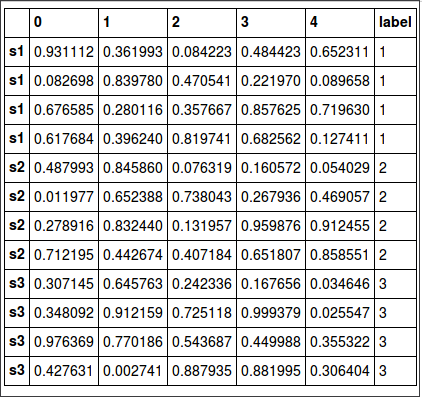
我有一个dataframe,5列作为特性,1列作为标签(图A)。
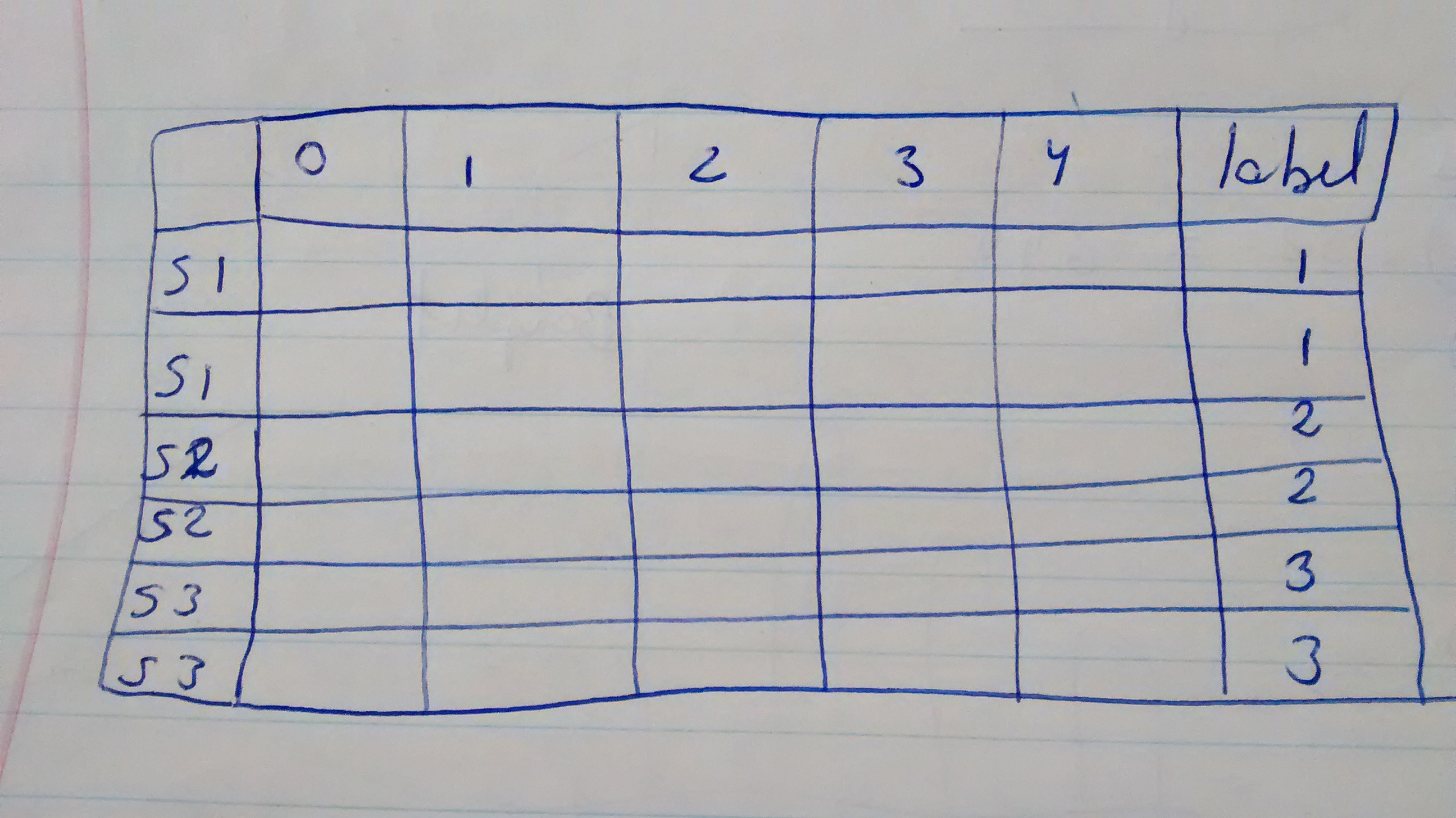
我想随机删除2行,但从每个标签。因此,有12行(每个标签有4行);我将得到6行(每个标签中有2行)(图B)。
我该怎么做呢?如果只用numpy来做会更容易吗?
图A
图B
这是我的密码:
# THIS IS FOR FIGURE A
import pandas as pd
import numpy as np
df = pd.DataFrame(np.random.rand(12, 5))

label=np.array([1, 1, 1, 1, 2, 2, 2, 2, 3, 3, 3, 3])

df['label'] = label
df.index=['s1', 's1', 's1', 's1', 's2', 's2', 's2', 's2', 's3', 's3', 's3', 's3']
df

#THIS IS MY ATTEMPT FOR FIGURE B
dfs = df.sample(n=2)
dfs回答 2
Stack Overflow用户
回答已采纳
发布于 2016-12-09 19:22:45
使用groupby.apply:
df.groupby('label', as_index=False).apply(lambda x: x.sample(2)) \
                                   .reset_index(level=0, drop=True)
Out:
           0         1         2         3         4  label
s1  0.433731  0.886622  0.683993  0.125918  0.398787      1
s1  0.719834  0.435971  0.935742  0.885779  0.460693      1
s2  0.324877  0.962413  0.366274  0.980935  0.487806      2
s2  0.600318  0.633574  0.453003  0.291159  0.223662      2
s3  0.741116  0.167992  0.513374  0.485132  0.550467      3
s3  0.301959  0.843531  0.654343  0.726779  0.594402      3
在我看来,一个更清晰的方法是理解:
pd.concat(g.sample(2) for idx, g in df.groupby('label'))这将产生同样的结果:
           0         1         2         3         4  label
s1  0.442293  0.470318  0.559764  0.829743  0.146971      1
s1  0.603235  0.218269  0.516422  0.295342  0.466475      1
s2  0.569428  0.109494  0.035729  0.548579  0.760698      2
s2  0.600318  0.633574  0.453003  0.291159  0.223662      2
s3  0.412750  0.079504  0.433272  0.136108  0.740311      3
s3 0.462627 0.025328 0.245863 0.931857 0.576927 3Stack Overflow用户
发布于 2016-12-09 19:31:16
这里有一个非常简单的方法。将所有行与sample(frac=1)混在一起,然后查找每个标签的累积计数,并选择值为1或更少的行。
df.loc[df.sample(frac=1).groupby('label').cumcount() <= 1]这里是与滑雪板的分层褶皱。示例从这里取走
from sklearn.model_selection import StratifiedKFold
X = df[[0,1,2,3,4]]
y = df.label
skf = StratifiedKFold(n_splits=2)

for train_index, test_index in skf.split(X, y):
    X_train, X_test = X.loc[train_index], X.loc[test_index]
    y_train, y_test = y[train_index], y[test_index]

print(X_train)

          0         1         2         3         4
0  0.656240  0.904032  0.256067  0.916293  0.262773
1  0.526509  0.555683  0.667756  0.208831  0.699438
4  0.096499  0.688737  0.328670  0.260733  0.834091
5  0.320150  0.602197  0.793404  0.911291  0.269915
8  0.913669  0.171831  0.534418  0.862583  0.994561
9  0.718337  0.256351  0.348813  0.420952  0.622890

print(y_train)

0    1
1    1
4    2
5    2
8    3
9 3页面原文内容由Stack Overflow提供。腾讯云小微IT领域专用引擎提供翻译支持
原文链接:
https://stackoverflow.com/questions/41067425
复制相关文章
相似问题
腾讯云开发者

Copyright © 2013 - 2026 Tencent Cloud. All Rights Reserved. 腾讯云 版权所有
深圳市腾讯计算机系统有限公司 ICP备案/许可证号:粤B2-20090059  粤公网安备44030502008569号
腾讯云计算(北京)有限责任公司 京ICP证150476号 | 京ICP备11018762号