
cwRsync,网络驱动器,文件修改时间问题
我正在windows下使用cwRsync 5.4.1 x86 Free,并尝试将文件夹同步到网络驱动器。我执行以下命令:
rsync.exe -rLtv --delete --ignore-errors "/cygdrive/d/1/" "/cygdrive/z/ZipNB/"
当D是本地驱动器,Z是网络驱动器(连接到路由器的外部HDD,RT-N16),执行它几次得到相同的结果:
>rsync.exe -rLtv --delete --ignore-errors "/cygdrive/d/1/" "/cygdrive/z/ZipNB/"
sending incremental file list
./
1.pdf

sent 11,893,922 bytes  received 38 bytes  1,829,840.00 bytes/sec
total size is 11,890,918  speedup is 1.00
我在文件夹中有一个文件,它每次执行都发送它的内容。文件每次都是相同的,在中间没有更改。
如果我添加了额外的参数-只有大小-它就会像预期的那样工作:
>rsync.exe -rLtv --delete --ignore-errors --size-only "/cygdrive/d/1/" "/cygdrive/z/ZipNB/"
sending incremental file list
./

sent 72 bytes  received 22 bytes  188.00 bytes/sec
total size is 11,890,918  speedup is 126,499.13
两个目录的DIR:
D:\1>dir
    Volume in drive D is XXX
    Volume Serial Number is XXXX-XXX

Directory of D:\1

08.12.2016  10:04    <DIR>          .
08.12.2016  10:04    <DIR>          ..
24.11.2016  18:31        11 890 918 1.pdf
           1 File(s)     11 890 918 bytes

Z:\ZipNB>dir
 Volume in drive Z is BackUp (at Portable)
 Volume Serial Number is XXXX-XXX

 Directory of Z:\ZipNB

08.12.2016  10:04    <DIR>          .
08.10.2016  20:40    <DIR>          ..
24.11.2016  18:31        11 890 918 1.pdf
           1 File(s)     11 890 918 bytes
我不确定,但正如我所知道的,在默认情况下,rsync会根据修改时间和大小对文件进行验证。这两个文件似乎是相同的。但似乎cwRsync出于某种原因在Z驱动器文件中获取/设置了错误的修改日期。如果两个目录都位于本地驱动器上,则cwRsync工作正常。这种情况只发生在网络驱动器上。
在windows属性中,1秒内修改时间有差异,这可能会导致问题。
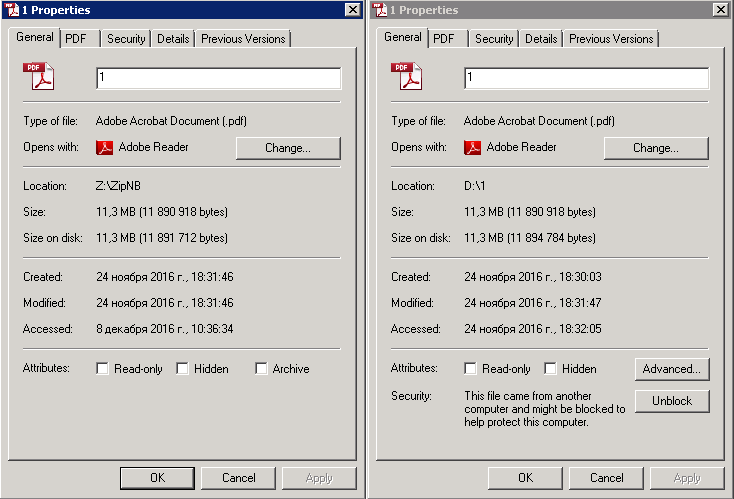
我只以一个文件为例,只是为了简化输出,情况是相同的,任何数量的不同文件。它总是发送每个文件的全部内容。这里有什么不对的地方,我怎么解决的?
回答 1
Stack Overflow用户
发布于 2016-12-14 19:06:55
https://stackoverflow.com/questions/41035240
复制相似问题
腾讯云开发者

Copyright © 2013 - 2026 Tencent Cloud. All Rights Reserved. 腾讯云 版权所有
深圳市腾讯计算机系统有限公司 ICP备案/许可证号:粤B2-20090059  粤公网安备44030502008569号
腾讯云计算(北京)有限责任公司 京ICP证150476号 | 京ICP备11018762号