
Kicad从源头开始构建,树状按钮都花光了?
我在Ubuntu14.04.5(LinuxKernel4.4.0-53-泛型)上使用通常的过程从源代码(git)构建了KiCad 4.0.5:
kicad_git_src$ mkdir build
kicad_git_src$ cd build
build$ cmake ../
build$ bzr whoami "Your Name <name@example.com>"
build$ make所有通过这里,kicad编译。然后我将其安装为"out of tree",意思是在标准系统位置之外(即/usr/):
build$ make install DESTDIR=/path/to/kicad_32b_4.0.5此时,DESTDIR树看起来大约如下所示:
/path/to/kicad_32b_4.0.5/
└── usr
    └── local
        ├── bin
        │   ├── bitmap2component
        │   ├── _cvpcb.kiface
        │   ├── dxf2idf
        │   ├── eeschema
        │   ├── _eeschema.kiface
        │   ├── gerbview
        │   ├── _gerbview.kiface
        │   ├── idf2vrml
        │   ├── idfcyl
        │   ├── idfrect
        │   ├── kicad
        │   ├── pcb_calculator
        │   ├── _pcb_calculator.kiface
        │   ├── pcbnew
        │   ├── _pcbnew.kiface
        │   ├── pl_editor
        │   └── _pl_editor.kiface
        ├── lib
        │   └── kicad
        │       └── plugins ...
        └── share
            ├── applications
            ├── doc
            │   └── kicad
            │       └── scripts
            │           └── bom-in-python ...
            ├── icons
            │   └── hicolor
            │       ...
            ├── kicad
            │   ├── demos
            │   │   ...
            │   └── template
            ├── mime
            │   └── packages
            └── mimelnk
└── application所有的可执行文件似乎都在usr/local/bin中;那么usr/local/lib似乎不包含任何.so库(只包含一些插件),而且usr/local/share中也有一些文件。所以我写了这个剧本:
#!/usr/bin/env bash

# trying to run kicad...

# the target DESTDIR of make install DESTDIR=...:
INSTD=/path/to/kicad_32b_4.0.5

cd $INSTD/usr/local/bin/
# there's only kicad/plugins in usr/local/lib, but still:
LD_LIBRARY_PATH=$INSTD/usr/local/lib:$LD_LIBRARY_PATH ./kicad
这是运行,但我得到了这样的东西:
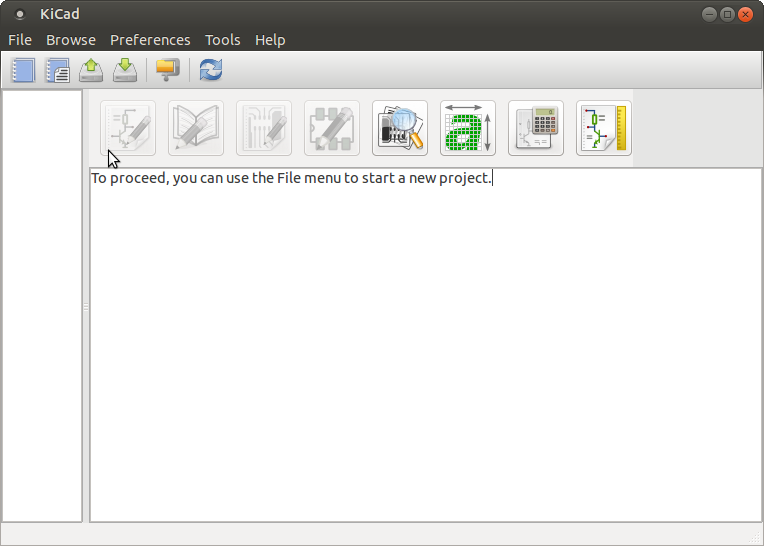
..。也就是说,EESchema按钮,原理图库按钮,pcbnew按钮,都是灰色的!在较早版本的Kicad中,我相信我可以在任何时候运行其中的任何一个,并在其中打开一个“空”文件,并在其中工作--如果我事先没有定义一个项目.注意,其他没有灰化的按钮(如GerbView)可以正常工作-我只需单击它们,相应的应用程序就会运行。
所以我的问题是:
- 为什么pcbnew,eeschema按钮会变灰?我是不是因为不标准的安装而缺少了一些目录引用?还是Kicad中的工作流程发生了变化,所以您不能再以独立的方式运行这些应用程序了?
- Kicad中是否有一些命令行开关,这样我就可以让它知道
INSTDIR/usr/local/share在哪里,以防Kicad需要它作为模板吗?
回答 1
Stack Overflow用户
发布于 2016-12-07 13:27:56
好的,找到了:正如注释中提到的,在eeschema等按钮未显示出来之前,有一个有来打开/创建一个新项目,并开始工作。
然而,在这样做后,点击eeschema按钮,我得到了“没有找到的折叠库:电源,设备,.”(如这篇文章[KiCad.info论坛])。
原来,还有另一种模式符号和3d符号的回购;在阅读了kicad_git_src/scripts/kicad-install.sh和kicad_git_src/scripts/library-repos-install.sh之后,我最终做到了这一点:
git clone https://github.com/KiCad/kicad-library kicad-library_git
cd kicad-library_git
mkdir build
cd build
cmake ../
make # exits and doesn't do anything...
make install DESTDIR=/path/to/kicad_32b_4.0.5这将将所有库文件复制到DESTDIR/usr/local/share/kicad,因此:
# before state:
$ ls /path/to/kicad_32b_4.0.5/usr/local/share/kicad/
demos  template

# after state
$ ls /path/to/kicad_32b_4.0.5/usr/local/share/kicad/
demos library modules template现在,当我运行OP运行脚本时,我的最后一个项目被自动打开,我可以点击eeschema按钮,eeschema现在就开始了,而不用抱怨库.
请注意,在这个版本中,足迹符号似乎也位于单独的.pretty存储库中,但我还没有达到这一点.
https://stackoverflow.com/questions/41016848
复制相似问题
腾讯云开发者

Copyright © 2013 - 2026 Tencent Cloud. All Rights Reserved. 腾讯云 版权所有
深圳市腾讯计算机系统有限公司 ICP备案/许可证号:粤B2-20090059  粤公网安备44030502008569号
腾讯云计算(北京)有限责任公司 京ICP证150476号 | 京ICP备11018762号