
SWRevealViewController导致无限循环初始化
我已经使用SWRevealViewController库很长时间了,没有问题,我真的很喜欢它!这一次,我不得不将它添加到一个项目中,所以这就是我所做的:
- 我拿了"RevealControllerExample“样本。
- 我已经将SWRevearViewController.h/.m直接复制到我的项目中。
- 我直接将FrontViewController.h/.m/..xib复制到我的项目中,直接将RearViewController.h/.m/..xib复制到我的项目中,但我删除了didSelectRowAtIndexPath中的所有代码(暂时不需要它)。
- 我忽略了RightViewController,因为我不需要它。
- 我已经将所有初始化代码添加到我的AppDelegate中:didFinishLaunchingWithOptions,除了RightViewController的初始化代码,因为我不需要它。
我就是这样获得初始化代码的:
    FrontViewController *frontViewController = [[FrontViewController alloc] init];
    RearViewController *rearViewController = [[RearViewController alloc] init];

    UINavigationController *frontNavigationController = [[UINavigationController alloc] initWithRootViewController:frontViewController];
    UINavigationController *rearNavigationController = [[UINavigationController alloc] initWithRootViewController:rearViewController];

    SWRevealViewController *revealController = [[SWRevealViewController alloc] initWithRearViewController:rearNavigationController frontViewController:frontNavigationController];
    revealController.delegate = self;


    self.swViewController = revealController;

    self.window.rootViewController = self.swViewController;
    [self.window makeKeyAndVisible];
    return YES;
当我启动应用程序时,这个程序会崩溃,因为有一个无限循环。这是调用堆栈:
...(here comes inifite calls to transitionFromViewController)...
#36603 0x00118620 in __80-[SWRevealViewController _transitionFromViewController:toViewController:inView:]_block_invoke_2 at /path/to/myproject/SWRevealViewController.m:1683
#36604 0x00118620 in __80-[SWRevealViewController _transitionFromViewController:toViewController:inView:]_block_invoke_2 at /path/to/myproject/SWRevealViewController.m:1683
#36605 0x00118620 in __80-[SWRevealViewController _transitionFromViewController:toViewController:inView:]_block_invoke_2 at /path/to/myproject/SWRevealViewController.m:1683
#36606 0x00118620 in __80-[SWRevealViewController _transitionFromViewController:toViewController:inView:]_block_invoke_2 at /path/to/myproject/SWRevealViewController.m:1683
#36607 0x00118620 in __80-[SWRevealViewController _transitionFromViewController:toViewController:inView:]_block_invoke_2 at /path/to/myproject/SWRevealViewController.m:1683
#36608 0x00118620 in __80-[SWRevealViewController _transitionFromViewController:toViewController:inView:]_block_invoke_2 at /path/to/myproject/SWRevealViewController.m:1683
#36609 0x00118620 in __80-[SWRevealViewController _transitionFromViewController:toViewController:inView:]_block_invoke_2 at /path/to/myproject/SWRevealViewController.m:1683
#36610 0x00118620 in __80-[SWRevealViewController _transitionFromViewController:toViewController:inView:]_block_invoke_2 at /path/to/myproject/SWRevealViewController.m:1683
#36611 0x00118620 in __80-[SWRevealViewController _transitionFromViewController:toViewController:inView:]_block_invoke_2 at /path/to/myproject/SWRevealViewController.m:1683
#36612 0x00118620 in __80-[SWRevealViewController _transitionFromViewController:toViewController:inView:]_block_invoke_2 at /path/to/myproject/SWRevealViewController.m:1683
#36613 0x00118620 in __80-[SWRevealViewController _transitionFromViewController:toViewController:inView:]_block_invoke_2 at /path/to/myproject/SWRevealViewController.m:1683
#36614 0x0011759c in __82-[SWRevealViewController _performTransitionOperation:withViewController:animated:]_block_invoke at /path/to/myproject/SWRevealViewController.m:1470
#36615 0x0011757e in -[SWRevealViewController _performTransitionOperation:withViewController:animated:] at /path/to/myproject/SWRevealViewController.m:1497
#36616 0x001137be in -[SWRevealViewController initWithRearViewController:frontViewController:] at /path/to/myproject/SWRevealViewController.m:635
#36617 0x000e1ec0 in -[AppDelegate application:didFinishLaunchingWithOptions:] at /path/to/myproject/AppDelegate.m:35
我已经直接测试了样本,当然有效了。我使用的是Xcode 8,我正在用iOS 10.1编译。我所做的唯一“不同”的事情是,我的应用程序仅仅是景观,我不知道这是否会影响侧菜单。
会发生什么事?
回答 1
Stack Overflow用户
发布于 2016-12-07 10:35:21
现在在使用图书馆的左侧滑动菜单的代码中有一些小的变化,为了正确使用,下面是一些棘手的步骤。
类配置:
- 在项目及其故事板以及下载链接中添加几个类
- `SWRevealViewController.h`
- `SWRevealViewController.m`
- `SidebarViewController.h`
- `SidebarViewController.m`
- 为了创建前视图和罕见视图,请参阅故事板配置。
- 要在菜单中添加更多的
viewControllers,首先需要创建可可类并添加以下代码。
- inside .h file create IBOutlet of side button which is used for navigate later.
- import `"SWRevealViewController.h"`
@property (弱的,非原子的) IBOutlet UIBarButtonItem *侧栏按钮;
-在.m文件中,在viewDidLoad方法中添加以下代码:
//更改按钮颜色_sidebarButton.tintColor = UIColor,白色:0.1Fα:0.9F;//设置侧栏按钮动作。当它被窃听的时候,它会出现在侧边栏上。_sidebarButton.target = self.revealViewController;_sidebarButton.action = @selector(revealToggle:);//设置手势self.view self.view
模板配置:
- 为了做一个正面视图,
viewController
- Connect any of the `vc` from `Reveal View Controller` using segue and choose `reveal view controller` see inside image: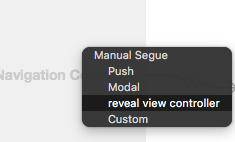
- Then must set the identifier of the above seugue as `sw_front` see image: 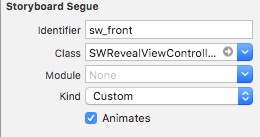
- 要将其他
viewController配置为菜单,必须使用segue将它们从Sidebar scenevc's单元中连接,而不需要像第一个图像这样的标识符。 - 在点击之前连接所有的
sidebarButtonIBOutlet。 - 要添加更多的viewController,您需要在
Sidebar scenevc中添加单元格,并在SidebarViewController.m类中的menuItems数组中进行一些更改,但不要忘记使该单元格标识与menuItmes相同。 menuItems =@@“标题”、@“新闻”、“评论”、@“地图”、@“日历”、@“愿望清单”、@“书签”、@“标签”、@"anotherVc_1“、@"anotherVc_2";
注意:您可以从prepareForSegue类中删除SidebarViewController.m方法,并为所有单元格进行单独的vc转换,prepareForSegue方法处理segue传输,即重定向具有不同外观的用户。
希望这对你有很大帮助。
https://stackoverflow.com/questions/40994012
复制相似问题
腾讯云开发者

Copyright © 2013 - 2026 Tencent Cloud. All Rights Reserved. 腾讯云 版权所有
深圳市腾讯计算机系统有限公司 ICP备案/许可证号:粤B2-20090059  粤公网安备44030502008569号
腾讯云计算(北京)有限责任公司 京ICP证150476号 | 京ICP备11018762号