
更改UISearchController视图的样式?
问题:
如何更改UISearchController在tvOS中的颜色/主题/样式
(看来我需要以某种方式设置UIStatusBarStyle,因为tvOS for UISearchController中不存在preferredStatusBarStyle覆盖)
描述:
方法在我的AppDelegate中调用,以编程方式创建searchNavigationController,其顶部为UISearchController,底部为自定义UITableViewController,称为"searchResultsController“(SearchViewController)。
func configueSearchController() -> UIViewController {

    let storyboard = UIStoryboard(name: "Search", bundle: nil)
    guard let searchResultsController = storyboard.instantiateViewController(withIdentifier: SearchViewController.storyboardIdentifier) as? SearchViewController else {
        fatalError("Unable to instatiate a SearchResultViewController from the storyboard.")
    }

    /*
     Create a UISearchController, passing the `searchResultsController` to
     use to display search results.
     */

    let searchController = UISearchController(searchResultsController: searchResultsController)
    searchController.searchResultsUpdater = searchResultsController
    searchController.searchBar.placeholder = NSLocalizedString("Enter keyword (e.g. Gastric Bypass)", comment: "")

    // Contain the `UISearchController` in a `UISearchContainerViewController`.
    let searchContainer = UISearchContainerViewController(searchController: searchController)
    searchContainer.title = NSLocalizedString("Search", comment: "")

    // Finally contain the `UISearchContainerViewController` in a `UINavigationController`.
    let searchNavigationController = UINavigationController(rootViewController: searchContainer)
    return searchNavigationController

}
图像的视觉表示方法:
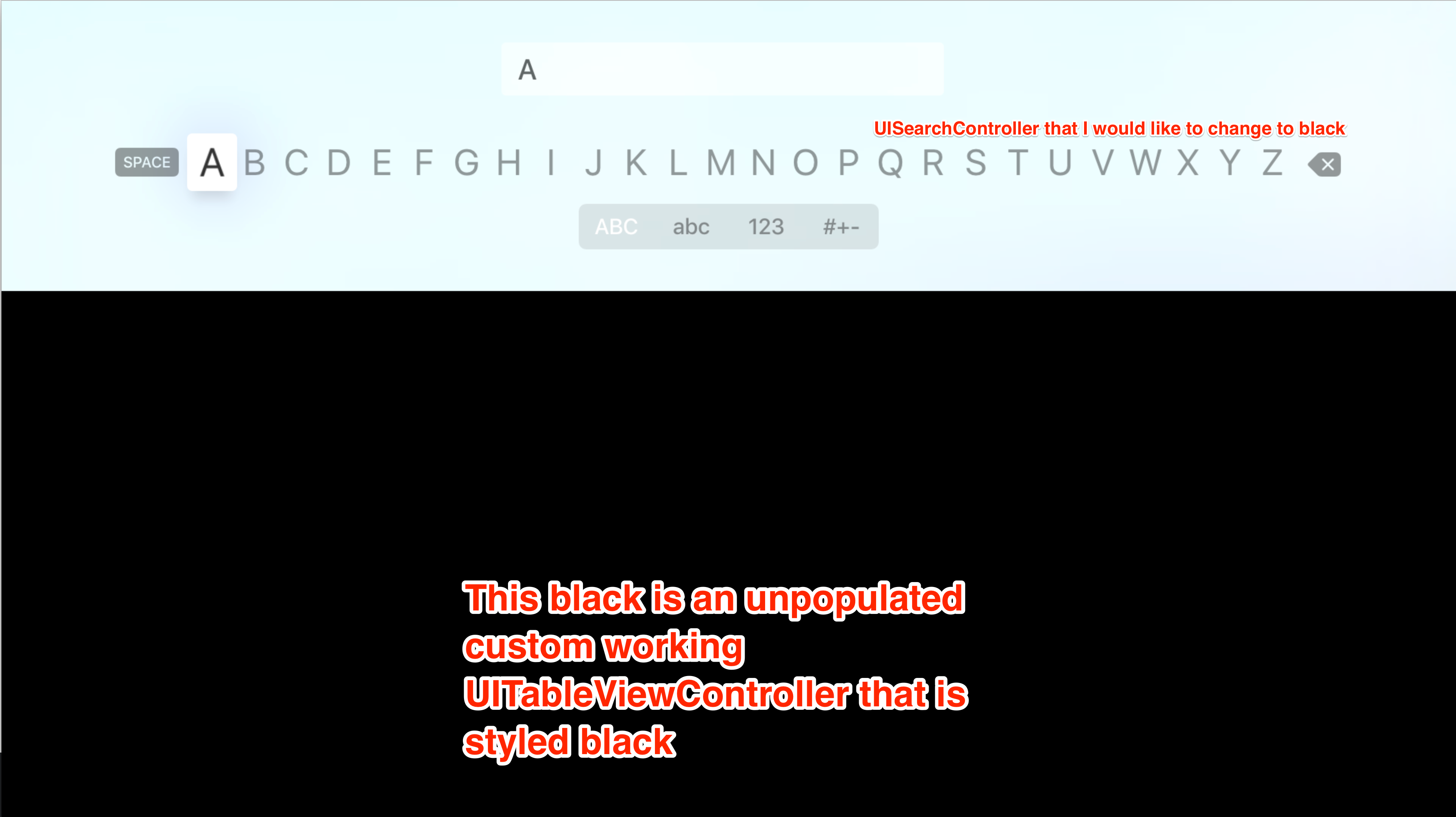
我试过的是:
我试图通过不同的方法来改变风格,但没有一种方法能达到预期的效果。
这对searchBar没有影响:
searchController.searchBar.searchBarStyle = .minimal //or .prominent or .default这只会使searchBar (实际输入区域)变黑。(用黑体):
searchController.searchBar.backgroundColor = .black这只会使UISearchController的整个背景视图变黑。所有的东西都是黑色的,因此键盘看不见。
searchController.view.backgroundColor = .black理想的解决方案是将主题从标准的.default转换为.dark。因为不仅背景颜色必须改变,边框和文本颜色也必须改变。
这个解决方案 试图实现
//UISearchController
override var preferredStatusBarStyle: UIStatusBarStyle {
    return .lightContent
}
但是,这种覆盖似乎不存在于tvOS。有什么原因吗?
回答 3
Stack Overflow用户
发布于 2016-12-12 16:04:03
关于这个问题,有很多工作要做,但是我真的不明白为什么他们不保留与iOS相同的系统。无论如何,要将SearchBar样式更改为黑色,主要要做的事情是将keyboardAppearance设置为黑暗,searchController视图的背景色设置为白色,并将searchBar的背景色设置为白色。
func application(_ application: UIApplication, didFinishLaunchingWithOptions launchOptions: [UIApplicationLaunchOptionsKey: Any]?) -> Bool {
    // Override point for customization after application launch.

    guard let win = window else {
        return true
    }


    if let tabController = win.rootViewController as? UITabBarController {
        tabController.viewControllers?.append(configueSearchController())
    }

    win.backgroundColor = UIColor.white
    win.makeKeyAndVisible()

    return true
}
func configueSearchController() -> UIViewController {

    let storyboard = UIStoryboard(name: "Search", bundle: nil)
    guard let searchResultsController = storyboard.instantiateViewController(withIdentifier: SearchViewController.storyboardIdentifier) as? SearchViewController else {
        fatalError("Unable to instatiate a SearchResultViewController from the storyboard.")
    }

    /*
     Create a UISearchController, passing the `searchResultsController` to
     use to display search results.
     */

    let searchController = UISearchController(searchResultsController: searchResultsController)
    searchController.searchResultsUpdater = searchResultsController
    searchController.searchBar.placeholder = NSLocalizedString("Enter keyword (e.g. Gastric Bypass)", comment: "")
    searchController.view.backgroundColor = UIColor.black
    searchController.searchBar.keyboardAppearance = UIKeyboardAppearance.dark
    searchController.searchBar.tintColor = UIColor.black
    searchController.searchBar.backgroundColor = UIColor.white
    searchController.hidesNavigationBarDuringPresentation = false
    searchController.obscuresBackgroundDuringPresentation = true
    searchController.searchBar.searchBarStyle = .minimal
    searchController.searchBar.sizeToFit()

    //searchResultsController.tableView.tableHeaderView = searchController.searchBar

    // Contain the `UISearchController` in a `UISearchContainerViewController`.
    let searchContainer: UISearchContainerViewController = UISearchContainerViewController(searchController: searchController)

    // Finally contain the `UISearchContainerViewController` in a `UINavigationController`.
    let searchNavigationController = UINavigationController(rootViewController: searchContainer)
    searchNavigationController.navigationBar.isTranslucent = true
    searchNavigationController.navigationBar.tintColor = .black
    searchNavigationController.tabBarItem.title = "Search"
    return searchNavigationController

}Stack Overflow用户
发布于 2020-04-14 22:45:12
对于所有想要在tvOS上使用TabBarController和故事板实现这一点的人,我所做的就是在视图控制器中添加一个容器视图,并在子视图中添加选项卡条控制器。
class SearchController: UIViewController  {

    @IBOutlet var containerView: UIView!


    override func viewDidLoad() {
        super.viewDidLoad()

        let searchController = UISearchController.init(searchResultsController: nil)
        searchController.view.autoresizingMask = [.flexibleHeight, .flexibleWidth]
        searchController.view.frame = containerView.bounds

        let searchContainer: UISearchContainerViewController = UISearchContainerViewController(searchController: searchController)

        // Finally contain the `UISearchContainerViewController` in a `UINavigationController`.
        let searchNavigationController = UINavigationController(rootViewController: searchContainer)
        searchNavigationController.navigationBar.isTranslucent = true
        searchNavigationController.navigationBar.tintColor = .black
        searchNavigationController.tabBarItem.title = "Search"

        containerView.addSubview(searchNavigationController.view)
        searchNavigationController.didMove(toParent: self)
    }
}Stack Overflow用户
发布于 2016-12-12 16:16:44
我不是tvOS方面的专家,但我发现了这一点。我从苹果的UIKit目录:创建和自定义UIKit控件示例代码开始。我注意到的第一件事是,上面提供的代码将searchResultsController实例化为SearchViewController,而苹果的示例代码将searchResultsController实例化为SearchResultsViewController。我猜你是故意这么做的。
在使用示例代码之后,我能够进行非常有限的样式更改。这是我最接近的截图,看上去你想要达到的效果。
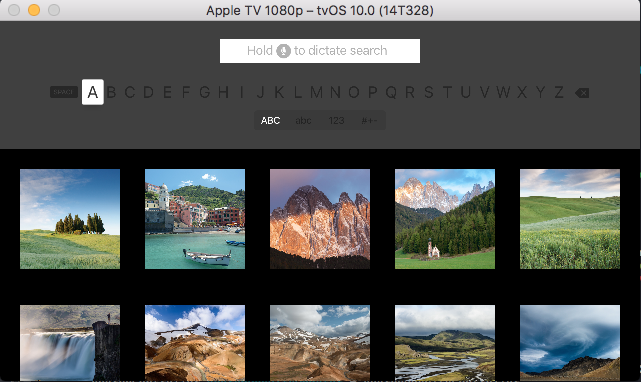
这是影响这种变化的代码。
func packagedSearchController() -> UIViewController {
    // Load a `SearchResultsViewController` from its storyboard.
    let storyboard = UIStoryboard(name: "ViewControllerSamples", bundle: nil)
    guard let searchResultsController = storyboard.instantiateViewController(withIdentifier: SearchResultsViewController.storyboardIdentifier) as? SearchResultsViewController else {
        fatalError("Unable to instatiate a SearchResultsViewController from the storyboard.")
    }

    /*
        Create a UISearchController, passing the `searchResultsController` to
        use to display search results.
    */
    let searchController = UISearchController(searchResultsController: searchResultsController)
    searchController.searchResultsUpdater = searchResultsController
    searchController.searchBar.placeholder = NSLocalizedString("Enter keyword (e.g. iceland)", comment: "")

    //** This is the part you are interested in **//
    searchResultsController.view.backgroundColor = .black
    searchController.view.backgroundColor = UIColor(red: 0.25, green: 0.25, blue: 0.25, alpha: 1.0)
    searchController.searchBar.backgroundColor = .white

    // Contain the `UISearchController` in a `UISearchContainerViewController`.
    let searchContainer = UISearchContainerViewController(searchController: searchController)
    searchContainer.title = NSLocalizedString("Search", comment: "")

    // Finally contain the `UISearchContainerViewController` in a `UINavigationController`.
    let searchNavigationController = UINavigationController(rootViewController: searchContainer)
    return searchNavigationController
}不幸的是,我无法将SearchController的视图设置为.black,而不需要在黑暗中松开键盘。我一直在寻找解决正在消失的键盘问题的方法,认为必须有一种方法来调整键盘的样式,或者至少修改选择状态,这都是徒劳的。我的失望在tvOS应用程序编程指南:设计键盘体验的发言中达到高潮;
内联键盘在单行上显示所有可能的输入。使用UISearchController创建一个可以与第三方内容完全集成的键盘。但是,当您使用UISearchController时,很少有自定义选项。您不能访问文本字段本身、自定义特征或添加输入附件。
我怀疑如果你能得到对键盘的引用,你可能会影响到一些改变。尽管如此,到目前为止,我还未能找到真正的解决办法。也许您可以将自定义inputAccessoryViewController附加到SearchController并以这种方式进行更改?
抱歉我帮不上忙了。
https://stackoverflow.com/questions/40991845
复制相似问题
腾讯云开发者

Copyright © 2013 - 2026 Tencent Cloud. All Rights Reserved. 腾讯云 版权所有
深圳市腾讯计算机系统有限公司 ICP备案/许可证号:粤B2-20090059  粤公网安备44030502008569号
腾讯云计算(北京)有限责任公司 京ICP证150476号 | 京ICP备11018762号