
选择标记外观浏览器到浏览器
选择标记外观浏览器到浏览器
提问于 2016-12-04 04:17:53
以下是我的select标签在IE和Firefox中显示的屏幕截图:
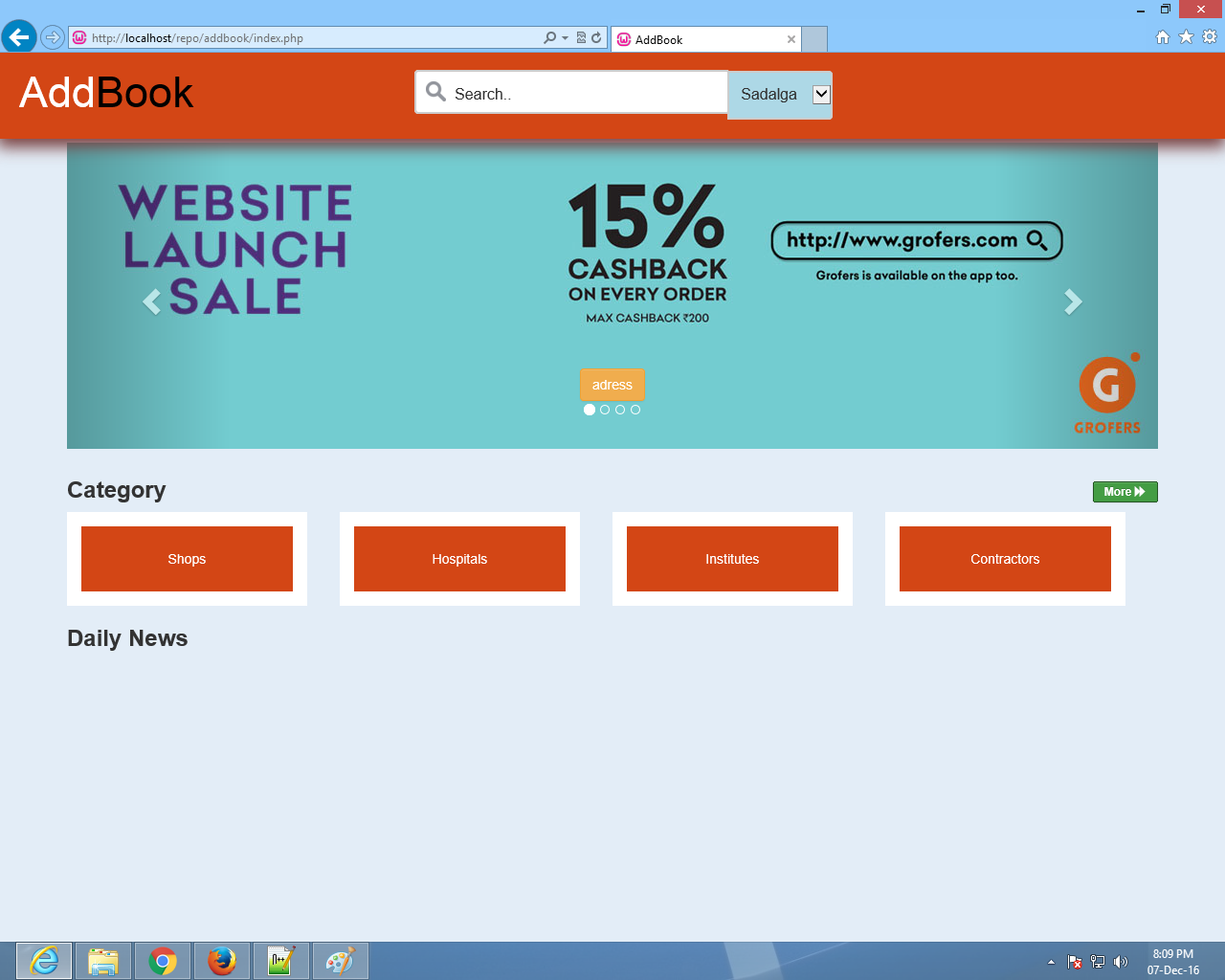
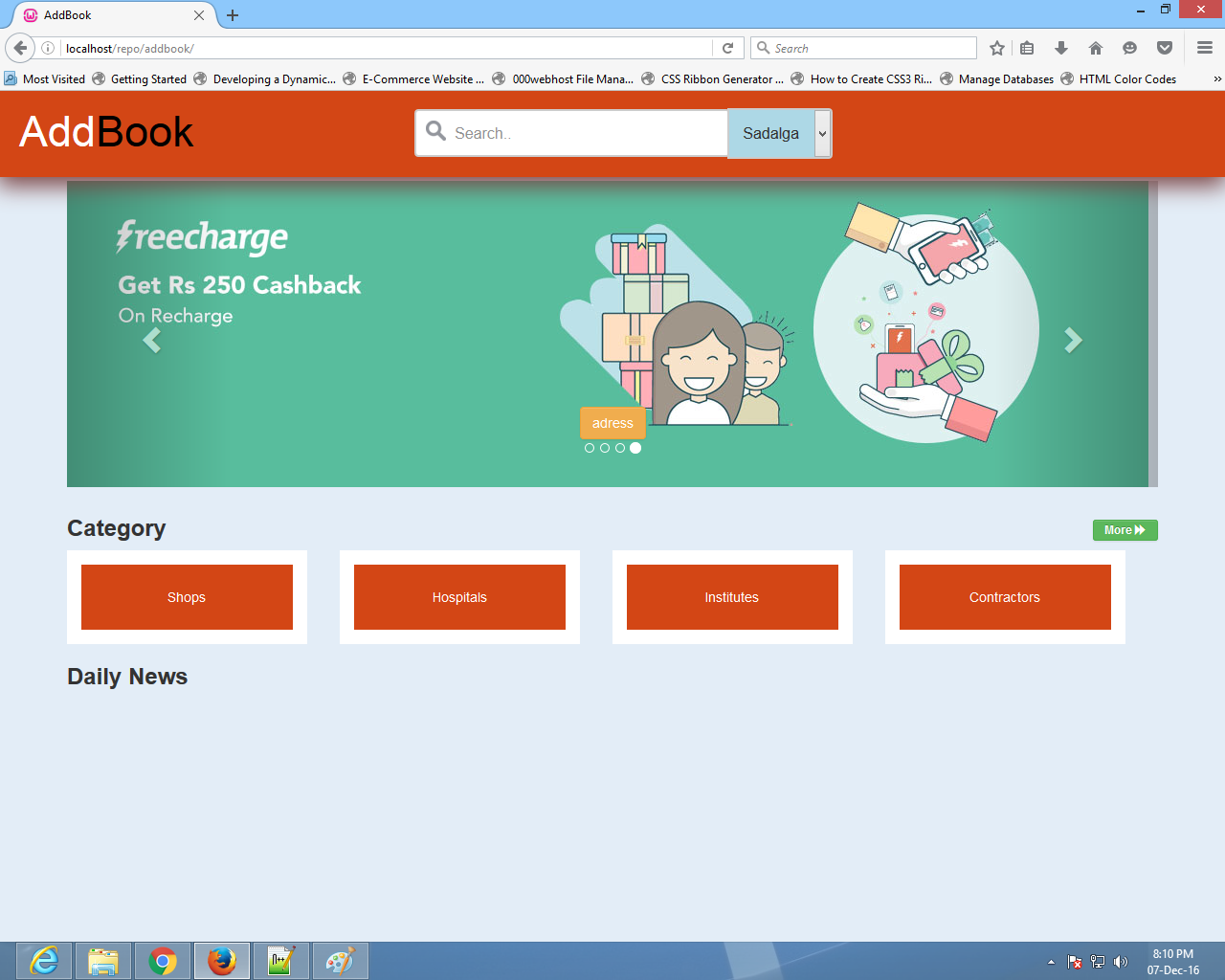
如何使它在每个浏览器中看起来都一样?
css代码是:
select{
    width:10%;
    margin:0;
    padding:0;
    box-sizing: border-box;
    border: 2px solid #ccc;
    border-radius: 0px 4px 4px 0px;
    font-size: 16px;
    background-color: white;
    padding: 13px 0px 14px 10px;
    background-color: lightblue;
    color:#333;
    margin-left: -7px;
}
更新:此新的自定义选择下拉工作在mozilla和chrome select#city {-webkit-外观:无;/REMOVES默认CHROME & SAFARI样式/-moz-外观:无;/REMOVES默认火狐样式/
    color: #fff;
    border-top: 2px solid #ccc;
    border-right: 2px solid #ccc;
    border-bottom: 2px solid #ccc;
    border-radius: 0px 4px 4px 0px;
    -webkit-border-radius: 0px 4px 4px 0px;
    font-size: 13px;
    /* padding For Mozilla*/
    padding: 15px 0px 14px 2px;
    /* padding for chrome */
    -webkit-padding-before:15px;
    -webkit-padding-end:0px;
    -webkit-padding-after:13px !important;
    -webkit-padding-start:5px;
    width: 10%;
    cursor: pointer;
    margin-left: -7px !important;
    background: #0d98e8 url(https://cdn1.iconfinder.com/data/icons/universal-icons-set-for-web-and-mobile/100/controls_0-12-512.png) no-repeat right center;
    background-size: 40px 37px; /*TO ACCOUNT FOR @2X IMAGE FOR RETINA */
    box-sizing: border-box;
}

select#city  option {
    background-color:#fff;
    color:black;
}
select::-ms-expand{
    display:none;
}回答 2
Stack Overflow用户
回答已采纳
发布于 2016-12-06 09:35:54
正如我所说,这样做没有直接的办法,我也不会建议这样做。在得到这里的一点帮助之后,这是我唯一能找到的让它在所有浏览器上看起来一致的方法。
所以我所做的
1)我删除了所有现有的样式
select::-ms-expand{
   display:none;  //FOR IE
}
select.custom-dropdown {
  -webkit-appearance: none;  /*REMOVES DEFAULT CHROME & SAFARI STYLE*/
  -moz-appearance: none;  /*REMOVES DEFAULT FIREFOX STYLE*/
  border: 0 !important;  /*REMOVES BORDER*/
}2)将自定义样式应用于select
color: #fff;
 -webkit-border-radius: 5px;
 border-radius: 5px;
 font-size: 14px;
 padding: 10px;
 width: 35%;
 cursor: pointer;

 background: #0d98e8 url(https://cdn1.iconfinder.com/data/icons/universal-icons-set-for-web-and-mobile/100/controls_0-12-512.png) no-repeat right center;
background-size: 40px 37px; /*TO ACCOUNT FOR @2X IMAGE FOR RETINA */3)在option上应用新风格
select.custom-dropdown option {
  background-color:#fff;
  color:black;
}下面是是我尝试的小提琴。
看看这是不是你想要的。
Stack Overflow用户
发布于 2016-12-04 12:55:29
仅用css就很难使其正确。
在这里阅读更多关于它的https://css-tricks.com/dropdown-default-styling/
您可以使用类似于以下https://github.com/paulstraw/FancySelect的javascript解决方案
页面原文内容由Stack Overflow提供。腾讯云小微IT领域专用引擎提供翻译支持
原文链接:
https://stackoverflow.com/questions/40955337
复制相关文章
相似问题
腾讯云开发者

Copyright © 2013 - 2026 Tencent Cloud. All Rights Reserved. 腾讯云 版权所有
深圳市腾讯计算机系统有限公司 ICP备案/许可证号:粤B2-20090059  粤公网安备44030502008569号
腾讯云计算(北京)有限责任公司 京ICP证150476号 | 京ICP备11018762号