
如何给出像条形图这样的背景等级
如何给出像条形图这样的背景等级
提问于 2016-12-02 08:16:23
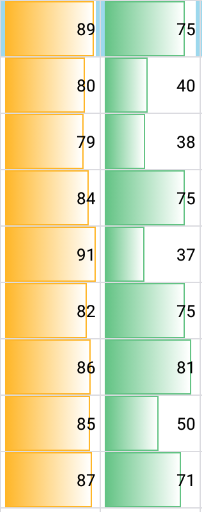
如果我想在TextView中像下面的图像那样进行分级,我应该做什么?有什么主意或解决办法吗?
(分级的宽度-长度取决于TextView中文本的值)
回答 1
Stack Overflow用户
回答已采纳
发布于 2016-12-02 08:21:10
定义如下可绘制资源文件
<shape xmlns:android="http://schemas.android.com/apk/res/android"
    android:shape="rectangle">
    <gradient
        android:angle="180"
        android:endColor="@color/your_color"
        android:startColor="@color/your_color2"
        android:type="linear" />
</shape>
并将其用作您视图的背景。
<FrameLayout
    android:layout_width="match_parent"
    android:layout_height="wrap_content">

    <View
        android:layout_width="match_parent"
        android:layout_height="20dp"
        android:id="@+id/view"
        android:background="@drawable/your_gradient"
        />

    <TextView
    android:layout_width="match_parent"
    android:layout_height="wrap_content"
    android:text="30"
    android:id="@+id/percentageTextview"
    />

</FrameLayout>
在你的活动中使用这个
View background = (View) findViewById(R.id.view);
TextView textView = (TextView) findViewById(R.id.percentageTextview);

DisplayMetrics displayMetrics = getResources().getDisplayMetrics();
int  screenWidthInPix = displayMetrics.widthPixels;

ViewGroup.LayoutParams params = background.getLayoutParams();
params.width = (screenWidthInPix * Integer.parseInt(textView.getText().toString()))/100;
background.setLayoutParams(params);页面原文内容由Stack Overflow提供。腾讯云小微IT领域专用引擎提供翻译支持
原文链接:
https://stackoverflow.com/questions/40927562
复制相关文章
相似问题
腾讯云开发者

Copyright © 2013 - 2026 Tencent Cloud. All Rights Reserved. 腾讯云 版权所有
深圳市腾讯计算机系统有限公司 ICP备案/许可证号:粤B2-20090059  粤公网安备44030502008569号
腾讯云计算(北京)有限责任公司 京ICP证150476号 | 京ICP备11018762号