
Xcode8.1无法协同设计.bundle文件
Xcode8.1无法协同设计.bundle文件
提问于 2016-11-29 12:52:23
从Xcode8.0升级到Xcode8.1之后,两个Braintree包的代码签名失败。
经过多次尝试,无法找到任何解决办法。在这里,我张贴错误日志。
CodeSign /Users/Arvaan/Library/Developer/Xcode/DerivedData/InstaCare-bielwuzaqgqgngcpffjnjballruv/Build/Products/Debug-iphonesimulator/Braintree-Drop-In-Localization.bundle
cd /Users/Arvaan/Documents/BitBucket/iOS/2016/Xcode8_1/New/Instacare/Pods
export CODESIGN_ALLOCATE=/Applications/Xcode8_1.app/Contents/Developer/Toolchains/XcodeDefault.xctoolchain/usr/bin/codesign_allocate
export PATH="/Applications/Xcode8_1.app/Contents/Developer/Platforms/iPhoneSimulator.platform/Developer/usr/bin:/Applications/Xcode8_1.app/Contents/Developer/usr/bin:/usr/local/bin:/usr/bin:/bin:/usr/sbin:/sbin"

Signing Identity:     "-"

/usr/bin/codesign --force --sign - --timestamp=none /Users/Arvaan/Library/Developer/Xcode/DerivedData/InstaCare-bielwuzaqgqgngcpffjnjballruv/Build/Products/Debug-iphonesimulator/Braintree-Drop-In-Localization.bundle

/Users/Arvaan/Library/Developer/Xcode/DerivedData/InstaCare-bielwuzaqgqgngcpffjnjballruv/Build/Products/Debug-iphonesimulator/Braintree-Drop-In-Localization.bundle: bundle format unrecognized, invalid, or unsuitable
Command /usr/bin/codesign failed with exit code 1
项目在设备上运行良好,并能够创建归档文件来分发它。但没有在模拟器上工作。
如果有谁面临同样的问题,请帮助我。
回答 1
Stack Overflow用户
回答已采纳
发布于 2016-11-30 06:31:47
我从这个苹果开发者论坛 link.Here那里得到了答案,也有这么多的解决方案,但是下面是对我有用的答案。
在导航->目标->您的BundleName ->签名(启用开发签名)->标识(选择Info.plist文件)中选择Pods。
- 首先选择项目中的Pod(.xcworkspace)。
- 然后选择导致代码符号错误的包。在我的例子中,
Braintree-Drop-In-Localization.bundle和Pods-InstaCare-Braintree-Braintree-Drop-In-Localization.bundle是两个导致错误的文件。
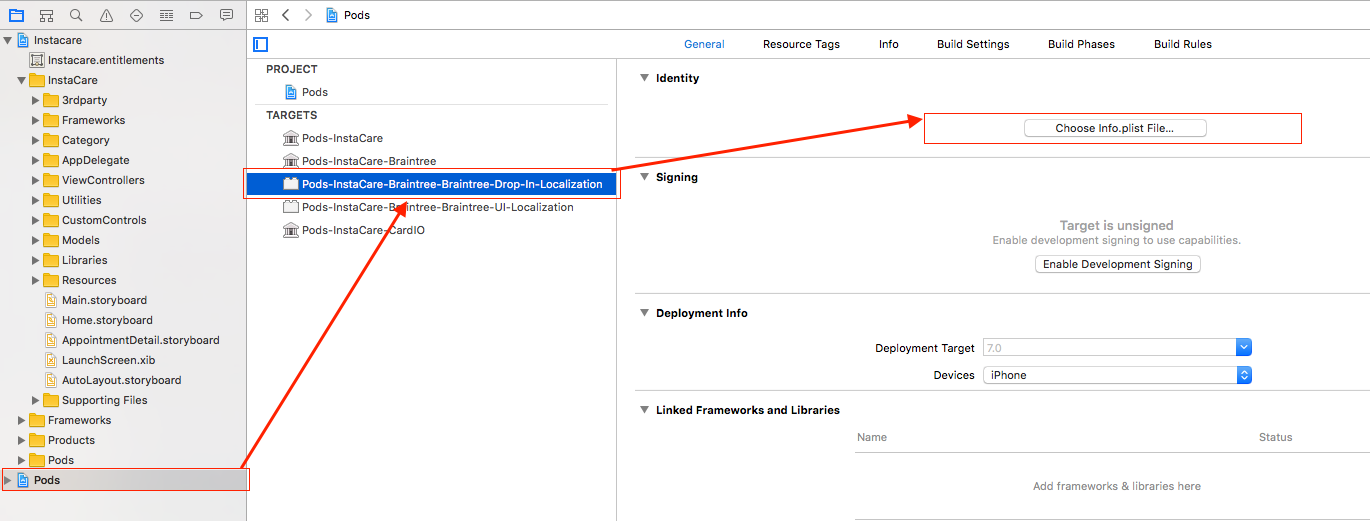
- 然后单击
Choose Info.plist file按钮。它将弹出如下所示。
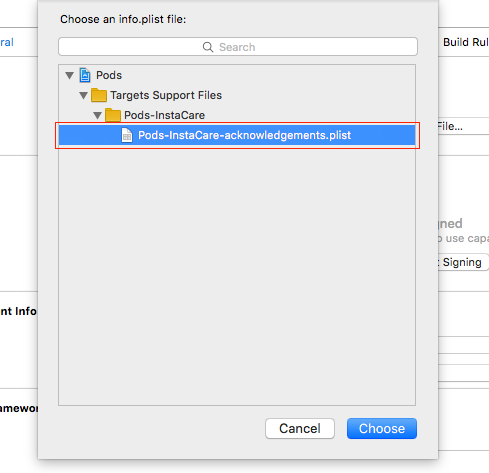
- 清洁项目并运行。它将工作在模拟器以及设备上。
页面原文内容由Stack Overflow提供。腾讯云小微IT领域专用引擎提供翻译支持
原文链接:
https://stackoverflow.com/questions/40866410
复制相关文章
相似问题
腾讯云开发者

Copyright © 2013 - 2026 Tencent Cloud. All Rights Reserved. 腾讯云 版权所有
深圳市腾讯计算机系统有限公司 ICP备案/许可证号:粤B2-20090059  粤公网安备44030502008569号
腾讯云计算(北京)有限责任公司 京ICP证150476号 | 京ICP备11018762号