
UICollectionView / FlowLayout
在使用UICollectionView和相关布局时,我面临着一个挑战。我正在尝试创建一个具有两个列的垂直UICollectionView,其中左列和右列中的单元格位于图片中的位置:
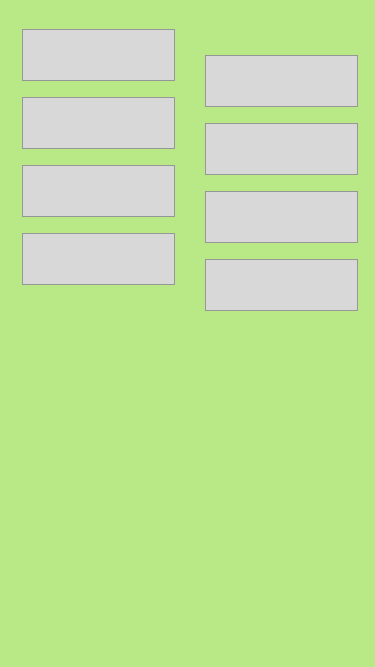
我在创建这两列时确实没有问题,但是在我的布局中很难找到正确的设置,以便使正确的列被一个单元格的一半高抵消。注意,根据屏幕的宽度(减去间距),所有单元格都具有相同的计算维数。
我的数据数组中的每个单元格都有一个位置索引,因此我可以很容易地根据它(奇数/偶数)判断单元格的位置是右还是左。
任何帮助都是非常感谢的
回答 1
Stack Overflow用户
发布于 2016-11-29 15:46:38
下面是我如何实现UICollectionViewFlowLayout的子类以实现您想要的结果。
class OffsetFlowLayout: UICollectionViewFlowLayout {
    var verticalOffset: CGFloat = 0

    override func prepare() {
        super.prepare()
        verticalOffset = 100 // Calculate offset here
    }

    override func layoutAttributesForItem(at indexPath: IndexPath) -> UICollectionViewLayoutAttributes? {
        guard let attributes = super.layoutAttributesForItem(at: indexPath) else { return nil }
        guard remainder(Double(indexPath.row), 2) != 0 else { return attributes }
        //  For each item in the right column, offset the y value of it's origin
        attributes.frame.origin.y += verticalOffset
        return attributes
    }
}正如您所看到的,在layoutAttributesForItem的实现中,我们首先要做的是调用Super并存储它返回的值。然后我们检查索引,如果我们在左边的列,我们返回的是超级给我们,这将是“默认值”的值。
如果我们在正确的列上,我们修改attributes对象以根据我们想要的偏移量移动单元格的框架,然后返回那个。
注意:我还没有测试过这个。有可能UICollectionViewFlowLayout使用前面的单元格来布局下一个单元格,在这种情况下,您只需要修改右边列中的第一个元素,只需将guard remainder(Double(indexPath.row), 2) != 0 else { return attributes }更改为guard indexPath.row == 1 else { return attributes }即可
https://stackoverflow.com/questions/40854396
复制相似问题
腾讯云开发者

Copyright © 2013 - 2026 Tencent Cloud. All Rights Reserved. 腾讯云 版权所有
深圳市腾讯计算机系统有限公司 ICP备案/许可证号:粤B2-20090059  粤公网安备44030502008569号
腾讯云计算(北京)有限责任公司 京ICP证150476号 | 京ICP备11018762号