
ASTM校验和计算
我需要了解设备是如何为下面的ASTM字符串计算校验和的。
<STX2P|1|||||||||||||||||||||||||||||||||<CR><ETX>3B<CR><LF>此字符串显示校验和为"3B",而我试图通过下面的代码找到校验和。
    public static string ConvertStringToHex(string asciiString)
    {
        string hex = "";
        foreach (char c in asciiString)
        {
            int tmp = c;
            hex += String.Format("{0:x2}", (uint)System.Convert.ToUInt32(tmp.ToString()));
        }
        return hex;
    }
但我得到了"3C“作为输出。请帮我找支票和。
回答 2
Stack Overflow用户
发布于 2016-12-10 15:15:13
如何计算ASTM.中的校验和
校验和是通过添加字符的二进制值来计算的,保留了结果中最不重要的八位。消息文本中的每个字符被添加到校验和(模256)。校验和是一个整数,由8位表示,它可以被认为是两组四位。四位组转换为十六进制表示的ASCII字符。两个ASCII字符作为校验和进行传输,其中最重要的字符优先。
我将这一行放在3B文件中,并运行脚本,我将在本节下面发布该脚本。我必须添加>符号来修复STX字符串。
豹:astm rene$ ./astm.sh ./3B开始./astm.sh . 2p\x{e76f}\x{e76f}2p\x{e76f}\x{e76f}}\x{e76f}\x{e76f}\x{e76f} 1000100111011 L8B= 111011 LSB用于计算MOD 256 L8B MOD= 00111011 支票和是..。 MOD= 00111011 M4B= 0011 ->L4B= 1011 Checksum=3B
#! /bin/ksh
#set -x

#
############################# Variables #######################
#
integer i=0
HEX=00
integer LEN=0
integer FROM=0
MESSAGE=$1
#blind=0 Not blind
#blind=1 blind, it does not see any astm character till it can see again (blind=0)
HEXTMP=/tmp/hex.tmp
BINTMP=/tmp/bin.tmp
#
############################# Functions #######################
#

astm_checksum() {
print"
# The checksum is computed by adding the binary values of the characters,
# keeping the least significant eight bits of the result.
# Each character in the message text is added to the checksum (modulo 256).
# The checksum is an integer represented by eight bits, it can be considered as two groups of four bits.
# The groups of four bits are converted to the ASCII characters of the hexadecimal representation.
# The two ASCII characters are transmitted as the checksum, with the most significant character first.
"
#converting text in Variable VAR to binairy ...
}


code2hex() {    #Read and convert text written with codes in ASCII like <STX>
printf "\n\n"
awk '
!/^#/   {
        gsub(/<NUL>/,"\x00",$0 )
        gsub(/<SOH>/,"\x01",$0 )
        gsub(/<STX>/,"\x02",$0 )
        gsub(/<ETX>/,"\x03",$0 )
        gsub(/<EOT>/,"\x04",$0 )
        gsub(/<ENQ>/,"\x05",$0 )
        gsub(/<ACK>/,"\x06",$0 )
        gsub( /<LF>/,"\x0A",$0 )
        gsub( /<FF>/,"\x0C",$0 )
        gsub( /<CR>/,"\x0D",$0 )
        gsub(/<NAK>/,"\x15",$0 )
        gsub(/<SYN>/,"\x16",$0 )
        gsub(/<ETB>/,"\x17",$0 )
        gsub(/<CAN>/,"\x18",$0 )
        gsub(/<ESC>/,"\x1B",$0 )
        printf( $0 "\n" )
}
' ${MESSAGE} | hd | cut -c11-58 | tr [:lower:] [:upper:] | xargs | tee ${HEXTMP} | awk '
#example output, one line due to xargs
#02 31 48 7C 5C 5E 26 7C 7C 7C 50 5E 31 7C 7C 7C 7C 7C 7C 7C 50 7C 31 7C 0D 03 31 35 0D 0A
#--- first part to filter out control data from real data ---
BEGIN{ RS=" "; blind = 0 ; printf "ibase=16 ; obase=2 ;scale=0;" }
/0A/            { next }                        # <LF>

/02/            { printf("00+"); blind = 0      # <STX>
                } #Eyes are opened (again), after <STX> we start counting
!/02/ && !/03/  { if ( blind == 0 )
                        printf( $0"+" )
                } #This also includes the <CR> (0D) BEFORE the ETX or ETB!!!
/03/ || /17/    { if ( blind == 0 ) {
                        printf( $0"\n" )
                        blind = 1   }           #The \n = end line and calculate
                } #Blind.. we see nothing till a <STX> is passing again
'| sed 's/+$/\n/p' | tee -a ${HEXTMP} | bc -q | tee ${BINTMP} | while read BIN
do
        #       The two files tee writes to is for debugging only.
        #
        #       % in bc is modulo but is not described clearly in the man page
        #       scale is default set to 0 but I set it anyway to be sure.
        #
        #Binairy
        printf "BIN= %08d\n" ${BIN}
        #Calculate from where we need to cut the string of bits to have the LSB 8 bits
        LEN=$(echo ${BIN} | wc -c )                     #Not supported by the QNX Shell
        FROM=$(( LEN - 8 ))                             #Not supported by the QNX Shell
        L8B=$(echo ${BIN} | cut -c ${FROM}- )
        printf "L8B=%${LEN}d\n" ${L8B}

        printf "LSB used to calculate the MOD 256\n"
        MOD=$(  echo "ibase=2 ; obase=2 ; ${L8B} % 100000000" | bc -q ) #LSB SUM
        printf "L8B MOD= %08d\n" ${MOD}

        printf "--------------------------- and the checksum is.......  \n"
        printf "MOD= %08d\n" ${MOD}
        M4B=$( printf "%08d\n" ${MOD} | cut -c -4 )
        L4B=$( printf "%08d\n" ${MOD} | cut -c 5- )
        printf "M4B= $M4B\n--->L4B= $L4B\n"
        CD1=$(printf "ibase=2 ; obase=10000 ; ${M4B}\n" | bc -q )
        CD2=$(printf "ibase=2 ; obase=10000 ; ${L4B}\n" | bc -q )
        printf "Checksum=${CD1}${CD2}\n\n"
done
}

############################# main part ################################
test -r "${MESSAGE}" && (echo "Starting $0 ...";cat ${MESSAGE};code2hex) || echo "ERROR: Cannot read file ${MESSAGE}."Stack Overflow用户
发布于 2021-08-25 13:04:55
检查这个链接:003.aspx,它解释得很好。请确保在STX之后使用加载数据并包含ETX。例如在belof一行:
<STX><Frame Data><CR><ETX><CHECKSUM 1><CHECKSUM 2><CR><LF>使用这部分数据计算MOD 256校验和。
<Frame Data><CR><ETX>(所有负载字符和模块之和为256)
编辑
有很少的网站,在那里你可以计算256模(和其他)检查和。例如:https://www.scadacore.com/tools/programming-calculators/online-checksum-calculator/
让我们以问题中使用的字符串为例:
<STX2P|1|||||||||||||||||||||||||||||||||<CR><ETX>3B<CR><LF>由于字符串是不正确的,所以在STX之后没有结束>,尽管它与校验和计算无关。
<STX>2P|1|||||||||||||||||||||||||||||||||<CR><ETX>3B<CR><LF>现在,ASTM 1381中的校验和使用数据,直到校验和,包括:
P|1|||||||||||||||||||||||||||||||||<CR><ETX>让我们转到站点,并将字符串粘贴到"ASCII输入“文本字段中。作为二进制数据的替代(不能显示为ASCII文本),移除 <CR><ETX>并按下按钮您将在下面看到计算出的校验和,这是错误的,因为数据缺少<CR><ETX>。忽略第一个校验和。
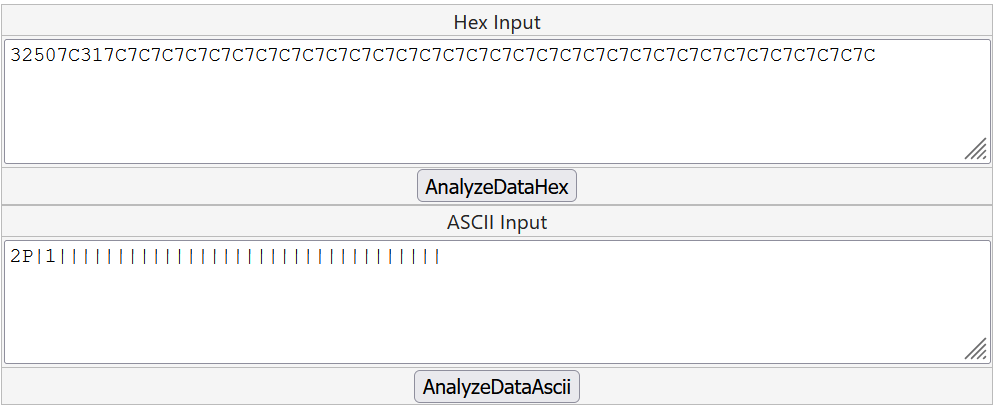
十六进制输入文本字段也被更新,并在HEX-表示法中显示二进制数据.因此,在HEX输入的十六进制字符串末尾添加<CR><ETX>的数据。在十六进制中,CR是0D,ETX是03,所以添加0D03,然后按下另一个按钮AnalyseDataHex
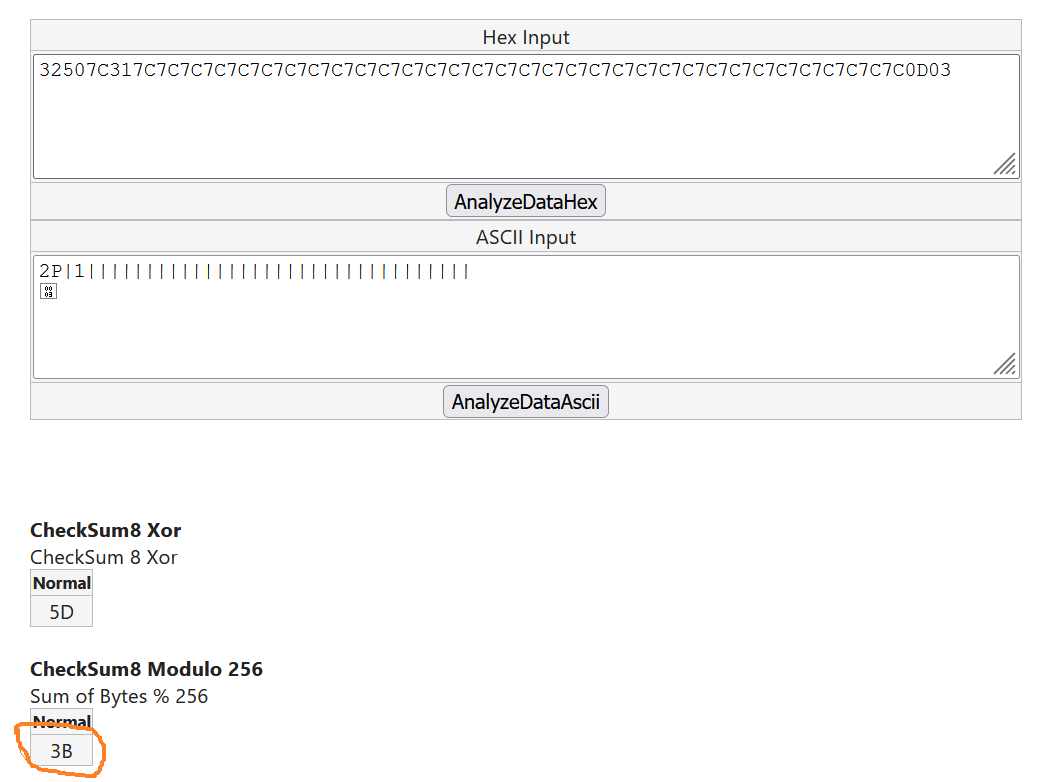
现在,您可以看到正确的校验和,它确实是3B,与消息示例完全一样。显然,问题作者提供的代码使用了字符串的不正确部分,并且没有用十六进制表示替换占位符。
https://stackoverflow.com/questions/40838240
复制相似问题
腾讯云开发者

Copyright © 2013 - 2026 Tencent Cloud. All Rights Reserved. 腾讯云 版权所有
深圳市腾讯计算机系统有限公司 ICP备案/许可证号:粤B2-20090059  粤公网安备44030502008569号
腾讯云计算(北京)有限责任公司 京ICP证150476号 | 京ICP备11018762号