
解析Excel中的字符串
我有一个宏向服务器发送XMLHTTP请求,它作为响应得到一个纯文本字符串,而不是JSON格式字符串或其他标准格式(至少就我所知而言)。
我希望解析输出字符串,以便以与此parseJson中的链接子例程相同的方式以结构化的方式访问数据。
我的问题是,我不擅长正则表达式,也无法根据我的需要修改例程。
我需要解析的字符串具有以下结构:
- 字符串是一行。
- 每个参数的定义是它的参数名称相等的simbol,它的值并以;"NID=3;"或"SID=Test;"结尾。
- 参数可以在"structures“中以符号\\开始和结束,并且它们的名称后面跟着;例如|STEST;NID=3;SID=Test;|。
- 一个结构也可以包含其他结构。
输出字符串的示例如下
|KC;|AD;PE=5;PF=3;|CD;PE=5;HP=test;|CD;PE=3;HP=abc;|在本例中,有一个宏结构KC,它包含一个结构AD。结构AD由参数PE、PF和2 structure CD组成。最后确定了CD的结构参数为、PE、和HP。
所以我想解析这个字符串来获得一个反映这个结构的对象/字典,你能帮我吗?
在第一个答案之后添加
大家好,谢谢你的帮助,但我想我应该更清楚的输出,我想得到。对于我所拥有的示例字符串,我希望有一个具有以下结构的对象:
<KC>
    <AD>
        <PE>5</PE>
        <PF>3</PF>
        <CD>
            <PE>5</PE>
            <HP>test</HP>
        </CD>
        <CD>
            <PE>3</PE>
            <HP>abc</HP>
        </CD>
    </AD>
</KC>因此,我开始根据@Nvj答案和这个链接中的答案编写一个可能的工作代码。
Option Explicit
Option Base 1

Sub Test()

  Dim strContent As String
  Dim strState   As String
  Dim varOutput  As Variant

  strContent = "|KC;|AD;PE=5;PF=3;|CD;PE=5;HP=test;|CD;PE=3;HP=abc;|"
  Call ParseString(strContent, varOutput, strState)

End Sub

Sub ParseString(ByVal strContent As String, varOutput As Variant, strState As String)
' strContent - source string
' varOutput - created object or array to be returned as result
' strState - Object|Array|Error depending on processing to be returned as state
Dim objTokens As Object
Dim lngTokenId As Long
Dim objRegEx As Object
Dim bMatched As Boolean

Set objTokens = CreateObject("Scripting.Dictionary")
lngTokenId = 0
Set objRegEx = CreateObject("VBScript.RegExp")
With objRegEx
    .Global = True
    .MultiLine = True
    .IgnoreCase = True
    .Pattern = "\|[A-Z]{2};"  'Pattern for the name of structures
    Tokenize objTokens, objRegEx, strContent, lngTokenId, bMatched, "str"
    .Pattern = "[A-Z]{2}=[^\|=;]+;" 'Pattern for parameters name and values
    Tokenize objTokens, objRegEx, strContent, lngTokenId, bMatched, "par"
End With

End Sub

Sub Tokenize(objTokens, objRegEx, strContent, lngTokenId, bMatched, strType)
Dim strKey        As String
Dim strKeyPar     As String
Dim strKeyVal     As String

Dim strWork       As String
Dim strPar        As String
Dim strVal        As String
Dim strLevel      As String

Dim strRes        As String

Dim lngCopyIndex  As Long
Dim objMatch      As Object

strRes = ""
lngCopyIndex = 1
With objRegEx
    For Each objMatch In .Execute(strContent)
        If strType = "str" Then
          bMatched = True
          With objMatch
              strWork = Replace(.Value, "|", "")
              strWork = Replace(strWork, ";", "")
              strLevel = get_Level(strWork)
              strKey = "<" & lngTokenId & strLevel & strType & ">"
              objTokens(strKey) = strWork
              strRes = strRes & Mid(strContent, lngCopyIndex, .FirstIndex - lngCopyIndex + 1) & strKey
              lngCopyIndex = .FirstIndex + .Length + 1
          End With
          lngTokenId = lngTokenId + 1
        ElseIf strType = "par" Then

          strKeyPar = "<" & lngTokenId & "par>"
          strKeyVal = "<" & lngTokenId & "val>"
          strKey = strKeyPar & strKeyVal
          bMatched = True
          With objMatch
              strWork = Replace(.Value, ";", "")
              strPar = Split(strWork, "=")(0)
              strVal = Split(strWork, "=")(1)
              objTokens(strKeyPar) = strPar
              objTokens(strKeyVal) = strVal
              strRes = strRes & Mid(strContent, lngCopyIndex, .FirstIndex - lngCopyIndex + 1) & strKey
              lngCopyIndex = .FirstIndex + .Length + 1
          End With
          lngTokenId = lngTokenId + 2

        End If
    Next
    strContent = strRes & Mid(strContent, lngCopyIndex, Len(strContent) - lngCopyIndex + 1)
End With
End Sub

Function get_Level(strInput As String) As String

Select Case strInput
  Case "KC"
  get_Level = "L1"
  Case "AD"
  get_Level = "L2"
  Case "CD"
  get_Level = "L3"
  Case Else
  MsgBox ("Error")
  End
End Select

End Function
此函数为每个结构名称、参数名称和参数值创建一个字典,如图所示。
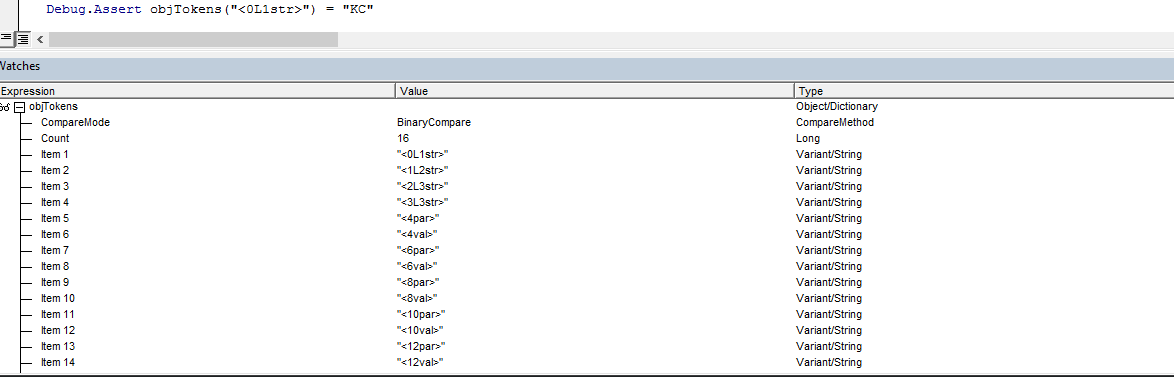
由于函数get_Level,与结构相关联的项具有一个级别,可以帮助保留数据的原始层次结构。
因此,我所缺少的是创建一个具有输入字符串的原始结构的对象的函数。这就是Retrieve函数在这个答案链接中所做的,但我不知道如何使它适应我的情况。
回答 3
Stack Overflow用户
发布于 2016-11-27 19:51:08
我已经开始用VBA为您指定的字符串结构编写一个解析器,它还没有完成,但无论如何我都会发布它。也许你可以从中学到一些想法。
Sub ParseString()

    Dim str As String
    str = "|KC;|AD;PE=5;PF=3;|CD;PE=5;HP=test;|CD;PE=3;HP=abc;|"

    ' Declare an object dictionary
    ' Make a reference to Microsoft Scripting Runtime in order for this to work
    Dim dict As New Dictionary

    ' If the bars are present in the first and last character of the string, replace them
    str = Replace(str, "|", "", 1, 1)
    If (Mid(str, Len(str), 1) = "|") Then
        str = Mid(str, 1, Len(str) - 1)
    End If

    ' Split the string by bars
    Dim substring_array() As String
    substring_array = Split(str, "|")

    ' Declare a regex object
    ' Check the reference to Microsoft VBScript Regular Expressions 5.5 in order for this to work
    Dim regex As New RegExp
    With regex
        .Global = True
        .IgnoreCase = True
        .MultiLine = True
    End With

    ' Object to store the regex matches
    Dim matches As MatchCollection
    Dim param_name_matches As MatchCollection
    Dim parameter_value_matches As MatchCollection

    ' Define some regex patterns
    pattern_for_structure_name = "^[^=;]+;"
    pattern_for_parameters = "[^=;]+=[^=;]+;"
    pattern_for_parameter_name = "[^=;]="
    pattern_for_parameter_val = "[^=;];"

    ' Loop through the elements of the array
    Dim i As Integer
    For i = 0 To UBound(substring_array) - LBound(substring_array)

        ' Get the array element in a string
        str1 = substring_array(i)

        ' Check if it contains a structure name
        regex.Pattern = pattern_for_structure_name
        Set matches = regex.Execute(str1)

        If matches.Count = 0 Then

            ' This substring does not contain a structure name
            ' Check if it contains parameters
            regex.Pattern = pattern_for_parameter
            Set matches = regex.Execute(matches(0).Value)
            If matches.Count = 0 Then

                ' There are no parameters as well as no structure name
                ' This means the string had || - invalid string
                MsgBox ("Invalid string")

            Else

                ' The string contains parameter names
                ' Add each parameter name to the dictionary
                Dim my_match As match
                For Each my_match In matches

                    ' Get the name of the parameter
                    regex.Pattern = pattern_for_parameter_name
                    Set parameter_name_matches = regex.Execute(my_match.Value)

                    ' Check if the above returned any matches
                    If parameter_name_matches.Count = 1 Then

                        ' Remove = sign from the parameter name
                        parameter_name = Replace(parameter_name_matches(0).Value, "=", "")

                        ' Get the value of the parameter
                        regex.Pattern = pattern_for_parameter_value
                        Set parameter_value_matches = regex.Execute(my_match.Value)

                        ' Check if the above returned any matches
                        If parameter_value_matches.Count = 1 Then

                            ' Get the value
                            parameter_value = Replace(parameter_value_matches(0).Value, ";", "")

                            ' Add the parameter name and value as a key pair to the Dictionary object
                            dict.Item(parameter_name) = parameter_value

                        Else

                            ' Number of matches is either 0 or greater than 1 - in both cases the string is invalid
                            MsgBox ("Invalid string")

                        End If

                    Else

                        ' Parameter name did not match - invalid string
                        MsgBox ("Invalid string")

                    End If

                Next

            End If

        ElseIf matches.Count = 1 Then

            ' This substring contains a single structure name
            ' Check if it has parameter names

        Else

            ' This substring contains more than one structure name - the original string is invalid
            MsgBox ("Invalid string")

        End If

    Next i

End SubStack Overflow用户
发布于 2016-11-27 20:19:59
这看起来像是一个简单的嵌套分隔字符串。有几个Split()函数就能做到这一点:
Option Explicit

Function parseString(str As String) As Collection

    Dim a1() As String, i1 As Long, c1 As Collection
    Dim a2() As String, i2 As Long, c2 As Collection
    Dim a3() As String

    a1 = Split(str, "|")
    Set c1 = New Collection
    For i1 = LBound(a1) To UBound(a1)
        If a1(i1) <> "" Then
            Set c2 = New Collection
            a2 = Split(a1(i1), ";")
            For i2 = LBound(a2) To UBound(a2)
                If a2(i2) <> "" Then
                    a3 = Split(a2(i2), "=")
                    If UBound(a3) > 0 Then
                        c2.Add a3(1), a3(0)
                    ElseIf UBound(a3) = 0 Then
                        c2.Add a3(0)
                    End If
                End If
            Next i2
            c1.Add c2
        End If
    Next i1

    Set parseString = c1

End Function


Sub testParseString()

    Dim c As Collection

    Set c = parseString("|KC;|AD;PE=5;PF=3;|CD;PE=5;HP=test;|CD;PE=3;HP=abc;|")

    Debug.Assert c(1)(1) = "KC"
    Debug.Assert c(2)("PE") = "5"
    Debug.Assert c(3)(1) = "CD"
    Debug.Assert c(4)("HP") = "abc"
    Debug.Assert c(4)(3) = "abc"

End Sub
请注意,您可以通过索引和键(如果输入中存在键)来寻址值。如果没有提供键,则只能通过索引访问该值。还可以递归地迭代集合,以获取树结构中的所有值。
思考:由于您的结构可能有重复的名称(在您的例子中,"CD“结构会发生两次),集合/词典会发现很难很好地存储这个(由于关键冲突)。另一种很好的方法是使用DOMDocument创建XML,并使用XPath访问其元素。请参阅在Visual中用DOM编程
更新:我还在下面添加了XML示例。看一看。
Stack Overflow用户
发布于 2016-11-27 23:04:18
下面是使用DOMDocument解析器解决字符串解析问题的另一个方法。您需要在VBA引用中包含Microsoft,v.6.0。
Function parseStringToDom(str As String) As DOMDocument60

    Dim a1() As String, i1 As Long
    Dim a2() As String, i2 As Long
    Dim a3() As String

    Dim dom As DOMDocument60
    Dim rt As IXMLDOMNode
    Dim nd As IXMLDOMNode

    Set dom = New DOMDocument60
    dom.async = False
    dom.validateOnParse = False
    dom.resolveExternals = False
    dom.preserveWhiteSpace = True

    Set rt = dom.createElement("root")
    dom.appendChild rt

    a1 = Split(str, "|")
    For i1 = LBound(a1) To UBound(a1)
        If a1(i1) <> "" Then
            a2 = Split(a1(i1), ";")
            Set nd = dom.createElement(a2(0))
            For i2 = LBound(a2) To UBound(a2)
                If a2(i2) <> "" Then
                    a3 = Split(a2(i2), "=")
                    If UBound(a3) > 0 Then
                        nd.appendChild dom.createElement(a3(0))
                        nd.LastChild.Text = a3(1)
                    End If
                End If
            Next i2
            rt.appendChild nd
        End If
    Next i1

    Set parseStringToDom = dom

End Function


Sub testParseStringToDom()

    Dim dom As DOMDocument60

    Set dom = parseStringToDom("|KC;|AD;PE=5;PF=3;|CD;PE=5;HP=test;|CD;PE=3;HP=abc;|")

    Debug.Assert Not dom.SelectSingleNode("/root/KC") Is Nothing
    Debug.Assert dom.SelectSingleNode("/root/AD/PE").Text = "5"
    Debug.Assert dom.SelectSingleNode("/root/CD[1]/HP").Text = "test"
    Debug.Assert dom.SelectSingleNode("/root/CD[2]/HP").Text = "abc"

    Debug.Print dom.XML

End Sub
如您所见,这会将文本转换为XML文档,保留所有结构,并允许命名时重复。然后可以使用XPath访问任何节点或值。这也可以扩展到有更多的嵌套水平和进一步的结构。
这是它在幕后创建的XML文档:
<root>
    <KC/>
    <AD>
        <PE>5</PE>
        <PF>3</PF>
    </AD>
    <CD>
        <PE>5</PE>
        <HP>test</HP>
    </CD>
    <CD>
        <PE>3</PE>
        <HP>abc</HP>
    </CD>
</root>https://stackoverflow.com/questions/40832549
复制相似问题
腾讯云开发者

Copyright © 2013 - 2026 Tencent Cloud. All Rights Reserved. 腾讯云 版权所有
深圳市腾讯计算机系统有限公司 ICP备案/许可证号:粤B2-20090059  粤公网安备44030502008569号
腾讯云计算(北京)有限责任公司 京ICP证150476号 | 京ICP备11018762号