
裁剪fits文件后坐标不被保存。
考虑以下代码(下载test.fits):
from astropy.io import fits
from photutils.utils import cutout_footprint

# Read fits file.
hdulist = fits.open('test.fits')
hdu_data = hdulist[0].data
hdulist.close()

# Some center and box to crop
xc, yc, xbox, ybox = 267., 280., 50., 100.
# Crop image.
hdu_crop = cutout_footprint(hdu_data, (xc, yc), (ybox, xbox))[0]
# Add comment to header
prihdr = hdulist[0].header
prihdr['COMMENT'] = "= Cropped fits file")
# Write cropped frame to new fits file.
fits.writeto('crop.fits', hdu_crop, prihdr)
原始(左)和裁剪(右)图像如下所示:
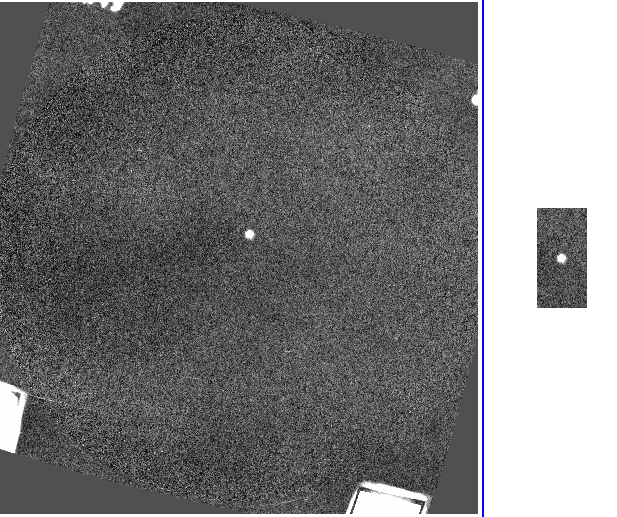
框架中心恒星的(ra,dec) 赤道坐标是:
Original frame: 12:10:32  +39:24:17
Cropped frame:  12:12:07  +39:06:50
为什么裁剪框中的坐标不同?
这是使用两种不同方法解决这一问题的两种方法。
from astropy.io import fits
from photutils.utils import cutout_footprint
from astropy.wcs import WCS
from astropy.nddata.utils import Cutout2D
import datetime

# Read fits file.
hdulist = fits.open('test.fits')
hdu = hdulist[0].data
# Header
hdr = hdulist[0].header
hdulist.close()

# Some center and box to crop
xc, yc, xbox, ybox = 267., 280., 50., 100.

# First method using cutout_footprint
# Crop image.
hdu_crop = cutout_footprint(hdu, (xc, yc), (ybox, xbox))[0]
# Read original WCS
wcs = WCS(hdr)
# Cropped WCS
wcs_cropped = wcs[yc - ybox // 2:yc + ybox // 2, xc - xbox // 2:xc + xbox // 2]
# Update WCS in header
hdr.update(wcs_cropped.to_header())
# Add comment to header
hdr['COMMENT'] = "= Cropped fits file ({}).".format(datetime.date.today())
# Write cropped frame to new fits file.
fits.writeto('crop.fits', hdu_crop, hdr)

# Second method using Cutout2D
# Crop image
hdu_crop = Cutout2D(hdu, (xc, yc), (xbox, ybox), wcs=WCS(hdr))
# Cropped WCS
wcs_cropped = hdu_crop.wcs
# Update WCS in header
hdr.update(wcs_cropped.to_header())
# Add comment to header
hdr['COMMENT'] = "= Cropped fits file ({}).".format(datetime.date.today())
# Write cropped frame to new fits file.
fits.writeto('crop.fits', hdu_crop.data, hdr)回答 3
Stack Overflow用户
发布于 2016-11-26 23:13:04
足迹只删除像素,不更新用于在像素和世界坐标之间转换的WCS。
使用astropy.nddata.utils.Cutout2D代替。
Stack Overflow用户
发布于 2016-11-26 18:37:34
坐标更改是因为您对图像进行了切片,但没有更改WCS信息(特别是参考像素值)。
一种方法是使用astropy.WCS
from astropy.wcs import WCS
wcs = WCS(hdulist[0].header)
wcs_cropped = wcs[280-50 : 280+50 , 267-25 : 267+25]
然后将更新后的wcs复制到标题中:
prihdr.update(wcs_cropped.to_header())在保存文件之前。
我不知道cutout_footprint做了什么,所以在创建wcs_cropped时可能需要更改切片索引。
astropy.nddata中有一个名为Cutout2D的方便功能,默认情况下更新WCS。
Stack Overflow用户
发布于 2016-11-28 19:46:51
另一个答案,因为它需要一个额外的包:ccdproc,特别是基于astropy.nddata.NDData的类CCDData
它简化了文件的读取:
from ccdproc import CCDData
ccd = CCDData.read(filename, unit='erg/cm**2/s/AA')必须指定该单元,因为标头单元与astropy.units模块不兼容。
CCDData的重要之处在于,您(大部分)不需要自己处理units、wcs、header和masks,它们被保存为属性,最基本的操作保存(并相应地)更新它们。例如切片:
xc, yc, xbox, ybox = 267., 280., 50., 100.
ccd_cropped = ccd[int(yc - ybox // 2) : int(yc + ybox // 2),
int(xc - xbox // 2) : int(xc + xbox // 2)]这个切片ccd_cropped已经更新了WCS信息,所以您可以继续处理它(比如再次保存它):
ccd_cropped.write('cropped.fits')它应该正确地更新坐标。切片部分实际上也可以使用astropy.nddata.NDDataRef,只有read和write部分是在ccdproc.CCDData中显式实现的。
https://stackoverflow.com/questions/40821565
复制相似问题
腾讯云开发者

Copyright © 2013 - 2026 Tencent Cloud. All Rights Reserved. 腾讯云 版权所有
深圳市腾讯计算机系统有限公司 ICP备案/许可证号:粤B2-20090059  粤公网安备44030502008569号
腾讯云计算(北京)有限责任公司 京ICP证150476号 | 京ICP备11018762号