
如何改变SearchView元素的颜色?
如何改变SearchView元素的颜色?
提问于 2016-11-24 12:15:34
我想在我的项目中使用SearchView,但是我对元素的颜色有问题。让我展示给你看:我的fragmentDialog在这里有我的SearchView
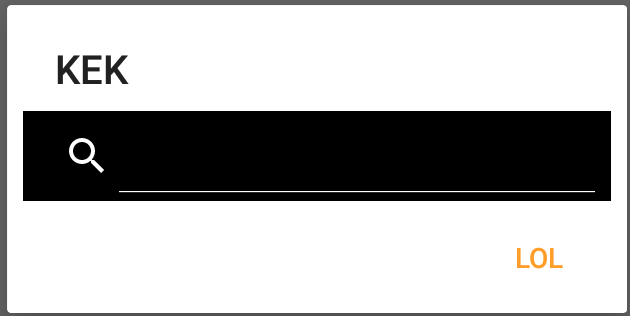
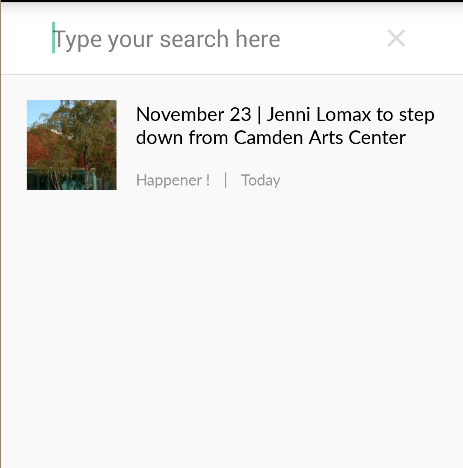
我不需要改变bg的颜色。例如,下一张图片。我想看到没有黑色bg的SearchView元素。

我试过
- 变更主题
- 改变风格
- 变色调
但什么都没起作用。搜索图标和指定元素仍然是白色的。也许我失去了什么?我能用XML做这个吗?求你帮帮我。
回答 9
Stack Overflow用户
回答已采纳
发布于 2016-11-24 13:16:51
您需要使用android.support.v7.widget.SearchView
在你的搜索视图中尝试使用这种风格,
在展开搜索视图之前-->

在扩展搜索视图之后->
<android.support.v7.widget.SearchView xmlns:android="http://schemas.android.com/apk/res/android"
            android:id="@+id/search_view"
            style="@style/SearchViewStyle"
            android:layout_width="wrap_content"
            android:layout_height="wrap_content"
            android:layout_alignParentEnd="true"
            android:layout_centerVertical="true"
            android:layout_gravity="end" />

<style name="SearchViewStyle" parent="Widget.AppCompat.SearchView">
    <!-- Gets rid of the search icon -->
    <item name="searchIcon">@drawable/ic_search</item>
    <!-- Gets rid of the "underline" in the text -->
    <item name="queryBackground">@color/white</item>
    <!-- Gets rid of the search icon when the SearchView is expanded -->
    <item name="searchHintIcon">@null</item>
    <!-- The hint text that appears when the user has not typed anything -->
    <item name="queryHint">@string/search_hint</item>
</style>Stack Overflow用户
发布于 2016-11-24 13:20:45
在这个答案中,我假设SearchView是在Toolbar中添加的,AppTheme是Theme.AppCompat.Light.NoActionBar的一个子项。
<style name="AppTheme.Toolbar" parent="AppTheme">
    <!--This line changes the color of text in Toolbar-->
    <item name="android:textColorPrimary">@color/green</item>
    <!--This line changes the color of icons in toolbar (back, overflow menu icons)-->
    <item name="android:textColorSecondary">@color/green</item>
</style>现在使用AppTheme.Toolbar作为工具栏的主题。
<android.support.v7.widget.Toolbar
    android:id="@+id/toolbar"
    android:layout_width="match_parent"
    android:layout_height="?attr/actionBarSize"
    android:background="?attr/colorPrimary"
    app:popupTheme="@style/AppTheme.PopupOverlay"
app:theme="@style/AppTheme.Toolbar" />Stack Overflow用户
发布于 2019-01-20 05:09:17
您可以使用`styles.xml‘中的服装样式修改搜索视图:
<style name="AppSearchView" parent="Widget.AppCompat.SearchView" >
    <!-- Text Size -->
    <item name="android:textSize">@dimen/textSizePrimary</item>
    <!-- Query Text Color -->
    <item name="android:textColorPrimary">@color/textColorPrimary</item>
    <!-- Hint Color -->
    <item name="android:textColorHint">@color/textColorDisabled</item>
    <!-- Icon Color -->
    <item name="android:tint">@color/textColorPrimary</item>
</style>
然后在搜索视图中使用此样式:
<android.support.v7.widget.SearchView
    android:layout_width="match_parent"
    android:layout_height="wrap_content"
    ...
app:theme="@style/AppSearchView" />页面原文内容由Stack Overflow提供。腾讯云小微IT领域专用引擎提供翻译支持
原文链接:
https://stackoverflow.com/questions/40786189
复制相关文章
相似问题
腾讯云开发者

Copyright © 2013 - 2026 Tencent Cloud. All Rights Reserved. 腾讯云 版权所有
深圳市腾讯计算机系统有限公司 ICP备案/许可证号:粤B2-20090059  粤公网安备44030502008569号
腾讯云计算(北京)有限责任公司 京ICP证150476号 | 京ICP备11018762号