
将日期格式从mm/dd/yy更改为dd/mm/yy
将日期格式从mm/dd/yy更改为dd/mm/yy
提问于 2016-11-24 11:24:18
我正在使用Google表单来收集用户的数据,他们使用的是数据报警器。格式是mm/dd/yy (1/25/2016),但我需要EU格式dd/mm/yy (25/1/2016)。
脚本收集服务日期:
  var Date1 = e.values[24];
  var Date2 = e.values[25];
  var Date3 = e.values[26];
  var Date4 = e.values[27];
  var Date5 = e.values[28];
如何将这些转换为欧盟日期格式?
到目前为止,我们尝试过的都是这样,但没有成功:
1)
  function myFunction() {
      var preDate = "1/25/2016";
      var postDate = preDate.Utilities.formatDate(dt, "PST", "dd/mm/yy");
      Logger.log(postDate);
    }
错误: TypeError:无法调用未定义的方法"formatDate“。
2)
function myFunction() {
  var preDate = "1/25/2016";
  var postDate = Date.parseExact(preDate ,"dd/MM/yyyy")
  Logger.log(postDate);
}
错误: TypeError:无法在对象函数Date() { Date.Date的本机代码,arity=1 }中找到函数parseExact
回答 2
Stack Overflow用户
回答已采纳
发布于 2016-11-24 11:34:41
如果谷歌电子表格中有日期,则可以使用Utilities.formatDate方法将日期转换为另一种格式。
function convertDate() {
  var sheet = SpreadsheetApp.getActiveSheet();
  var source = sheet.getRange("A1").getValue();
  if (typeof source === "date") {
   sheet.getRange("B1").setValue(Utilities.formatDate(dt, "PST", "dd/mm/yy"));
  }
}
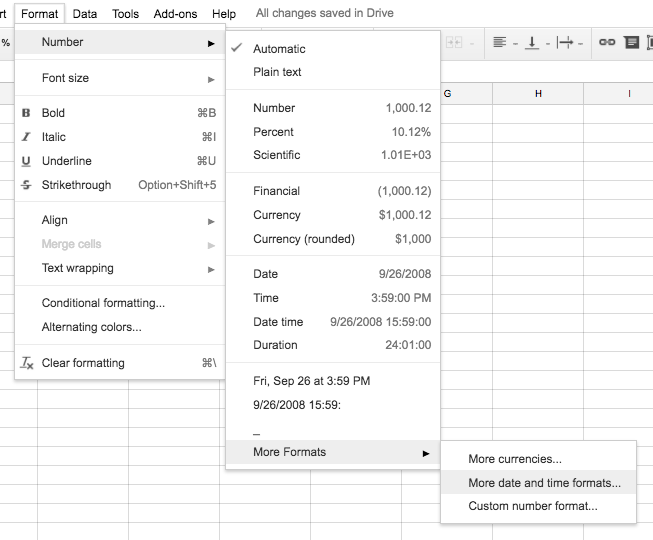
一个更容易的选择是选择电子表格中的整个列,并在“格式”菜单下更改默认格式(请参见屏幕快照)。
Stack Overflow用户
发布于 2016-11-24 11:34:13
您可以为此使用DateJS,如下所示:
http://code.google.com/p/datejs/wiki/APIDocumentation#parseExact
Date.parseExact("10/15/2004", "M/d/yyyy");  // The Date of 15-Oct-2004
Date.parse("15-Oct-2004", "d-MMM-yyyy");    // The Date of 15-Oct-2004
Date.parse("2004.10.15", "yyyy.MM.dd");     // The Date of 15-Oct-2004
Date.parseExact("10/15/2004", ["M/d/yyyy", "MMMM d, yyyy"]); // The Date of 15-Oct-2004
在你的问题中,你需要:
Date.parseExact("dateyouneed" ,"dd/MM/yyyy")页面原文内容由Stack Overflow提供。腾讯云小微IT领域专用引擎提供翻译支持
原文链接:
https://stackoverflow.com/questions/40785173
复制相关文章
相似问题
腾讯云开发者

Copyright © 2013 - 2026 Tencent Cloud. All Rights Reserved. 腾讯云 版权所有
深圳市腾讯计算机系统有限公司 ICP备案/许可证号:粤B2-20090059  粤公网安备44030502008569号
腾讯云计算(北京)有限责任公司 京ICP证150476号 | 京ICP备11018762号