
熊猫不使用bbox_inches=“紧”控制帧大小
熊猫不使用bbox_inches=“紧”控制帧大小
提问于 2016-11-22 00:34:42
在绘制数据帧时:
d_f.plot()
plt.savefig(image.png, bbox_inches='tight')bbox_inches='tight'可用于彻底删除最终.png图像中的许多帧(空白)。
是可以减少一点点的框架吗?
回答 1
Stack Overflow用户
回答已采纳
发布于 2016-11-22 00:56:22
bbox_inches='tight'或plt.tight_layout都是自动的。
您应该使用调整()来代替:
ax = df[['y','w']].plot()
fig = ax.get_figure()
left  = 0.125  # the left side of the subplots of the figure
right = 0.9    # the right side of the subplots of the figure
bottom = 0.1   # the bottom of the subplots of the figure
top = 0.9      # the top of the subplots of the figure
wspace = 0.2   # the amount of width reserved for blank space between subplots
hspace = 0.2   # the amount of height reserved for white space between subplots
# These two can be called on 'fig' instead of 'plt' too
plt.subplots_adjust(left=left, bottom=bottom, right=right, top=top,
                wspace=wspace, hspace=hspace)
plt.savefig('image.png')如果您希望左边没有空格,请设置left=0,如果不想在右侧放置right=1。
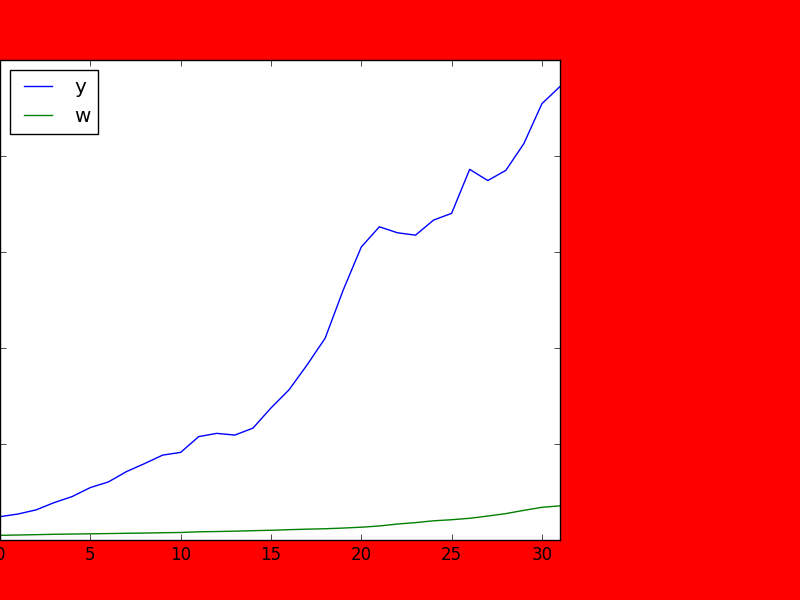
下面是一个夸张的例子,左边没有空格,右边有很多地方,面部颜色设置为红色,这样我们就可以清楚地看到:
fig.subplots_adjust(left=left, bottom=bottom, right=right, top=top,
            wspace=wspace, hspace=hspace)
plt.savefig('image.png', facecolor='red')
页面原文内容由Stack Overflow提供。腾讯云小微IT领域专用引擎提供翻译支持
原文链接:
https://stackoverflow.com/questions/40731938
复制相关文章
相似问题
腾讯云开发者

Copyright © 2013 - 2026 Tencent Cloud. All Rights Reserved. 腾讯云 版权所有
深圳市腾讯计算机系统有限公司 ICP备案/许可证号:粤B2-20090059  粤公网安备44030502008569号
腾讯云计算(北京)有限责任公司 京ICP证150476号 | 京ICP备11018762号