
如何使用Java从此页面读取html内容?
我的Java应用程序正在尝试从以下网址读取内容:https://www.iplocation.net/?query=62.92.63.48
我使用了以下方法:
  StringBuffer readFromUrl(String Url)
  {
    StringBuffer sb=new StringBuffer();
    BufferedReader in=null;

    try
    {
      in=new BufferedReader(new InputStreamReader(new URL(Url).openStream()));
      String inputLine;

      while ((inputLine=in.readLine()) != null) sb.append(inputLine+"\n");
      in.close();
    }
    catch (Exception e) { e.printStackTrace(); }
    finally
    {
      try
      {
        if (in!=null)
        {
          in.close();
          in=null;
        }
      }
      catch (Exception ex) { ex.printStackTrace(); }
    }
    return sb;
  }
通常,它对其他urls很好,但是对于这个urls,结果与浏览器中显示的不同,如下所示:
<html>
<head>
<META NAME="robots" CONTENT="noindex,nofollow">
<script>
(function(){function getSessionCookies(){var cookieArray=new Array();var cName=/^\s?incap_ses_/;var c=document.cookie.split(";");for(var i=0;i<c.length;i++){var key=c[i].substr(0,c[i].indexOf("="));var value=c[i].substr(c[i].indexOf("=")+1,c[i].length);if(cName.test(key)){cookieArray[cookieArray.length]=value}}return cookieArray}function setIncapCookie(vArray){var res;try{var cookies=getSessionCookies();var digests=new Array(cookies.length);for(var i=0;i<cookies.length;i++){digests[i]=simpleDigest((vArray)+cookies[i])}res=vArray+",digest="+(digests.join())}catch(e){res=vArray+",digest="+(encodeURIComponent(e.toString()))}createCookie("___utmvc",res,20)}function simpleDigest(mystr){var res=0;for(var i=0;i<mystr.length;i++){res+=mystr.charCodeAt(i)}return res}function createCookie(name,value,seconds){var expires="";if(seconds){var date=new Date();date.setTime(date.getTime()+(seconds*1000));var expires="; expires="+date.toGMTString()}document.cookie=name+"="+value+expires+"; path=/"}function test(o){var res="";var vArray=new Array();for(var j=0;j<o.length;j++){var test=o[j][0];switch(o[j][1]){case"exists":try{if(typeof(eval(test))!="undefined"){vArray[vArray.length]=encodeURIComponent(test+"=true")}else{vArray[vArray.length]=encodeURIComponent(test+"=false")}}catch(e){vArray[vArray.length]=encodeURIComponent(test+"=false")}break;case"value":try{try{res=eval(test);if(typeof(res)==="undefined"){vArray[vArray.length]=encodeURIComponent(test+"=undefined")}else if(res===null){vArray[vArray.length]=encodeURIComponent(test+"=null")}else{vArray[vArray.length]=encodeURIComponent(test+"="+res.toString())}}catch(e){vArray[vArray.length]=encodeURIComponent(test+"=cannot evaluate");break}break}catch(e){vArray[vArray.length]=encodeURIComponent(test+"="+e)}case"plugin_extentions":try{var extentions=[];try{i=extentions.indexOf("i")}catch(e){vArray[vArray.length]=encodeURIComponent("plugin_ext=indexOf is not a function");break}try{var num=navigator.plugins.length if(num==0||num==null){vArray[vArray.length]=encodeURIComponent("plugin_ext=no plugins");break}}catch(e){vArray[vArray.length]=encodeURIComponent("plugin_ext=cannot evaluate");break}for(var i=0;i<navigator.plugins.length;i++){if(typeof(navigator.plugins[i])=="undefined"){vArray[vArray.length]=encodeURIComponent("plugin_ext=plugins[i] is undefined");break}var filename=navigator.plugins[i].filename var ext="no extention";if(typeof(filename)=="undefined"){ext="filename is undefined"}else if(filename.split(".").length>1){ext=filename.split('.').pop()}if(extentions.indexOf(ext)<0){extentions.push(ext)}}for(i=0;i<extentions.length;i++){vArray[vArray.length]=encodeURIComponent("plugin_ext="+extentions[i])}}catch(e){vArray[vArray.length]=encodeURIComponent("plugin_ext="+e)}break}}vArray=vArray.join();return vArray}var o=[["navigator","exists"],["navigator.vendor","value"],["navigator.appName","value"],["navigator.plugins.length==0","value"],["navigator.platform","value"],["navigator.webdriver","value"],["platform","plugin_extentions"],["ActiveXObject","exists"],["webkitURL","exists"],["_phantom","exists"],["callPhantom","exists"],["chrome","exists"],["yandex","exists"],["opera","exists"],["opr","exists"],["safari","exists"],["awesomium","exists"],["puffinDevice","exists"],["navigator.cpuClass","exists"],["navigator.oscpu","exists"],["navigator.connection","exists"],["window.outerWidth==0","value"],["window.outerHeight==0","value"],["window.WebGLRenderingContext","exists"],["document.documentMode","value"],["eval.toString().length","value"]];try{setIncapCookie(test(o));document.createElement("img").src="/_Incapsula_Resource?SWKMTFSR=1&e="+Math.random()}catch(e){img=document.createElement("img");img.src="/_Incapsula_Resource?SWKMTFSR=1&e="+e}})();
</script>
<script>
(function() {
var z="";var b="7472797B766172207868723B76617220743D6E6577204461746528292E67657454696D6528293B766172207374617475733D2273746128......6F6465555249436F6D706F6E656E74287374617475732B222028222B74696D696E672E6A6F696E28292B222922297D3B";for (var i=0;i<b.length;i+=2){z=z+parseInt(b.substring(i, i+2), 16)+",";}z = z.substring(0,z.length-1); eval(eval('String.fromCharCode('+z+')'));})();
</script></head>
<body>
<iframe style="display:none;visibility:hidden;" src="//content.incapsula.com/jsTest.html" id="gaIframe"></iframe>
</body></html>
那么,在这种情况下,如何正确地读取浏览器中显示的html内容呢?
编辑:在阅读了建议之后,我更新了我的程序如下所示:
StringBuilder response=new StringBuilder();
String USER_AGENT="Mozilla/5.0",inputLine;
BufferedReader in=null;

try
{
  HttpURLConnection con=(HttpURLConnection)new URL(Url).openConnection();
  con.setRequestMethod("GET");
  con.setRequestProperty("Accept-Charset","UTF-8");
  con.setRequestProperty("User-Agent",USER_AGENT);                         // Add request header

  int responseCode=con.getResponseCode();
  in=new BufferedReader(new InputStreamReader(con.getInputStream()));
  while ((inputLine=in.readLine())!=null) { response.append(inputLine); }
  in.close();
}
catch (Exception e) { e.printStackTrace(); }
finally
{
  try { if (in!=null) in.close(); }
  catch (Exception ex) { ex.printStackTrace(); }
}
return response.toString();
但还是没有起作用,我得到的回应如下:
<html style="height:100%"><head><META NAME="ROBOTS" CONTENT="NOINDEX, NOFOLLOW"><meta name="format-detection" content="telephone=no"><meta name="viewport" content="initial-scale=1.0"><meta http-equiv="X-UA-Compatible" content="IE=edge,chrome=1"></head><body style="margin:0px;height:100%"><iframe src="/_Incapsula_Resource?CWUDNSAI=24&xinfo=8-75933493-0 0NNN RT(1479758027223 127) q(0 -1 -1 -1) r(0 -1) B12(4,315,0) U10000&incident_id=516000100118713619-514529209419563176&edet=12&cinfo=04000000" frameborder=0 width="100%" height="100%" marginheight="0px" marginwidth="0px">Request unsuccessful. Incapsula incident ID: 516000100118713619-514529209419563176</iframe></body></html>有人能给我看一些有用的示例代码吗?
多亏@那个家伙,我修改了我的程序,使其看起来如下所示:
import java.util.*;
import java.util.concurrent.*;
import java.io.*;
import java.net.*;
import java.util.Map.Entry;

public class Read_From_Url_Runner implements Callable<String[]>
{
  int Id;
  String Read_From_Url_Result[]=null,IP_Location_Url="https://www.iplocation.net/?query=[IP]",IP="62.92.63.48",Cookie,Result[],A_Url;

  public Read_From_Url_Runner(int Id)
  {
    this.Id=Id;

    A_Url=IP_Location_Url.replace("[IP]",IP);
    Cookie=getIncapsulaCookie(A_Url);
    Out("Cookie = [ "+Cookie+" ]");

    try
    {
      Result=call();
//      for (int i=0;i<Result.length;i++) Out(Result[i]);
    }
    catch (Exception e) { e.printStackTrace(); }
  }

  public String[] call() throws InterruptedException
  {
    String Text;

    try
    {
      Text=readUrl(A_Url,Cookie);
      Out(Text);
    }
    catch (Exception e)
    {
      Out(" --> Error in data : IP = "+IP);
//    e.printStackTrace();
    }
    return Read_From_Url_Result;
  }

  public static String readUrl(String url,String incapsulaCookie)
  {
    StringBuilder response=new StringBuilder();
    String USER_AGENT="Mozilla/5.0",inputLine;
    BufferedReader in=null;

    try
    {
      HttpURLConnection connection=(HttpURLConnection)new URL(url).openConnection();
      connection.setRequestMethod("GET");
      connection.setRequestProperty("Accept","text/html; charset=UTF-8");
      connection.setRequestProperty("User-Agent",USER_AGENT);
      connection.setDoInput(true);
      connection.setDoOutput(true);
      connection.setRequestProperty("Cookie",incapsulaCookie);                           // Set the Incapsula cookie
      Out(connection.getRequestProperty("Cookie"));

      in=new BufferedReader(new InputStreamReader(connection.getInputStream()));
      while ((inputLine=in.readLine())!=null) { response.append(inputLine+"\n"); }
      in.close();
    }
    catch (Exception e) { e.printStackTrace(); }
    finally
    {
      try { if (in!=null) in.close(); }
      catch (Exception ex) { ex.printStackTrace(); }
    }
    return response.toString();
  }

  public static String getIncapsulaCookie(String url)
  {
    String USER_AGENT="Mozilla/5.0",incapsulaCookie=null,visid=null,incap=null;          // Cookies for Incapsula, preserve order
    BufferedReader in=null;

    try
    {
      HttpURLConnection cookieConnection=(HttpURLConnection)new URL(url).openConnection();
      cookieConnection.setRequestMethod("GET");
      cookieConnection.setRequestProperty("Accept","text/html; charset=UTF-8");
      cookieConnection.setRequestProperty("User-Agent",USER_AGENT);
      cookieConnection.connect();

      for (Entry<String,List<String>> header : cookieConnection.getHeaderFields().entrySet())
      {
        if (header.getKey()!=null && header.getKey().equals("Set-Cookie"))               // Incapsula gives you the required cookies
        {
          for (String cookieValue : header.getValue())                                   // Search for the desired cookies
          {
            if (cookieValue.contains("visid")) visid=cookieValue.substring(0,cookieValue.indexOf(";")+1);
            if (cookieValue.contains("incap_ses")) incap=cookieValue.substring(0,cookieValue.indexOf(";"));
          }
        }
      }
      incapsulaCookie=visid+" "+incap;
      cookieConnection.disconnect();
    }
    catch (Exception e) { e.printStackTrace(); }
    finally
    {
      try { if (in!=null) in.close(); }
      catch (Exception ex) { ex.printStackTrace(); }
    }
    return incapsulaCookie;
  }

  private static void out(String message) { System.out.print(message); }
  private static void Out(String message) { System.out.println(message); }

  public static void main(String[] args)
  {
    final Read_From_Url_Runner demo=new Read_From_Url_Runner(0);
  }
}
但这只得到了响应的第一部分,如下所示:
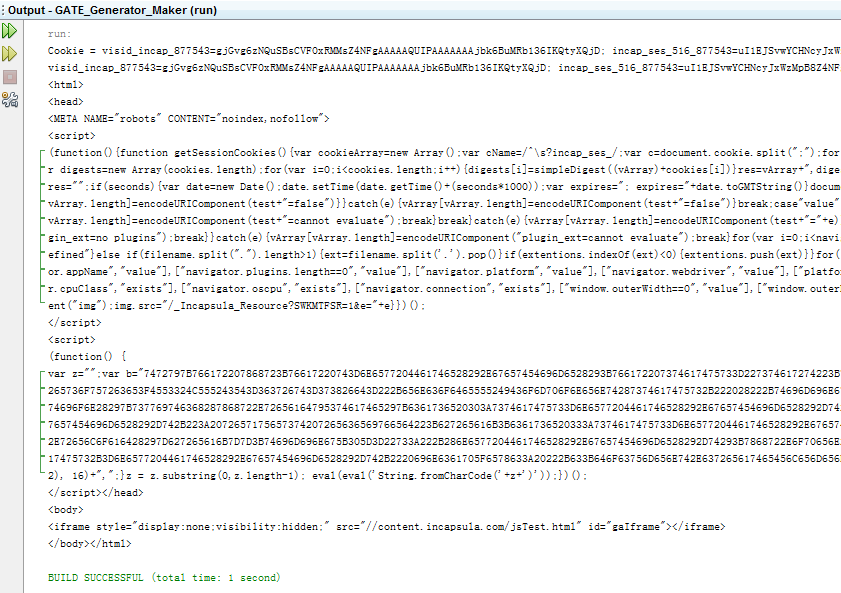
我真正想得到的是这样的东西:
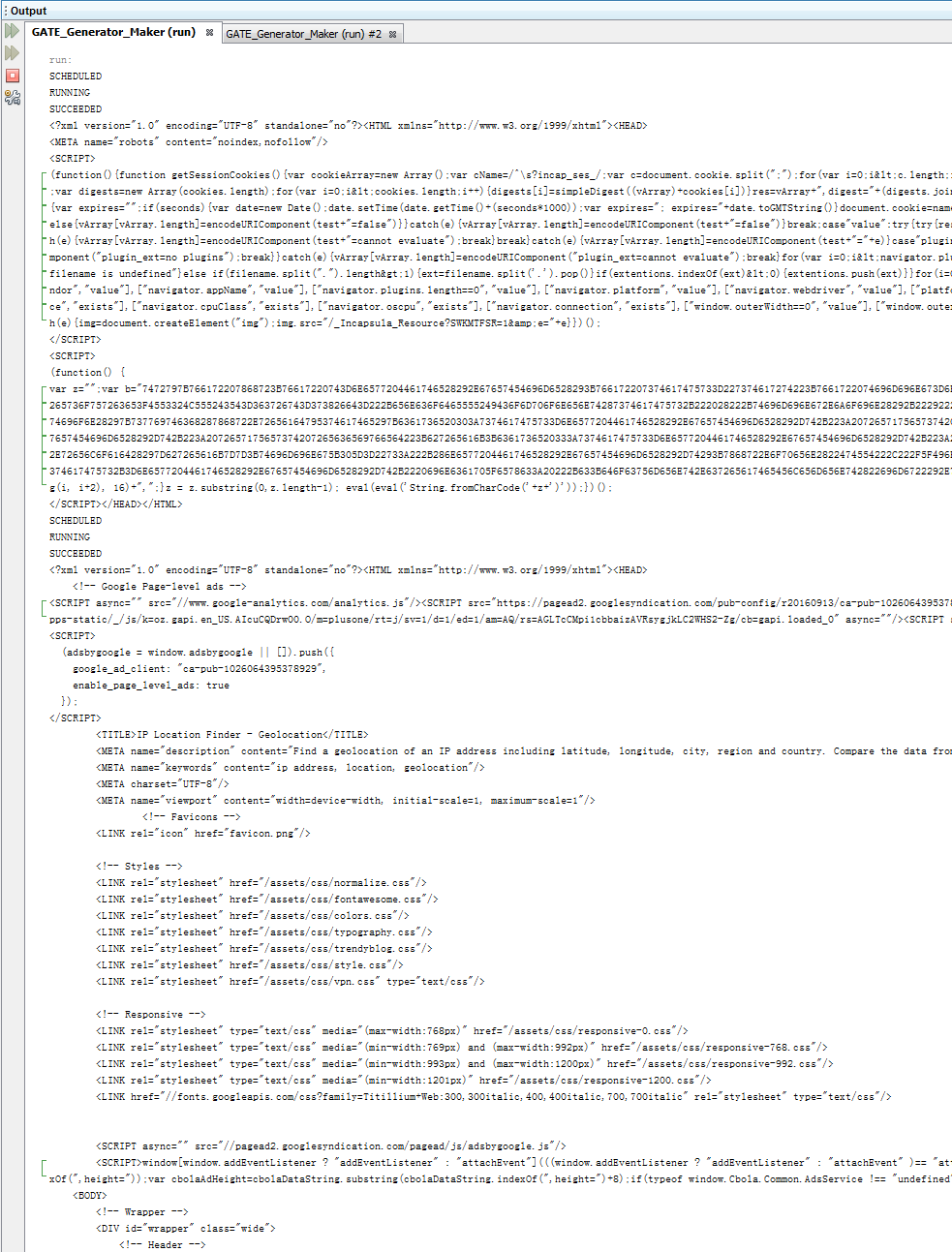
这个结果是通过在:如何关闭Javafx?上运行我的程序得到的。
回答 1
Stack Overflow用户
发布于 2016-11-21 18:10:26
您所面临的问题本质上可能是HTTP请求头,您没有显式地设置它。网站通常以不同的表示形式交付,这取决于HTTP报头(和有效负载)中的属性,以便以适当的方式为桌面或移动客户端服务。对于您的代码,您没有设置任何内容,因此您发送了一个默认头,不管库设置了什么。如果检查浏览器发送的具体HTTP头,很可能会有差异(比如用户代理或编码,.)。如果在代码中重新生成标头,结果应该是相同的。
此外,您还可以使用HttpUrlConnection,这样就可以轻松地设置或读取相应的header,就像在这中那样。否则,对于URLConnection,请查看这里。
进一步调查
您的方法重新编辑了一个特殊的错误页面,该页面表示该网站使用了In荚A中的其他安全功能。你得到的网站是这样的:
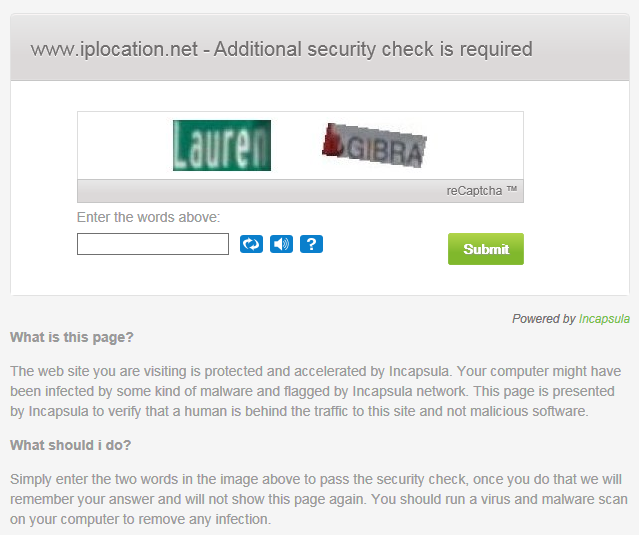
在研究标题时,我注意到两个需要显示的cookie字符串,因此您可以直接访问网站,而不是进行安全检查:
visid_incap_...=...
incap_ses_..._...=...您可以做的是使用一个请求在错误页面上登陆,这将在Set-Cookie头中为您提供两个cookie字符串。然后,您可以直接请求网站,将cookie字符串设置为visid_incap_...=...; incap_ses_..._...=...。您可以多次执行请求,直到cookie过期为止。只需检查错误页面就可以检测到。下面是工作的代码,它显然缺乏样式和额外的检查,但解决了您的问题。剩下的就看你了。
public static String getIncapsulaCookie(String url) {

    String USER_AGENT = "Mozilla/5.0";
    BufferedReader in = null;

    String incapsulaCookie = null;

    try {

        HttpURLConnection cookieConnection =
                (HttpURLConnection) new URL(url).openConnection();
        cookieConnection.setRequestMethod("GET");
        cookieConnection.setRequestProperty("Accept",
                "text/html; charset=UTF-8");
        cookieConnection.setRequestProperty("User-Agent", USER_AGENT);

        // Disable 'keep-alive'
        cookieConnection.setRequestProperty("Connection", "close");

        // Cookies for Incapsula, preserve order
        String visid = null;
        String incap = null;

        cookieConnection.connect();

        for (Entry<String, List<String>> header : cookieConnection
                .getHeaderFields().entrySet()) {

            // Incapsula gives you the required cookies
            if (header.getKey() != null
                    && header.getKey().equals("Set-Cookie")) {

                // Search for the desired cookies
                for (String cookieValue : header.getValue()) {
                    if (cookieValue.contains("visid")) {
                        visid = cookieValue.substring(0,
                                cookieValue.indexOf(";") + 1);
                    }
                    if (cookieValue.contains("incap_ses")) {
                        incap = cookieValue.substring(0,
                                cookieValue.indexOf(";"));
                    }
                }
            }
        }

        incapsulaCookie = visid + " " + incap;

        // Explicitly disconnect, also essential in this method!
        cookieConnection.disconnect();

    } catch (Exception e) {
        e.printStackTrace();
    } finally {
        try {
            if (in != null)
                in.close();
        } catch (Exception ex) {
            ex.printStackTrace();
        }
    }

    return incapsulaCookie;

}
此方法为您提取封装的cookie。下面是您的方法的修改版本,它使用cookie:
public static String readUrl(String url, String incapsulaCookie) {

    StringBuilder response = new StringBuilder();
    String USER_AGENT = "Mozilla/5.0", inputLine;
    BufferedReader in = null;

    try {

        HttpURLConnection connection =
                (HttpURLConnection) new URL(url).openConnection();
        connection.setRequestMethod("GET");
        connection.setRequestProperty("Accept", "text/html; charset=UTF-8");
        connection.setRequestProperty("User-Agent", USER_AGENT);

        // Set the Incapsula cookie
        connection.setRequestProperty("Cookie", incapsulaCookie);

        in = new BufferedReader(
                new InputStreamReader(connection.getInputStream()));

        while ((inputLine = in.readLine()) != null) {
            response.append(inputLine);
        }

        in.close();

    } catch (Exception e) {
        e.printStackTrace();
    } finally {
        try {
            if (in != null)
                in.close();
        } catch (Exception ex) {
            ex.printStackTrace();
        }
    }
    return response.toString();

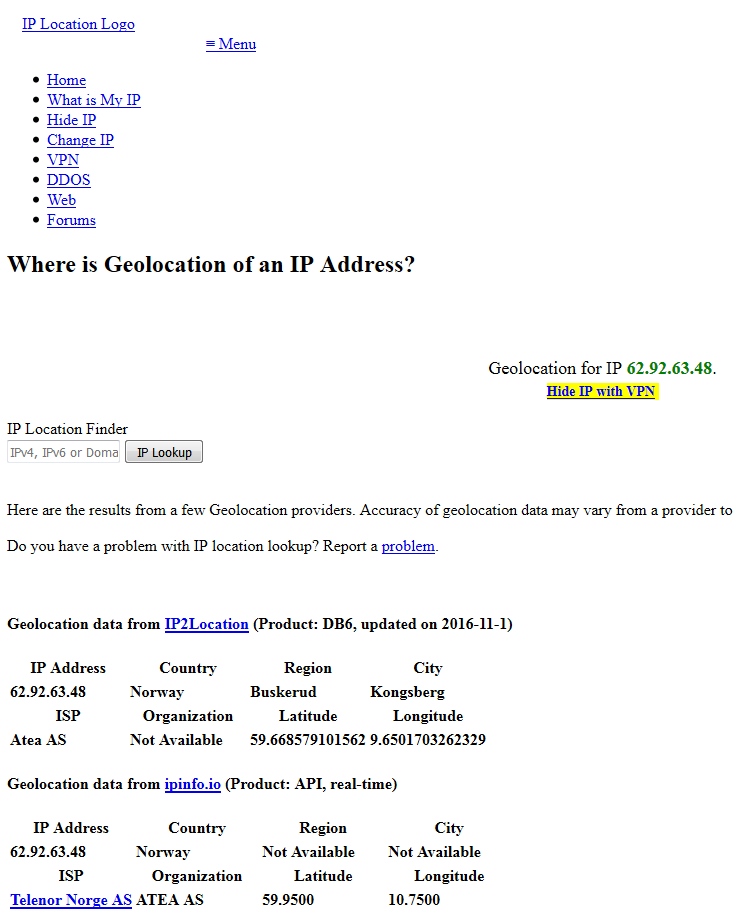
}正如我所观察到的,用户代理和其他属性似乎并不重要。您现在可以调用getIncapsulaCookie(String url)一次或任何时候,您需要一个新的cookie,以获得cookie和readUrl(String url, String incapsulaCookie) 多次请求页面,直到cookie到期。其结果是完整的 HTML页面,如下面的部分图像所示:
重要细节:在getIncapsulaCookie(...)方法中有两个基本命令,即cookieConnection.setRequestProperty("Connection", "close");和cookieConnection.disconnect();。这两者都是必需的,如果您想立即调用readUrl(...) 之后。如果省略这些命令,则在收到cookie后,HTTP连接将在服务器端保持活动状态,下一次对readUrl(...)的调用将向您返回错误的页面。您可以尝试这样做,方法是省略这些命令,然后调用getIncapsulaCookie(...)、,然后等待5-65秒并调用readUrl(...)。您将看到这也是有效的,因为连接会自动超时。另见这里。
https://stackoverflow.com/questions/40726427
复制相似问题
腾讯云开发者

Copyright © 2013 - 2026 Tencent Cloud. All Rights Reserved. 腾讯云 版权所有
深圳市腾讯计算机系统有限公司 ICP备案/许可证号:粤B2-20090059  粤公网安备44030502008569号
腾讯云计算(北京)有限责任公司 京ICP证150476号 | 京ICP备11018762号