
无法在magento 2中重写collapsible.js
我正在开发MagentoEE2.1.1,我需要扩展位于activate中的lib/web/mage/collapsible.js方法功能。但是,我无法找到使用Magento文档和googling的正确方法,下面是我的尝试,以及每个人的问题所在:
- try 1:
- created following file:
namespace_module_dir/view/frontend/web/js/collapsible-mixin.js
define([
    'jquery'
], function ($) {
    'use strict';
    var mixin = {
        activate: function () {
            if (!this.options.disabled) {
                if (this.options.animate) {
                    this._animate(showProps);
                } else {

// my custom code goes here ...
                    this.content.show();
                }
                this._open();
            }
        }
    };

    return function (target) {
         return target.extend(mixin);
    };

});- 创建的需求配置文件
namespace_module_dir/view/frontend/requirejs-config.js
    var config = {
    config: {
        mixins: {
            'mage/collapsible': {
                '<namespace_module>/js/collapsible-mixin': true
            }
        }
    }
};
问题是:
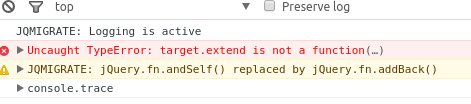
- try 2:
- 创建的需求配置文件
namespace_module_dir/view/frontend/requirejs-config.js
    var config = {
    map: {
        '*': {
            collapsible: '<namespace_module>/js/collapsible-map'
        }
    }
};的问题是:,不管collapsible-map.js的内容是什么,都不会加载(创建了可折叠的map.js文件),即使我可以在magento自动生成的requirejs-config.js文件中看到自己的requirejs-config.js内容,而且还加载了defalut magento collapsible.js文件。
- try 3:
- 创建了以下文件:
namespace_module_dir/view/frontend/web/js/collapsible-map.js
    define([
    'jquery',
    'jquery/ui',
    'mage/collapsible'
], function ($) {
    "use strict";
    $.widget('<namespace_module>.collapsible', $.mage.collapsible, {
        activate: function () {
            if (!this.options.disabled) {
                if (this.options.animate) {
                    this._animate(showProps);
                } else {

                    // custome code goes here ...

                    this.content.show();
                }
                this._open();
            }
        }
    });
    return $.ctv.collapsible;
});- 创建的需求配置文件
namespace_module_dir/view/frontend/requirejs-config.js
var config = {
        map: {
            '*': {
                'mage/collapsible': '<namespace_module>/js/collapsible-mixin'
            }
        }
    };
问题是:
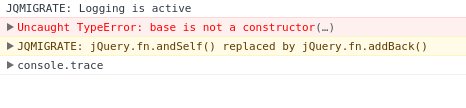
通过调试发现typeof $.mage.collapsible = undefined
那么,请告诉我,我错过了什么,什么是最好的方式跟随?
提前谢谢..。
回答 5
Stack Overflow用户
发布于 2017-05-13 14:08:54
mage.collapsible是一个JqueryUi小部件。有关更多信息,请参见JqueryUi文档。我宁愿像下面这样做,而不是将JS文件从核心Magento 2代码复制到主题并修改函数,或者用我的函数替换小部件,但只在其中添加一个函数。
在我的主题dir/web/mage/ my -折叠-Mixin.js中,这应该是可行的:
define([
    'jquery',
    'jquery/ui'
], function ($, wrapper) {
    'use strict';

    return function(target) {
        $.widget("mage.myCollapsible", target, {
            activate: function () {
               if (!this.options.disabled) {
                   if (this.options.animate) {
                       this._animate(showProps);
                   } else {
                      // custom code goes here ...
                      this.content.show();
                   }
                   this._open();
               }

               // Or:
               // this._super();
               // if (!this.options.disabled) { .. custom code .. }
            }
        });
    };
});
其他建议&未测试:将上述变量“this”替换为“target”。
以及我的主题dir中的request-config.js
var config = {
    config: {
        mixins: {
            'mage/collapsible': {
                'mage/my-collapsible-mixin': true
            }
        }
    }
};Stack Overflow用户
发布于 2018-09-28 14:50:18
要覆盖collapsible.js,这对我是有效的:
- 从:
lib/web/mage/collapsible.js复制原件到:app/design/frontend/VENDOR/THEME/web/js/collapsible-custom.js
注意:复制的collapsible.js版本已重命名为可折叠自定义. to。
- 在主题目录中添加一个requirejs文件,并将原始collapsible.js文件映射到新的自定义文件。
app/design/frontend/VENDOR/THEME/requirejs-config.jsvar config ={ "map":{ "*":{“mage/可折叠”:“js/可折叠-定制”} }; - 刷新页面并检查检查器,看看我们的可折叠自定义. to是否已加载。

Stack Overflow用户
发布于 2016-11-22 12:04:12
要修复您的尝试3,请将地图中的“mage/”更改为“可折叠”:
var config = { map: { '*': { 'collapsible': '<namespace_module>/js/collapsible-map' } } };
我认为bug是由循环引用引起的:可折叠-map.js引用mage/可折叠,而mage/可折叠再次映射到可折叠-map。别名“可折叠”用于mage/可折叠,它配置在主题\view\前端\ alias config.js中。因此,您可以重新映射这个别名到您自己的文件,同时引用真正的法师/可折叠在您的文件中。
try 1和2是错误的,因为mixins只能应用于UI组件。这意味着组件必须从uiClass、uiElement、uiCollection或任何其他ui组件中扩展。collapsible.js只是jQuery小部件。
一些有用的链接:
Exteding组件或小部件(它们不一样!):js.html
jQuery小部件:https://learn.jquery.com/jquery-ui/widget-factory/extending-widgets/
https://stackoverflow.com/questions/40713696
复制相似问题
腾讯云开发者

Copyright © 2013 - 2026 Tencent Cloud. All Rights Reserved. 腾讯云 版权所有
深圳市腾讯计算机系统有限公司 ICP备案/许可证号:粤B2-20090059  粤公网安备44030502008569号
腾讯云计算(北京)有限责任公司 京ICP证150476号 | 京ICP备11018762号