
使用控制数组对图片框进行洗牌
所以我想创建一个集中式的内存匹配游戏。但现在我只想把重点放在填充画框上。我希望每一次游戏加载时,图片都会随机地被洗牌。我的老师推荐使用一个控制数组,并给我发送了这个链接http://www.acthompson.net/DotNet/ControlArrays.htm。
我仍然很困惑,因为到处都是红线,我不知道如何将图像添加到程序中。最初,我想在构建时添加图片框,但本教程建议在运行时进行。
InitializeComponent()和card()下面有红线。为什么?以及如何添加我保存在文件中的图像?
另外,我想知道我是否需要双级申报?类的名称是“表单”,“Form1”指的是表单本身。当我声明' Form1‘时,它说的是'class Form1和partial class Form1 class’。我能声明一下‘表单’吗?它将能够与表单交互吗?
如何填充一个控制阵列的图片框,可以被洗牌每次游戏运行?
提前谢谢你。到目前为止我的代码是:
Public Class Form

    Public Class Form1

        Inherits System.Windows.Forms.Form

        Dim cards(23) As PictureBox


   Public Class Form
Public Class Form1

    Inherits System.Windows.Forms.Form

    Dim cards(23) As PictureBox

    Sub New()
        InitializeComponent()
        cards = New PictureBox() {PictureBox1, PictureBox2, PictureBox3, PictureBox4, PictureBox5, PictureBox6, PictureBox7, PictureBox8, PictureBox9, PictureBox10, PictureBox11, PictureBox12, PictureBox13, PictureBox14, PictureBox15, PictureBox16, PictureBox17, PictureBox18, PictureBox19, PictureBox20, PictureBox21, PictureBox22, PictureBox23, PictureBox24}
    End Sub

End Class
端级
我尝试过这个和其他各种配置,但ti仍然不起作用。我在哪里犯了一个错误?
更新:
所以我一直在玩这个,我遇到了一些问题。1.它说没有声明路径,所以我做了IO.Path,这似乎没问题。我不知道它是否合适,虽然2。它说,PictureBox1等,没有声明和不可访问。Img文件夹也是如此。我认为带有图像的文件夹的路径不正确。
公共类Form1
'picture boxes

Private pBoxes As PictureBox()

'images

Private imgs As String()

'random number generator

Private rNum As Random

'cover image

Private coverImg As String = "bg.jpeg"

'timer

Private dt As DateTime

'turns cards

Private pbFirst As PictureBox

Private pbSecond As PictureBox

Private matches As Int32 = 0


Private Sub Form1_Load(sender As Object, e As EventArgs) Handles MyBase.Load

    Dim ImgFolder As String

    rNum = New Random()

    pBoxes = New PictureBox() {PictureBox1, PictureBox2, PictureBox3, PictureBox4, PictureBox5, PictureBox6, PictureBox7, PictureBox8, PictureBox9, PictureBox10, PictureBox11, PictureBox12, PictureBox13, PictureBox14, PictureBox15, PictureBox16, PictureBox17, PictureBox18, PictureBox19, PictureBox20, PictureBox21, PictureBox22, PictureBox23, PictureBox24}

    'where images are stored

    ImgFolder = IO.Path.Combine(Environment.GetFolderPath("H:\Test images"))

    coverImg = IO.Path.Combine(ImgFolder, coverImg)


    For Each p As PictureBox In pBoxes

        p.ImageLocation = coverImg

    Next

    'NewGame()

End Sub

'Private Sub NewGame()

' reset everything that matters

'matches = 0

'pbFirst = Nothing

'pbSecond = Nothing

' repick, reshuffle

'PickImages()

'Shuffle()

'dt = DateTime.Now

'tmrMain.Enabled = True

'End Sub
端级
又一次更新:
我的第一个版本的确有画框,但这个版本没有。不敢相信我犯了这么愚蠢的错误..。它是固定的,但它仍然说我的ImgFolder是未声明和不可访问的。顺便说一句,非常感谢你的耐心和帮助。
进口System.IO
公共类Form1
'array of picture boxes
Private pBoxes As PictureBox()
'array of images
Private imgs As String()
'random number generator
Private rNum As Random
'cover image
Private coverImg As String = "bg.jpeg"

'timer
Private dt As DateTime

'turns cards
Private pbFirst As PictureBox
Private pbSecond As PictureBox
Private matches As Int32 = 0


Private Sub Form1_Load(sender As Object, e As EventArgs) Handles MyBase.Load
    rNum = New Random()

    pBoxes = New PictureBox() {PictureBox1, PictureBox2, PictureBox3, PictureBox4,
                           PictureBox5, PictureBox6, PictureBox7, PictureBox8,
                           PictureBox9, PictureBox10, PictureBox11, PictureBox12, PictureBox13, PictureBox14, PictureBox15, PictureBox16, PictureBox17, PictureBox18, PictureBox19, PictureBox20, PictureBox21, PictureBox22, PictureBox23, PictureBox24}

    ' where you keep YOUR images

    ImgFolder = "F:\COMPUTER SCIENCE\Test images"

    coverImg = Path.Combine(ImgFolder, coverImg)
    For Each p As PictureBox In pBoxes
        p.ImageLocation = coverImg
    Next

    'NewGame()
End Sub

'Private Sub NewGame()
' reset everything that matters
'matches = 0
'pbFirst = Nothing
'pbSecond = Nothing
' repick, reshuffle
'PickImages()
'Shuffle()

'dt = DateTime.Now
'tmrMain.Enabled = True
'End Sub
端级
回答 1
Stack Overflow用户
发布于 2016-11-20 18:20:59
您可能不想在启动时将匹配图像加载到PictureBoxes中--它们应该从相同的图像开始,直到它们被选中,不是吗?您还想避免实际使用映像--如果您创建/加载映像,您也要负责处理它们。使用ImageLoacation属性指定文件的路径。
这个游戏版本使用了一副牌的图像。这只是个开始,因为这似乎是家庭作业。
Public Class frmGame
    Private pbs As PictureBox()
    Private myImgs As String()        ' img file paths
    Private RNG As Random

    Private ImgFolder As String
    Private CoverImg As String = "b1fv.png"
    ' crude timer
    Private dt As DateTime

    ' turn elements - first and second pbs clicked,
    ' matches so you know when it is Game Over
    Private pbFirst As PictureBox
    Private pbSecond As PictureBox
    Private matches As Int32 = 0

    Private Sub frmGame_Load(sender As Object, e As EventArgs) Handles MyBase.Load
        RNG = New Random()

        pbs = New PictureBox() {PictureBox1, PictureBox2, PictureBox3, PictureBox4,
                               PictureBox5, PictureBox6, PictureBox7, PictureBox8,
                               PictureBox9, PictureBox10, PictureBox11, PictureBox12}

        ' where you keep YOUR images
        ImgFolder = Path.Combine(Environment.GetFolderPath(Environment.SpecialFolder.MyDocuments),
                                 "DevGraphics", "Cards")

        CoverImg = Path.Combine(ImgFolder, CoverImg)
        For Each p As PictureBox In pbs
            p.ImageLocation = CoverImg
        Next

        NewGame()
    End Sub

    Private Sub NewGame()
        ' reset verything that matters
        matches = 0
        pbFirst = Nothing
        pbSecond = Nothing
        ' repick, reshuffle
        PickImages()
        Shuffle()

        dt = DateTime.Now
        tmrMain.Enabled = True
    End Sub
End Class- 这些卡片来自www.jifz.com/ cards /显然已经不存在了
- 在单击事件中,代码可以存储使用
pbFirst和pbSecond单击的第一个和第二个PB。 PickImages将把文件名加载到数组中- 从1-52的值数组开始
- 洗牌(你对上一个问题的洗牌是错误的-有很多Shuffle answers like this one在SO上)
- 取一半你需要的( 24场比赛12次),复制他们。
- 洗牌那个数组
- 通过在
myImgs(n)中显示PictureBox来映射它们,其中n是上面数组中单击的picturebox的索引 - 菲茨卡有一个数字集,其中
1.png是Ace-黑桃,2映射到2-黑桃等,所以转换一个整数到卡图像文件名是简单的。
- 通过在
CoverImg是你找不到的匹配图像。你可以留下空白
使用ImageLocation而不是图像还可以轻松地比较pbFirst是否具有与pbSecond相同的图像
为游戏和延迟添加计时器,最终一个12卡版本可能看起来如下:
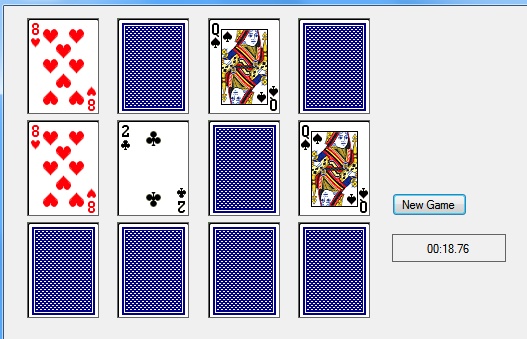
您似乎在窗体中有一个表单声明。我会用一种新的表格重新开始。
https://stackoverflow.com/questions/40705998
复制相似问题
腾讯云开发者

Copyright © 2013 - 2026 Tencent Cloud. All Rights Reserved. 腾讯云 版权所有
深圳市腾讯计算机系统有限公司 ICP备案/许可证号:粤B2-20090059  粤公网安备44030502008569号
腾讯云计算(北京)有限责任公司 京ICP证150476号 | 京ICP备11018762号