
WPF PasswordBox圆角
WPF PasswordBox圆角
提问于 2016-11-20 09:38:05
我用它绕过TextBox的角落,
    <ControlTemplate x:Key="TextBoxBaseControlTemplate" TargetType="{x:Type TextBoxBase}">
        <Border Background="{TemplateBinding Background}"
            x:Name="Bd" BorderBrush="#FFE6DDDD"
            BorderThickness="{TemplateBinding BorderThickness}" CornerRadius="10">
            <ScrollViewer x:Name="PART_ContentHost"/>
        </Border>
        <ControlTemplate.Triggers>
            <Trigger Property="IsEnabled" Value="False">
                <Setter Property="Background" Value="{DynamicResource {x:Static SystemColors.ControlBrushKey}}" TargetName="Bd"/>
                <Setter Property="Foreground" Value="{DynamicResource {x:Static SystemColors.GrayTextBrushKey}}"/>
            </Trigger>
            <Trigger Property="Width" Value="Auto">
                <Setter Property="MinWidth" Value="100"/>
            </Trigger>
            <Trigger Property="Height" Value="Auto">
                <Setter Property="MinHeight" Value="20"/>
            </Trigger>
        </ControlTemplate.Triggers>
    </ControlTemplate>
我申请,
        <TextBox Template="{StaticResource TextBoxBaseControlTemplate}"
             Height="25"
             Margin="168,100,139,194"
             HorizontalContentAlignment="Center"
             VerticalContentAlignment="Center"
             Background="{x:Null}"
             BorderBrush="{x:Null}"
             FontFamily="Aller Light">
        </TextBox>
特派团已完成

然后我想在PasswordBox做,
    <ControlTemplate x:Key="passwordbox" TargetType="{x:Type PasswordBox}">
        <Border Background="{TemplateBinding Background}"
            x:Name="Bd" BorderBrush="#FFE6DDDD"
            BorderThickness="{TemplateBinding BorderThickness}" CornerRadius="10">
        </Border>
        <ControlTemplate.Triggers>
            <Trigger Property="IsEnabled" Value="False">
                <Setter Property="Background" Value="{DynamicResource {x:Static SystemColors.ControlBrushKey}}" TargetName="Bd"/>
                <Setter Property="Foreground" Value="{DynamicResource {x:Static SystemColors.GrayTextBrushKey}}"/>
            </Trigger>
            <Trigger Property="Width" Value="Auto">
                <Setter Property="MinWidth" Value="100"/>
            </Trigger>
            <Trigger Property="Height" Value="Auto">
                <Setter Property="MinHeight" Value="20"/>
            </Trigger>
        </ControlTemplate.Triggers>
    </ControlTemplate>
应用
    <PasswordBox Template="{StaticResource passwordbox}"
                 Height="25"
                 Margin="168,140,139,154"
                 HorizontalContentAlignment="Center"
                 VerticalContentAlignment="Center"
                 Background="{x:Null}"
                 Password="someonepass">
    </PasswordBox>
它似乎是成功的,但内容不能输入。(第二个方框)
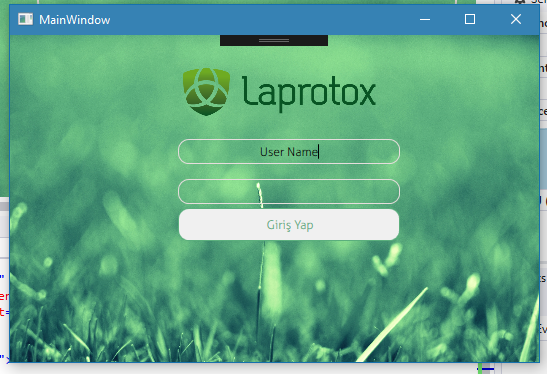
如果我删除模板,通常是

怎么修呢?谢谢..。
回答 1
Stack Overflow用户
回答已采纳
发布于 2016-11-20 10:07:59
您的PasswordBox控件模板遗漏了一个名为"PART_ContentHost“的部分(提示是一个ScrollViewer)。以您的TextBoxBase模板为样本。
所以你的模板应该是:
<ControlTemplate x:Key="passwordbox" TargetType="{x:Type PasswordBox}">
    <Border Background="{TemplateBinding Background}"
        x:Name="Bd" BorderBrush="#FFE6DDDD"
        BorderThickness="{TemplateBinding BorderThickness}" CornerRadius="10">
        <ScrollViewer Name="PART_ContentHost" SnapsToDevicePixels="{TemplateBinding UIElement.SnapsToDevicePixels}" />
    </Border>
    <ControlTemplate.Triggers>
        <Trigger Property="IsEnabled" Value="False">
            <Setter Property="Background" Value="{DynamicResource {x:Static SystemColors.ControlBrushKey}}" TargetName="Bd"/>
            <Setter Property="Foreground" Value="{DynamicResource {x:Static SystemColors.GrayTextBrushKey}}"/>
        </Trigger>
        <Trigger Property="Width" Value="Auto">
            <Setter Property="MinWidth" Value="100"/>
        </Trigger>
        <Trigger Property="Height" Value="Auto">
            <Setter Property="MinHeight" Value="20"/>
        </Trigger>
    </ControlTemplate.Triggers>
</ControlTemplate>
我希望它能帮到你。
页面原文内容由Stack Overflow提供。腾讯云小微IT领域专用引擎提供翻译支持
原文链接:
https://stackoverflow.com/questions/40702547
复制相关文章
相似问题
腾讯云开发者

Copyright © 2013 - 2026 Tencent Cloud. All Rights Reserved. 腾讯云 版权所有
深圳市腾讯计算机系统有限公司 ICP备案/许可证号:粤B2-20090059  粤公网安备44030502008569号
腾讯云计算(北京)有限责任公司 京ICP证150476号 | 京ICP备11018762号