
使用@4模式填充输入
使用@4模式填充输入
提问于 2016-11-17 13:45:34
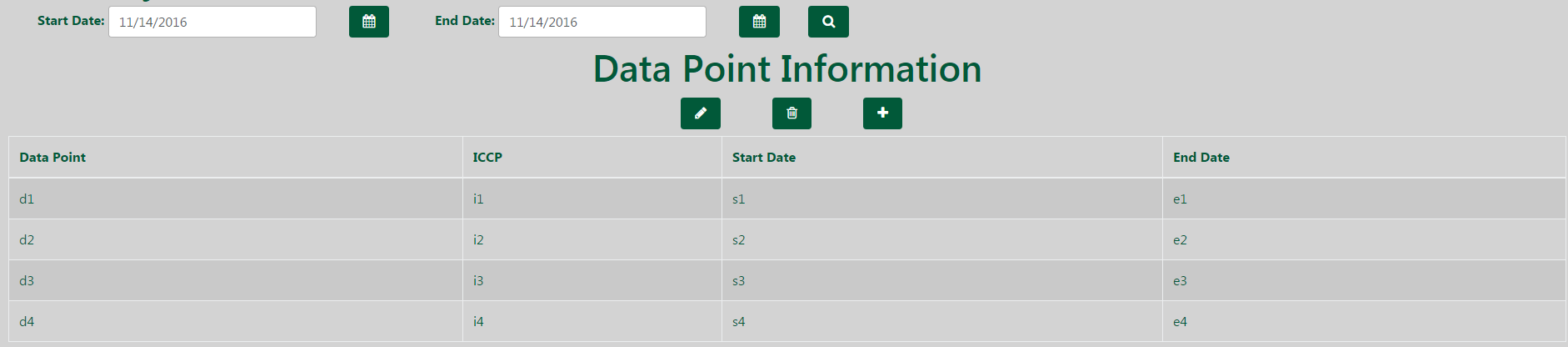
我有一个带有表的主页,当单击一个行时,它使用@Output发送该行的数据(我已经确认通过在项目中的另一个地方使用它来正确发送数据)。然后,我有一个引导4模式,当我点击左边的按钮,上面写着“数据点信息”时弹出。我需要做的是从被点击的行中获取数据,并使用它填充模式内的表单。
主页:
模态:
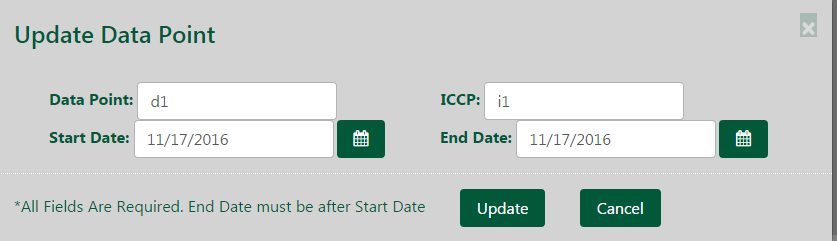
用于模式的HTML:
<div class="modal fade" id="myModal2" tabindex="-1" role="dialog" aria-labelledby="myModalLabel" aria-hidden="true">
<div class="modal-dialog bodyWidth">
<div class="modal-content wide">
  <div class="modal-header">
    <button type="button" class="close" data-dismiss="modal" aria-hidden="true">×</button>
    <h4 class="modal-title">Update Data Point</h4>
  </div>
  <div class="modal-body">
    <form class="form-inline" [formGroup]="updateForm" (ngSubmit)="submitForm(updateForm.value)">
      <div class="row">
        <div class="form-group" [ngClass]="{'has-error':!updateForm.controls['dataPoint'].valid && updateForm.controls['dataPoint'].touched}">
          <label>Data Point:</label>
          <input class="form-control special" type="text" [formControl]="updateForm.controls['dataPoint']">
        </div>
        <div class="form-group move" [ngClass]="{'has-error':!updateForm.controls['ICCP'].valid && updateForm.controls['ICCP'].touched}">
          <label >ICCP:</label>
          <input type="text" class="form-control special" [formControl]="updateForm.controls['ICCP']">
        </div>
        <div class="form-group" [ngClass]="{'has-error':!updateForm.controls['startDate'].valid && updateForm.controls['startDate'].touched}">
          <label>Start Date:</label>
          <input [value]="getDate('start')" class="form-control special" type="text" [formControl]="updateForm.controls['startDate']" style="margin-right: 4px;">
        </div>
        <div style="display:inline-block">
          <ngb-datepicker id="special" *ngIf="startCheck;" [(ngModel)]="startDate" (ngModelChange)="showDatePick(0)" [ngModelOptions]="{standalone: true}"></ngb-datepicker>
        </div>
        <button type="button" class="btn icon-calendar closest" (click)="showDatePick(0)"></button>
        <div class="form-group" [ngClass]="{'has-error':!updateForm.controls['endDate'].valid && updateForm.controls['endDate'].touched}">
          <label >End Date:</label>
          <input [value]="getDate('end')" class="form-control special" type="text" [formControl]="updateForm.controls['endDate']">
        </div>
        <div style="display:inline-block">
          <ngb-datepicker id="special" *ngIf="endCheck;" [(ngModel)]="endDate" (ngModelChange)="showDatePick(1)" [ngModelOptions]="{standalone: true}"></ngb-datepicker>
        </div>
        <button type="button" class="btn icon-calendar closer" (click)="showDatePick(1)"></button>
      </div>
    </form>
  </div>
  <div class="modal-footer">
    *All Fields Are Required. End Date must be after Start Date
    <button type="submit" class="btn" [disabled]="!updateForm.valid" data-dismiss="modal">Update</button>
    <button type="button" (click)="resetForm()" class="btn" data-dismiss="modal">Cancel</button>
  </div>
</div>
</div>
</div>
情态打字本:
@Component({
  selector: 'update-validation',
  styleUrls: ['../app.component.css'],
  templateUrl: 'update.component.html',
  providers: [DatePipe]
})
export class UpdateComponent {
  @Input() receivedRow:DataTable;
  public dt: NgbDateStruct;
  public dt2: NgbDateStruct;
  public startCheck: boolean = false;
  public endCheck: boolean = false;
  updateForm : FormGroup;

 constructor(fb: FormBuilder, private datePipe: DatePipe){
   this.updateForm = fb.group({
    'dataPoint' : [DPS[0].tDataPoint, Validators.required],
    'ICCP' : [DPS[0].tICCP, Validators.required],
    'startDate' : [DPS[0].tStartDate, Validators.required],
    'endDate' : [DPS[0].tEndDate, Validators.required]
 }, {validator: this.endDateAfterOrEqualValidator})
 }

resetForm(){
  location.reload();
  //this.updateForm.reset();
}

submitForm(value: any){
  console.log(value);
}

public getDate(dateName: string) {
  let workingDateName = dateName + 'Date';
  let timestamp = this[workingDateName] != null ? new Date(this[workingDateName].year, this[workingDateName].month-1, this[workingDateName].day).getTime() : new Date().getTime();
  this.updateForm.controls[dateName + 'Date'].setValue(this.datePipe.transform(timestamp, 'MM/dd/yyyy'));
}

public showDatePick(selector):void {
  if(selector === 0) {
    this.startCheck = !this.startCheck
  } else {
    this.endCheck = !this.endCheck;
  }
}

endDateAfterOrEqualValidator(formGroup): any {
  var startDateTimestamp, endDateTimestamp;
  for(var controlName in formGroup.controls) {
    if (controlName.indexOf("startDate") !== -1) {
      startDateTimestamp = Date.parse(formGroup.controls[controlName].value);
    }
    if (controlName.indexOf("endDate") !== -1) {
      endDateTimestamp = Date.parse(formGroup.controls[controlName].value);
    }
  }
  return (endDateTimestamp < startDateTimestamp) ? { endDateLessThanStartDate: true } : null;
  }
}HTML来自使用它的选择器放置模式的主页(toSend的类型为DataTable,它是我从主页的类型记录中发送的数据):
<update-validation [receivedRow]='toSend'></update-validation>由于我使用的是@Output和@Input,所以我不知道为什么我的类型记录中的receivedRow没有定义。
回答 1
Stack Overflow用户
回答已采纳
发布于 2016-11-17 14:11:53
原因是当您的组件初始化模态时,没有任何receivedRow。您应该使用*ngIf指令和ngOnChange方法来控制它;
//xyz is just any field on your parent component

//in html
<div *ngIf="xyz">
     <update-validation [receivedRow]="xyz"></update-validation>
</div>

//in component of modal
ngOnChanges(){
     if(receivedRow){
          //do whatever you want
     }
}页面原文内容由Stack Overflow提供。腾讯云小微IT领域专用引擎提供翻译支持
原文链接:
https://stackoverflow.com/questions/40656564
复制相关文章
相似问题
腾讯云开发者

Copyright © 2013 - 2026 Tencent Cloud. All Rights Reserved. 腾讯云 版权所有
深圳市腾讯计算机系统有限公司 ICP备案/许可证号:粤B2-20090059  粤公网安备44030502008569号
腾讯云计算(北京)有限责任公司 京ICP证150476号 | 京ICP备11018762号