
输出VBScript表的输出
输出VBScript表的输出
提问于 2016-11-17 03:08:14
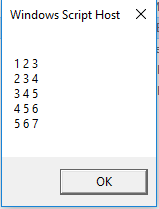
我正在尝试读取包含行的文本文件,然后以html文件中列的形式输出它们。在使用WScript.echo在屏幕上显示它时,我没有问题,但是我无法将它放到HTML中的表中。在试图运行vbs文件时,我得到了以下错误:输入不匹配:'OpenTextFile‘。如有任何指导,将不胜感激。
Dim fso : Set fso = CreateObject("Scripting.FileSystemObject")
Dim OutputHTML : Set OutputHTML = fso.CreateTextFile("C:\Users\Istaley.RXDATA\Desktop\NewEmployeeTest\Part2_TableData.html")
Dim file : Set file = fso.OpenTextFile("C:\Users\Istaley.RXDATA\Desktop\NewEmployeeTest\Part2_data.txt", 1, True)
Dim fc : fc = file.ReadAll : file.close : Dim fcArray : fcArray = Split(fc, vbCrLf)
OutputHTML.WriteLine "<html>"
OutputHTML.Writeline "<body>"
OutputHTML.WriteLine "<table BORDER=1>"
Dim opArray() : ReDim opArray(0)
For Each row In fcArray
    Dim tmp: tmp = Split(row, "|")
    For ent=0 To UBound(tmp)
        If ent  > UBound(opArray) Then
            ReDim Preserve opArray(UBound(opArray)+1)
            opArray(ent) = Trim(tmp(ent))
        Else
            If Len(opArray(ent)) > 0 Then
                OutputHTML.WriteLine "<tr>"
                opArray(ent) = opArray(ent) & " " & Trim(tmp(ent))
                OutputHTML.WriteLine "</tr>"
            Else
                opArray(ent) = Trim(tmp(ent))
            End If
        End If
    Next
Next
WScript.echo Join(opArray, vbCrLf)
OutputHTML.WriteLine "</table>"
OutputHTML.WriteLine "</body>"
OutputHTML.WriteLine "</html>"
OutputHTML.Write Join(opArray, vbCrLf) : OutputHTML.Close回答 2
Stack Overflow用户
回答已采纳
发布于 2016-11-17 03:21:58
问题是这条线。OpenTextFile的第一个参数接受一个字符串,但您已经为它传递了一个对象。您已经打开了使用CreateTextFile编写的文本文件。
Set WriteOutput = fso.OpenTextFile(OutputHTML, 8, True)去掉这一行,并将所有剩余的WriteOutput实例更改为OutputHTML。
Stack Overflow用户
发布于 2017-10-12 17:47:25
我知道这是个老生常谈的话题,但这对任何想做同样事情的人来说都是有用的,就像我一样。这有点仓促,但我已经在网上添加了评论。很多地方都有比特,所以这不是我自己的工作.
Function LoadFile(File)
On Error Resume Next
'Declaire all variables
Dim fso,F,ReadText,strError
Dim ReadArray
Dim ReadHTMLOutput, ReadRowCount, ReadRowItem, ReadRowItemSplit, ReadElementCount, ReadElementItem
'Create the object to read files
Set fso = CreateObject("Scripting.FileSystemObject")
'Set the file to read and the format
Set F = fso.OpenTextFile(File,1)
'If there's a problem, say so...
If Err.Number <> 0 Then
strError = "<center><b><font color=Red>The file "& File &" dosen't exists !</font></b></center>"
OutputTable.InnerHTML = strError
Exit Function
End If
'Read the contents of the file into ReadText
ReadText = F.ReadAll
'Split the text based on Carriage return / Line feed
ReadArray = Split(ReadText,vbCrLf)
'fill the output variable with the HTML of the start of the table
ReadHTMLOutput = "<table border=" & chr(34) & "2" & chr(34) & ">" & vbcrlf
'starting at 0 until the last line in the array, run through each line
For ReadRowCount=0 to UBound(ReadArray)
'Take the whole row into it's own variable
ReadRowItem = ReadArray(ReadRowCount)
'Split the row (separated by commas) into an array
ReadRowItemSplit = Split(ReadRowItem,",")
'Add the HTML for the row of the table
ReadHTMLOutput = ReadHTMLOutput & "<tr>" & vbcrlf
'starting at 0 until the last entry of the row array, run through each element
For ReadElementCount=0 to UBound(ReadRowItemSplit)
'Read the element into a variable
ReadElementItem = ReadRowItemSplit(ReadElementCount)
'If the element is blank, put a space in (stops the cell being formatted empty)
If ReadElementItem = "" Then ReadElementItem = " "
'Add the HTML for the cell of the row of the table
ReadHTMLOutput = ReadHTMLOutput & "<td>" & ReadElementItem & "</td>" & vbcrlf
'Go to the next element in the row
Next
'Add the HTML for the end of the row of the table
ReadHTMLOutput = ReadHTMLOutput & "</tr>" & vbcrlf
'Go to the next row in the file
Next
'Add the HTML for the end of the table
ReadHTMLOutput = ReadHTMLOutput & "</table>" & vbcrlf
'Fill the DIV with the contents of the variable
OutputTable.InnerHTML = ReadHTMLOutput
End Function在HTML中:
<div id="OutputTable"></div>这样,DIV就会被来自ReadHTMLOutput的HTML填充。
页面原文内容由Stack Overflow提供。腾讯云小微IT领域专用引擎提供翻译支持
原文链接:
https://stackoverflow.com/questions/40646061
复制相关文章
相似问题
腾讯云开发者

Copyright © 2013 - 2026 Tencent Cloud. All Rights Reserved. 腾讯云 版权所有
深圳市腾讯计算机系统有限公司 ICP备案/许可证号:粤B2-20090059  粤公网安备44030502008569号
腾讯云计算(北京)有限责任公司 京ICP证150476号 | 京ICP备11018762号