
PowerShell以启用set COM+安全框
PowerShell以启用set COM+安全框
提问于 2016-11-14 20:35:37
我正在编写一个脚本,以启用复选框、强制组件级访问检查,并在角色之前选中该复选框。
这是我到目前为止拥有的代码(更改为COM+应用程序的名称):
$comAdmin = New-Object -ComObject COMAdmin.COMAdminCatalog
$apps = $comAdmin.GetCollection('Applications')
$apps.Populate()
$targetApp = '<appname>'
$app = $apps | Where-Object -FilterScript {
    $_.Name -eq $targetApp
}
$components = $apps.GetCollection('Components',$app.key)
$components.Populate()

foreach ($component in $components)
{
    $componentName = $component.Name
    $componentID = $component.Value('CLSID')
}


$accesschecks = $component.Value('ComponentAccessChecksEnabled')
$component.Value('ComponentAccessChecksEnabled') = $true
$components.SaveChanges()


$comAdmin = New-Object -ComObject COMAdmin.COMAdminCatalog
$apps = $comAdmin.GetCollection('Applications')
$apps.Populate()

$app = $apps|Where-Object -FilterScript {
    $_.Name -eq $targetApp
}
$components = $apps.GetCollection('Components', $app.Key)
$components.Populate()
$components.GetCollection('RolesForComponent', $component.Key)

foreach ($component in $components)
{
    $component.Value('ComponentAccessChecksEnabled') = $true
    $component.value('RolesForComponentEnabled') = #t
    '{0,-30}{2,-10}{1}{1}' -f $component.Name, $component.Value('CLSID'), $component.Value('ComponentAccessChecksEnabled'), $component.Key

}
$components.SaveChanges()
脚本的第一部分工作,它启用复选框。但是第二部分没有选中角色之前的复选框。现在看起来是这样:
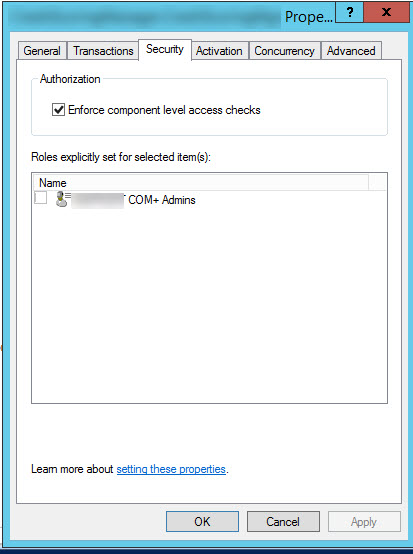
我需要一点帮助,以使脚本工作,以复选框。有什么想法吗?
回答 1
Stack Overflow用户
发布于 2016-11-15 11:27:41
检查是否可以通过注册表启用复选框。如果您已经拥有COM对象的ClassId,则可以在它之后搜索注册表。如果它存储在注册表中,则可以通过Set-ItemProperty更改密钥。
希望这能有所帮助。
页面原文内容由Stack Overflow提供。腾讯云小微IT领域专用引擎提供翻译支持
原文链接:
https://stackoverflow.com/questions/40597386
复制相关文章
相似问题
腾讯云开发者

Copyright © 2013 - 2026 Tencent Cloud. All Rights Reserved. 腾讯云 版权所有
深圳市腾讯计算机系统有限公司 ICP备案/许可证号:粤B2-20090059  粤公网安备44030502008569号
腾讯云计算(北京)有限责任公司 京ICP证150476号 | 京ICP备11018762号