
com.google.api.server.spi.SystemServiceServlet :java.lang.ClassNotFoundException
我刚刚克隆了一个存储库,其中包含一个基于Google的maven项目。接下来,我将它导入Eclipse。
当eclipse/maven完成导入项目时,我看到以下文件已经被修改,eclipse已经创建了一个新文件:
Changes not staged for commit:
  (use "git add <file>..." to update what will be committed)
  (use "git checkout -- <file>..." to discard changes in working directory)

        modified:   project/src/main/webapp/WEB-INF/appengine-web.xml
        modified:   project/src/main/webapp/WEB-INF/web.xml

Untracked files:
  (use "git add <file>..." to include in what will be committed)

        project/src/main/java/META-INF/persistence.xml
当我从eclipse构建和运行应用程序时,我会得到以下错误:
WARNING: EXCEPTION
java.lang.ClassNotFoundException: com.google.api.server.spi.SystemServiceServlet
    at java.net.URLClassLoader$1.run(URLClassLoader.java:366)
    at java.net.URLClassLoader$1.run(URLClassLoader.java:355)
    at java.security.AccessController.doPrivileged(Native Method)
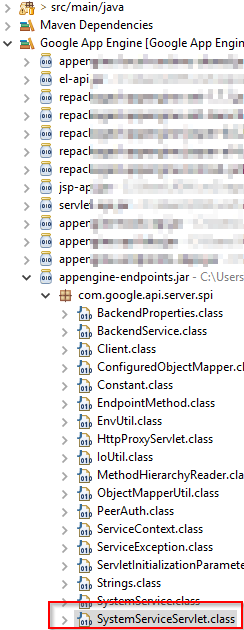
at java.net.URLClassLoader.findClass(URLClassLoader.java:354)但是,在eclipse中,com.google.api.server.spi.SystemServiceServlet是可用的:
仔细看看:我看到下面的project/src/main/webapp/WEB-INF/web.xml是由eclipse添加的:
 <servlet>
  <servlet-name>SystemServiceServlet</servlet-name>
  <servlet-class>com.google.api.server.spi.SystemServiceServlet</servlet-class>
  <init-param>
   <param-name>services</param-name>
   <param-value>com.project.[all the classes here.....]</param-value>
  </init-param>
 </servlet>
 <servlet-mapping>
  <servlet-name>SystemServiceServlet</servlet-name>
  <url-pattern>/_ah/spi/*</url-pattern>
 </servlet-mapping>
</web-app>这似乎与上述错误有关。但是为什么我要拿到ClassNotFoundException呢?
如下所示,我查看了部署程序集
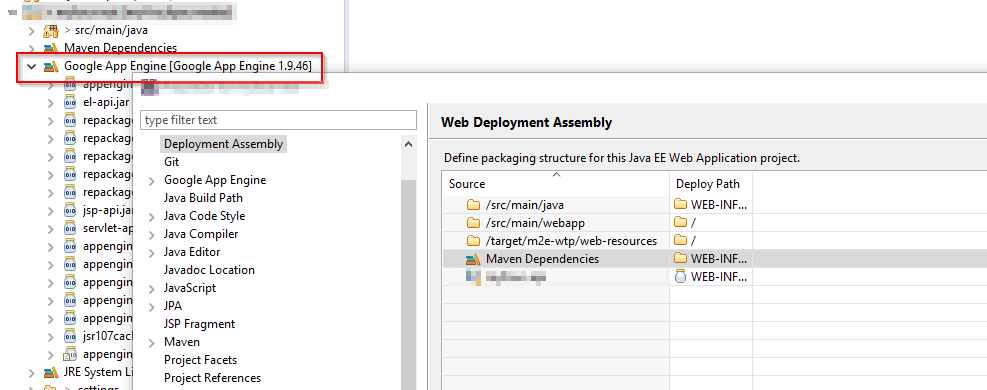
如果有,我可以在文件系统上添加任何jars。但是为什么Google 1.9.45中的jars没有列出呢?它有Maven依赖项,但没有Google 1.9.45。我希望避免显式地添加jars,而是让maven把它们拉进来。在构建路径上同时拥有Maven依赖项和Google 1.9.45似乎很奇怪,仅仅拥有Maven依赖项还不够吗?
回答 1
Stack Overflow用户
发布于 2016-11-14 17:22:29
检查部署程序集
在Eclipse中,打开项目的属性(右键单击它),然后转到部署程序集。确保所有库都包括在内。
如果没有,单击“add.”并选择任何缺少的库。(通常至少应该包括"java构建路径条目“)。
https://stackoverflow.com/questions/40578248
复制相似问题
腾讯云开发者

Copyright © 2013 - 2026 Tencent Cloud. All Rights Reserved. 腾讯云 版权所有
深圳市腾讯计算机系统有限公司 ICP备案/许可证号:粤B2-20090059  粤公网安备44030502008569号
腾讯云计算(北京)有限责任公司 京ICP证150476号 | 京ICP备11018762号