
JavaFX聚焦按钮UnderLine
JavaFX聚焦按钮UnderLine
提问于 2016-11-12 09:07:01
我制作了Button,我用Rectangle制作了它,并改变了背景色。
源代码:
MainApplication.java:
AnchorPane anchor  = new AnchorPane();
    anchor.maxWidth(325);
    Button[] buttons = new Button[3];
    String[] buttonName = new String[]{"Player","World","Log"};
    for (int i = 0 ; i < 3 ; i ++){
        Button button = new Button();
        button.setText(buttonName[i]);
        button.setShape(new Rectangle(100, 25));
        button.setMaxWidth(100);
        button.setMinWidth(100);
        button.setMaxHeight(25);
        button.setMinHeight(25);
        button.setId("tabButton");
        StackPane stack = new StackPane();
        stack.setMaxWidth(100);
        stack.setMaxHeight(25);
        stack.setMinWidth(100);
        stack.setMinHeight(25);
        RippingCircle circle = new RippingCircle();//just a rippleAnimation
        circle.setToSize(Math.sqrt(100 * 100 + 25 * 25));
        circle.setFromSize(0.0);
        circle.setFill(Color.rgb(0, 0, 0, 0.2));
        Rectangle clip = new Rectangle(-50, -12.5, 100, 25);
        circle.setClip(clip);
        stack.getChildren().addAll(button, circle);
        stack.setLayoutX(100 * i);
        stack.setLayoutY(0);
        button.setOnMousePressed(new EventHandler<MouseEvent>() {
            @Override
            public void handle(MouseEvent mouseEvent){
                StackPane.setMargin(circle, new Insets((mouseEvent.getY() - 12.5) * 2, 0, 0, (mouseEvent.getX() - 50) * 2));
                clip.setX(-mouseEvent.getX());
                clip.setY(-mouseEvent.getY());
                circle.play();
            }
        });
        button.setOnMouseReleased(new EventHandler<MouseEvent>() {
            @Override
            public void handle(MouseEvent mouseEvent){
                circle.stop();
            }
        });
        anchor.getChildren().add(stack);
        buttons[i] = button;
    }
MainApplication.css:
#tabButton {
-fx-background-color: #03A9F4;
-fx-text-fill: rgba(150,255,255,255);
-fx-font: 12 Arial;
-fx-focus-color: #FFEB3B;
-fx-faint-focus-color: #FFEB3B;
-fx-accent: #FFEB3B;
}
#tabButton:hover {
    -fx-background-color: #039BE5;
    -fx-text-fill: rgba(150,255,255,255);
    -fx-font: 12 Arial;
    -fx-focus-color: #FFEB3B;
    -fx-faint-focus-color: #FFEB3B;
    -fx-accent: #FFEB3B;
}
#tabButton:focused {
    -fx-background-color: #03A9F4;
    -fx-text-fill: rgba(255,255,255,255);
    -fx-font: 12 Arial;
    -fx-focus-color: black;
    -fx-faint-focus-color: black;
}当它聚焦时,在Player按钮下会出现一个下划线:
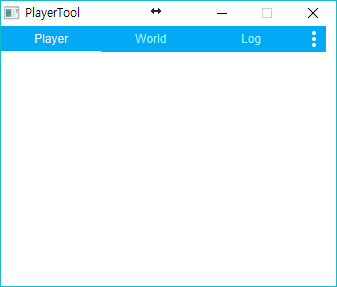
就像这样。
这是什么下划线,我如何改变它的颜色?
回答 1
Stack Overflow用户
发布于 2016-11-12 09:53:30
我认为它属于焦点,如果你想隐藏它:
-fx-background-insets:0;或改变颜色:
-fx-focus-color: red;
-fx-faint-focus-color: red;
祝你好运!
页面原文内容由Stack Overflow提供。腾讯云小微IT领域专用引擎提供翻译支持
原文链接:
https://stackoverflow.com/questions/40561275
复制相关文章
相似问题
腾讯云开发者

Copyright © 2013 - 2026 Tencent Cloud. All Rights Reserved. 腾讯云 版权所有
深圳市腾讯计算机系统有限公司 ICP备案/许可证号:粤B2-20090059  粤公网安备44030502008569号
腾讯云计算(北京)有限责任公司 京ICP证150476号 | 京ICP备11018762号