
为什么"didRegisterForRemoteNotificationsWithDeviceToken“不被称为n iOS 3,iOS 10,XCode 8?
我的应用程序有:
应用程序ID -启动推送通知,
提供资料(发展)-已启用推送通知,
目标-功能-启用推送通知,
目标-后台模式-后台获取,启用远程通知
在附件1.import UserNotifications中
2.class AppDelegate: UIResponder, UIApplicationDelegate, UINavigationControllerDelegate, UNUserNotificationCenterDelegate
3.

     func application(_ application: UIApplication, didFinishLaunchingWithOptions launchOptions: [UIApplicationLaunchOptionsKey: Any]?) -> Bool {

    if #available(iOS 10.0, *)
            {
                let center = UNUserNotificationCenter.current()
                center.delegate = self
                center.requestAuthorization(options: [.badge, .sound, .alert], completionHandler: { (granted, error) in
                    if error == nil
                    {


                        //UIApplication.shared.registerForRemoteNotifications()
                        application.registerForRemoteNotifications()
                    }
                    else
                    {
                        print("\(error?.localizedDescription)")

                    }
                })
            }
            else
            {
                registerForPushNotifications(application)
                // Fallback on earlier versions
            }
}但是didRegisterForRemoteNotificationsWithDeviceToken不是被调用的,而是didFailToRegisterForRemoteNotificationsWithError是被调用的
func application(_ application: UIApplication, didRegisterForRemoteNotificationsWithDeviceToken deviceToken: Data) {下面是我在didFailToRegisterForRemoteNotificationsWithError上遇到的错误
Domain=NSCocoaErrorDomain Code=3000为应用程序找到的“无有效的‘aps-环境’应享权利字符串”UserInfo={NSLocalizedDescription=no有效的‘aps-环境’应享权利字符串为应用程序}
我是不是漏掉了什么?
回答 2
Stack Overflow用户
发布于 2016-11-10 06:57:24
我在Xcode 8中也面临着同样的问题,我通过在Capabilities->Push Notification->Add the Push Notifications entitlement to your entitlements file中选择选项解决了这个问题。
欲知更多信息,请找到下面的截图。
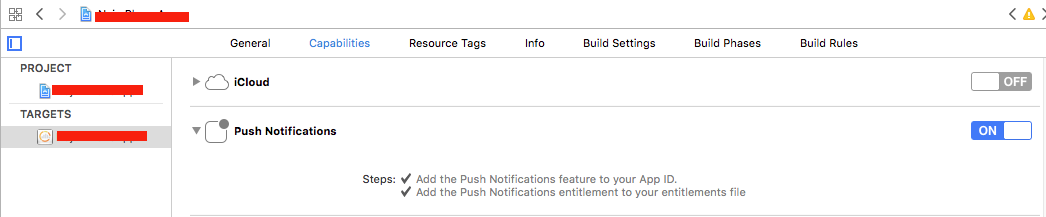
一旦选择了该选项,就会向项目文件夹中添加一个权限文件。请找到下面的截图。
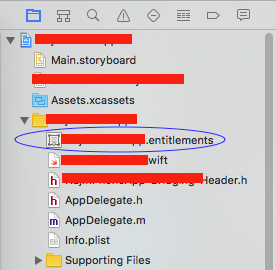
作为XCode 8,应享权利是从本地权益文件中设置的,而不是从您在上创建的供应配置文件中设置的。现在,除了在供应配置文件中添加功能之外,还需要将这些权利添加到您的Xcode构建中。
希望它对你有用!
Stack Overflow用户
发布于 2016-11-12 07:48:28
当我更新到最新版本的XCode和塞拉利昂时,我遇到了类似的问题。
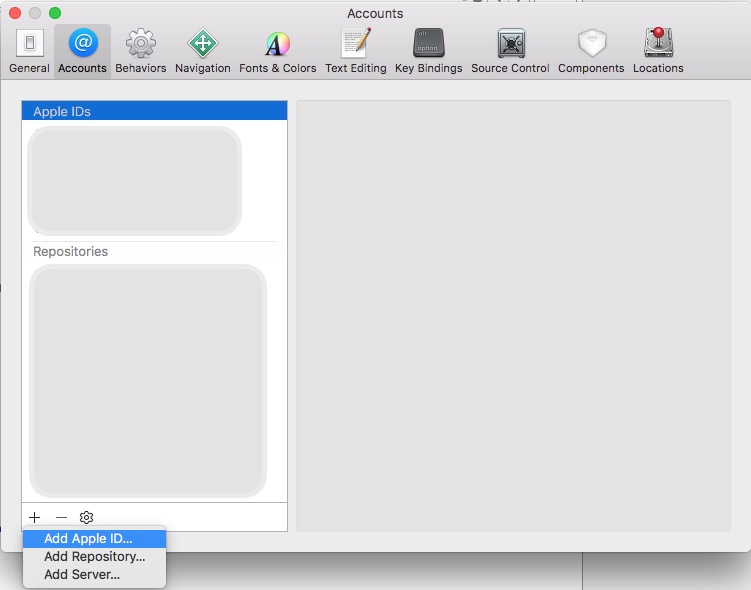
- 在将与该项目相关的Apple添加到project ->首选项之后,我得到了这个修正,如下所示,尝试它。
- 我还执行了支持iOS 10的所有步骤。
https://stackoverflow.com/questions/40521011
复制相似问题
腾讯云开发者

Copyright © 2013 - 2026 Tencent Cloud. All Rights Reserved. 腾讯云 版权所有
深圳市腾讯计算机系统有限公司 ICP备案/许可证号:粤B2-20090059  粤公网安备44030502008569号
腾讯云计算(北京)有限责任公司 京ICP证150476号 | 京ICP备11018762号