
使用multer-s3 nodejs将图像上传到amazon s3
我正试图使用s3将图片上传到multer-s3,但我得到了以下错误:
TypeError:预期opts.s3为对象节点_模块/Multer-S3/index.js:69:20
这是我的服务器代码:
var upload = multer({
    storage: s3({
        dirname: '/',
        bucket: 'bucket',
        secretAccessKey: 'key',
        accessKeyId: 'key',
        region: 'us-west-2',
        filename: function (req, file, cb) {
            cb(null, file.originalname);
        }
    })
});

app.post('/upload', upload.array('file'), function (req, res, next) {
    res.send("Uploaded!");
});
我为什么要犯这个错误?
回答 8
Stack Overflow用户
发布于 2016-12-03 17:09:15
更新2022年3月2022年,它的工作非常好,直到日期,现在也显示上传的文件公共以及。
完成和工作使用multer-s3将节点欺骗上传到s3可用。
代码:
var express = require('express'),
    aws = require('aws-sdk'),
    bodyParser = require('body-parser'),
    multer = require('multer'),
    multerS3 = require('multer-s3');

aws.config.update({
    secretAccessKey: 'XXXXXXXXXXXXXXXXXXXXXXXXXXXXXXXXXXX',
    accessKeyId: 'XXXXXXXXXXXXXXX',
    region: 'us-east-1'
});

var app = express(),
    s3 = new aws.S3();

app.use(bodyParser.json());

var upload = multer({
    storage: multerS3({
        s3: s3,
        acl: 'public-read',
        bucket: 'bucket-name',
        key: function (req, file, cb) {
            console.log(file);
            cb(null, file.originalname); //use Date.now() for unique file keys
        }
    })
});

//open in browser to see upload form
app.get('/', function (req, res) {
    res.sendFile(__dirname + '/index.html');//index.html is inside node-cheat
});

//use by upload form
app.post('/upload', upload.array('upl', 25), function (req, res, next) {
    res.send({
        message: "Uploaded!",
        urls: req.files.map(function(file) {
            return {url: file.location, name: file.key, type: file.mimetype, size: file.size};
        })
    });
});

app.listen(3000, function () {
    console.log('Example app listening on port 3000!');
});
用于完全回购
克隆节点-欺骗s3,运行node app和npm install express body-parser aws-sdk multer multer-s3。
乐于助人!
Stack Overflow用户
发布于 2018-06-23 09:27:37
@V31已经回答得很好
我相信,为了更好的代码组织和调试目的,应该将一个责任保存在一个文件中。
我已经创建了一个上传upload.js的文件。
require('dotenv').config();
const AWS = require('aws-sdk');
const multer = require('multer');
const multerS3 = require('multer-s3');

const s3Config = new AWS.S3({
    accessKeyId: process.env.AWS_IAM_USER_KEY,
    secretAccessKey: process.env.AWS_IAM_USER_SECRET,
    Bucket: process.env.AWS_BUCKET_NAME
  });

const fileFilter = (req, file, cb) => {
    if (file.mimetype === 'image/jpeg' || file.mimetype === 'image/png') {
        cb(null, true)
    } else {
        cb(null, false)
    }
}

// this is just to test locally if multer is working fine.
const storage = multer.diskStorage({
    destination: (req, res, cb) => {
        cb(null, 'src/api/media/profiles')
    },
    filename: (req, file, cb) => {
        cb(null, new Date().toISOString() + '-' + file.originalname)
    }
})

const multerS3Config = multerS3({
    s3: s3Config,
    bucket: process.env.AWS_BUCKET_NAME,
    metadata: function (req, file, cb) {
        cb(null, { fieldName: file.fieldname });
    },
    key: function (req, file, cb) {
        console.log(file)
        cb(null, new Date().toISOString() + '-' + file.originalname)
    }
});

const upload = multer({
    storage: multerS3Config,
    fileFilter: fileFilter,
    limits: {
        fileSize: 1024 * 1024 * 5 // we are allowing only 5 MB files
    }
})

exports.profileImage = upload; 它是在我的路线routes.js中导入的
const express = require('express');

const ProfileController = require('../profile/controller');
const { profileImage } = require('../utils/upload.js');

 const routes = (app) => {
    const apiRoutes = express.Router();

    apiRoutes.use('/profile', profileRoutes);
    profileRoutes.post('/',profileImage.single('profileImage'), ProfileController.saveProfile);

    app.use('/api', apiRoutes);

 }

module.exports = routes
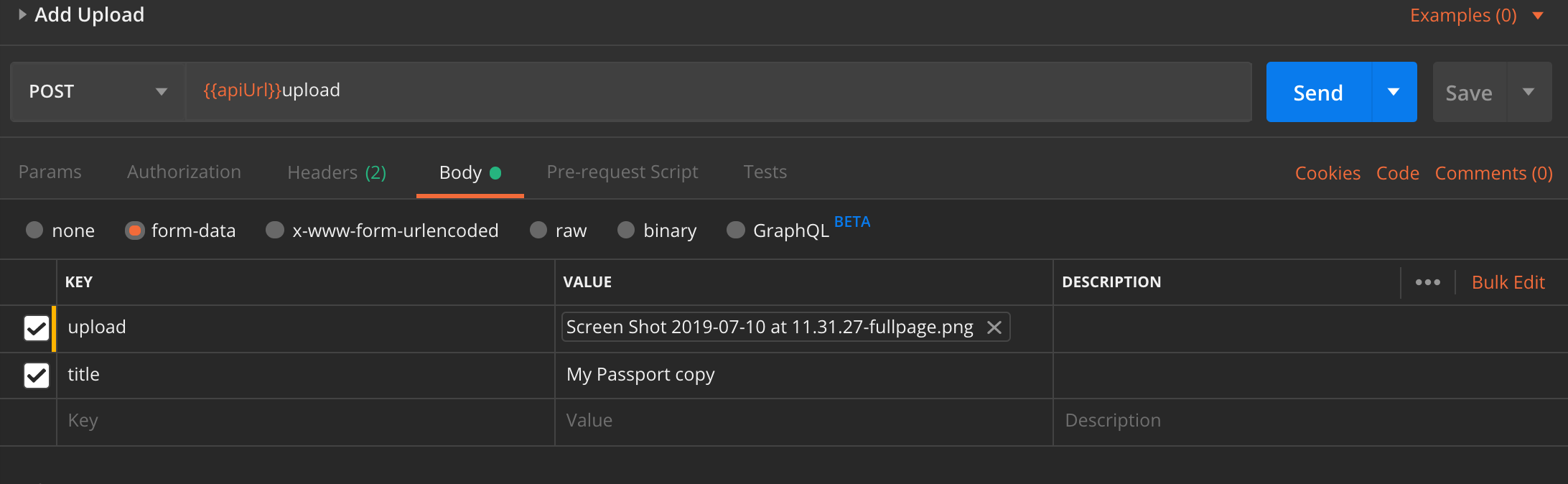
邮递员为邮政机身拍摄的屏幕
Stack Overflow用户
发布于 2020-06-08 09:18:25
我只想再加一毛钱,
在所有的答案中都有很多评论,比如如何在上传和S3响应对象之后获取公共URL,让我们看看实现和案例,
// INITIALIZE NPMS
var AWS = require('aws-sdk'),
multer = require('multer'),
multerS3 = require('multer-s3'),
path = require('path');

// CONFIGURATION OF S3
AWS.config.update({
    secretAccessKey: '***********************************',
    accessKeyId: '****************',
    region: 'us-east-1'
});

// CREATE OBJECT FOR S3
const S3 = new AWS.S3();// CREATE MULTER FUNCTION FOR UPLOAD
var upload = multer({
// CREATE MULTER-S3 FUNCTION FOR STORAGE
storage: multerS3({
s3: S3,
acl: 'public-read',
// bucket - WE CAN PASS SUB FOLDER NAME ALSO LIKE 'bucket-name/sub-folder1'
bucket: 'bucket-name',
// META DATA FOR PUTTING FIELD NAME
metadata: function (req, file, cb) {
cb(null, { fieldName: file.fieldname });
},
// SET / MODIFY ORIGINAL FILE NAME
key: function (req, file, cb) {
cb(null, file.originalname); //set unique file name if you wise using Date.toISOString()
// EXAMPLE 1
// cb(null, Date.now() + '-' + file.originalname);
// EXAMPLE 2
// cb(null, new Date().toISOString() + '-' + file.originalname);
}
}),
// SET DEFAULT FILE SIZE UPLOAD LIMIT
limits: { fileSize: 1024 * 1024 * 50 }, // 50MB
// FILTER OPTIONS LIKE VALIDATING FILE EXTENSION
fileFilter: function(req, file, cb) {
const filetypes = /jpeg|jpg|png/;
const extname = filetypes.test(path.extname(file.originalname).toLowerCase());
const mimetype = filetypes.test(file.mimetype);
if (mimetype && extname) {
return cb(null, true);
} else {
cb("Error: Allow images only of extensions jpeg|jpg|png !");
}
}
});有三种情况,如果我们希望在上传res 对象后从S3检索文件对象
使用.single(fieldname)方法时,它将返回req.file中的对象
app.post('/upload', upload.single('file'), function (req, res, next) {
    console.log('Uploaded!');
    res.send(req.file);
});使用.array(fieldname[, maxCount])方法时,它将返回req.files中的对象
app.post('/upload', upload.array('file', 1), function (req, res, next) {
    console.log('Uploaded!');
    res.send(req.files);
});使用.fields(fields)方法时,它将返回req.files中的对象
app.post('/upload', upload.fields([
  { name: 'avatar', maxCount: 1 },
  { name: 'gallery', maxCount: 8 }
]), function (req, res, next) {
    console.log('Uploaded!');
    res.send(req.files);
});https://stackoverflow.com/questions/40494050
复制相似问题
腾讯云开发者

Copyright © 2013 - 2026 Tencent Cloud. All Rights Reserved. 腾讯云 版权所有
深圳市腾讯计算机系统有限公司 ICP备案/许可证号:粤B2-20090059  粤公网安备44030502008569号
腾讯云计算(北京)有限责任公司 京ICP证150476号 | 京ICP备11018762号