
Swift:为不同的选项卡设置不同的导航条按钮
Swift:为不同的选项卡设置不同的导航条按钮
提问于 2016-11-06 10:42:16
我在SWIFT3.0中创建了一个带有5个选项卡的自定义UITabBarController。我一直试图为某些选项卡设置不同的导航栏项,但效果不佳。
情境:我在每个选项卡的viewDidLoad()中放置了更改导航栏按钮的代码。
//The customized Tab Bar controller instance. Contained in each of the tabs.
var mainController: TabBarController?

override func viewDidLoad() {
    // ... more code
    setupNavBar()
    // ... more code
}

func setupNavBar() {
    // ... more code
    mainController?.navigationItem.leftBarButtonItem = UIBarButtonItem(image: friendsImage, style: .plain, target: self, action: #selector(handleFindFriends))
    // ... more code
}
问题:假设Tab #1应该有NavBarButton A,而Tab #2应该有NavBarButton B。当我从Tab #1切换到Tab #2时,代码工作正常;但是,当我单击Tab #1时,NavBarButton仍然是B。
如何才能使导航栏按钮相应地更改,即使我单击了以前在该选项卡上的选项卡?
回答 2
Stack Overflow用户
回答已采纳
发布于 2016-11-06 10:57:19
实际上,我在TabBarController中找到了一个解决方案XD:
override func viewWillAppear(_ animated: Bool) {
    //Original code to set up tabs

    //Code I added:
    for i in 0...4 {
        tabBar.items?[i].tag = i
    }
}
//Code I added:
override func tabBar(_ tabBar: UITabBar, didSelect item: UITabBarItem) {
    //Code to run when a certain tab is selected
}
不过,还是非常感谢!
Stack Overflow用户
发布于 2016-11-06 11:05:46
我假设您将UITabBarController (或它的子类)嵌入到UIViewController中。这是错误的,因为在这种情况下,您倾向于使视图控制器泛化,这通常是一种糟糕的实践。
相反,我建议将视图控制器的层次结构更改为您在下面的图像上看到的内容。
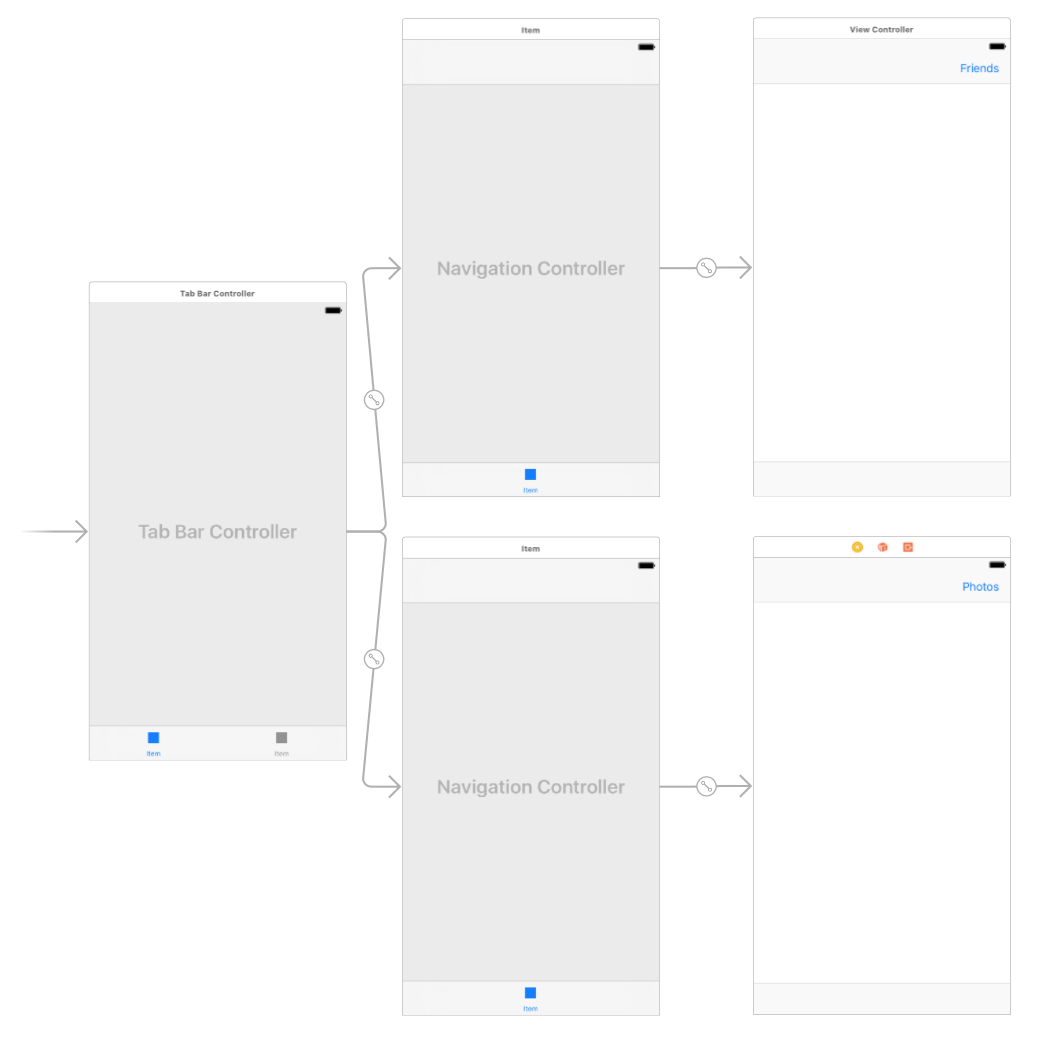
更新
如果你用代码来做:
@UIApplicationMain
class AppDelegate: UIResponder, UIApplicationDelegate {

    var window: UIWindow?


    func application(_ application: UIApplication, didFinishLaunchingWithOptions launchOptions: [UIApplicationLaunchOptionsKey: Any]?) -> Bool {

        let tabBarController = UITabBarController()

        // first tab
        let firstViewController = UIViewController()
        _ = firstViewController.view
        firstViewController.title = "First"
        let firstNavigationController = UINavigationController(rootViewController: firstViewController)

        // sets a specific button ("Friends") on a navigation bar for the first screen
        firstViewController.navigationItem.rightBarButtonItem = UIBarButtonItem(title: "Friends", style: .plain, target: nil, action: nil)

        // second tab
        let secondViewController = UIViewController()
        _ = secondViewController.view
        secondViewController.title = "Second"
        let secondNavigationController = UINavigationController(rootViewController: secondViewController)

        // sets a specific button ("Photos") on a navigation bar for the second screen
        secondViewController.navigationItem.rightBarButtonItem = UIBarButtonItem(title: "Photos", style: .plain, target: nil, action: nil)

        // embeds the navigation controllers into the tab bar controller
        tabBarController.viewControllers = [firstNavigationController, secondNavigationController]

        // creates a window with the tab bar controller inside
        window = UIWindow(frame: UIScreen.main.bounds)
        window?.rootViewController = tabBarController
        window?.makeKeyAndVisible()

        return true
    }

}页面原文内容由Stack Overflow提供。腾讯云小微IT领域专用引擎提供翻译支持
原文链接:
https://stackoverflow.com/questions/40448383
复制相关文章
相似问题
腾讯云开发者

Copyright © 2013 - 2026 Tencent Cloud. All Rights Reserved. 腾讯云 版权所有
深圳市腾讯计算机系统有限公司 ICP备案/许可证号:粤B2-20090059  粤公网安备44030502008569号
腾讯云计算(北京)有限责任公司 京ICP证150476号 | 京ICP备11018762号