
在listview中围绕选定的图像绘制线
在listview中围绕选定的图像绘制线
提问于 2016-11-03 19:19:13
嘿,我只有以下代码:
<Window x:Class="MainWindow"
        xmlns="http://schemas.microsoft.com/winfx/2006/xaml/presentation"
        xmlns:x="http://schemas.microsoft.com/winfx/2006/xaml"
        xmlns:d="http://schemas.microsoft.com/expression/blend/2008"
        xmlns:mc="http://schemas.openxmlformats.org/markup-compatibility/2006"
        xmlns:local="clr-namespace:scrollView"
        mc:Ignorable="d"
        Background="LightGray"
        Title="MainWindow" Height="350" Width="964.806">
    <Window.Resources>
        <Style x:Key="ListViewItemStyle" TargetType="{x:Type ListViewItem}">
            <Setter Property="Background" Value="Transparent"/>
            <Setter Property="HorizontalContentAlignment" Value="{Binding HorizontalContentAlignment, RelativeSource={RelativeSource AncestorType={x:Type ItemsControl}}}"/>
            <Setter Property="VerticalContentAlignment" Value="{Binding VerticalContentAlignment, RelativeSource={RelativeSource AncestorType={x:Type ItemsControl}}}"/>
            <Setter Property="Padding" Value="2,0,0,0"/>
            <Setter Property="FocusVisualStyle" Value="{x:Null}"/>
            <Setter Property="Template">
                <Setter.Value>
                    <ControlTemplate TargetType="{x:Type ListBoxItem}">
                        <Border x:Name="Bd" BorderBrush="{TemplateBinding BorderBrush}"
                            BorderThickness="{TemplateBinding BorderThickness}" Background="{TemplateBinding Background}"
                            Padding="{TemplateBinding Padding}" SnapsToDevicePixels="true">
                            <ContentPresenter HorizontalAlignment="{TemplateBinding HorizontalContentAlignment}"
                            SnapsToDevicePixels="{TemplateBinding SnapsToDevicePixels}"
                            VerticalAlignment="{TemplateBinding VerticalContentAlignment}"/>
                        </Border>
                        <ControlTemplate.Triggers>
                            <Trigger Property="IsSelected" Value="true">
                                <Setter Property="Background" TargetName="Bd" Value="Transparent"/>
                            </Trigger>
                        </ControlTemplate.Triggers>
                    </ControlTemplate>
                </Setter.Value>
            </Setter>
        </Style>
        <Storyboard x:Key="sb" RepeatBehavior="Forever">
            <DoubleAnimation
                Storyboard.TargetName="TvBox"
                From="0"
                To="1"
                AutoReverse="True"
                Duration="0:0:10" />
        </Storyboard>
    </Window.Resources>
    <ListView
        x:Name="TvBox"
        ItemContainerStyle="{DynamicResource ListViewItemStyle}"
        HorizontalAlignment="Stretch"
        Background="Transparent"
        BorderThickness="0"
        VerticalAlignment="Top"
        IsTextSearchEnabled="False"
        SelectionMode="Single"
        UseLayoutRounding="True"
        ScrollViewer.VerticalScrollBarVisibility="Hidden"
        ScrollViewer.HorizontalScrollBarVisibility="Disabled"
    >
        <ItemsControl.ItemsPanel>
            <ItemsPanelTemplate>
                <UniformGrid Columns="5" HorizontalAlignment="Center"/>
            </ItemsPanelTemplate>
        </ItemsControl.ItemsPanel>
        <ListView.ItemTemplate x:Uid="LVUID">
            <DataTemplate x:Name="DT">
                <StackPanel x:Name="SP" Orientation="Vertical" VerticalAlignment="Center" HorizontalAlignment="Center">
                    <Image
                        x:Name="img1"
                        RenderOptions.BitmapScalingMode="HighQuality"
                        Source="{Binding ImageData}"
                        Margin="10"
                        HorizontalAlignment="Center"
                        VerticalAlignment="Top"
                        Stretch="Uniform"
                        Width="150">
                        <Image.BitmapEffect>
                            <DropShadowBitmapEffect x:Name="theglowing" Softness=".7" ShadowDepth="3" Color="Black" />
                        </Image.BitmapEffect>
                    </Image>
                    <TextBlock Text="{Binding Title}" VerticalAlignment="Bottom" HorizontalAlignment="center" Visibility="Hidden" />
                </StackPanel>
            </DataTemplate>
        </ListView.ItemTemplate>
    </ListView>
</Window>
根据列表视图中选择的项目,我希望能够在该列表视图框中围绕该图像绘制一个矩形。
Private Sub TvBox_KeyUp(sender As Object, e As KeyEventArgs) Handles TvBox.KeyUp
   Dim lv As ListViewItem = e.OriginalSource
   Dim lvi As MovieData = lv.DataContext

   If e.Key = Key.Left Then
        Call DrawLine(New Point(0, 0), New Point(100, 100), img1)
   End If
End Sub

Private Sub DrawLine(From As Point, [To] As Point, Target As Image)
    Dim CurrentLine = New Line()
    CurrentLine.StrokeEndLineCap = PenLineCap.Round
    CurrentLine.StrokeStartLineCap = PenLineCap.Round
    CurrentLine.Stroke = Brushes.Red
    CurrentLine.StrokeThickness = 2.0
    CurrentLine.X1 = From.X
    CurrentLine.Y1 = From.Y
    CurrentLine.X2 = [To].X
    CurrentLine.Y2 = [To].Y
    Canvas.SetLeft(Target, From.X)
    Canvas.SetTop(Target, From.Y)
    Target.Children.Add(CurrentLine)
End Sub
现在这里有两个问题:
1- img1在代码DrawLine()中说:“错误BC30451 'img1‘未声明。由于其保护级别,可能无法访问。” 代码*中的目标作为图像似乎没有任何,因为错误说明"Error BC30456‘子“不是’Image‘的成员。
要在选定的图像框( ONLY )周围绘制该矩形,我需要做什么?
请求屏幕截图
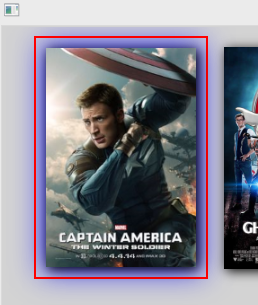
回答 1
Stack Overflow用户
回答已采纳
发布于 2016-11-03 19:29:44
这类事情在XAML中比在C#中要容易得多。如果您只希望图像周围的边框,它将在DataTemplate中。如下所示:
<ListView.ItemTemplate>
    <DataTemplate x:Name="DT">
        <StackPanel x:Name="SP" Orientation="Vertical" VerticalAlignment="Center" HorizontalAlignment="Center">
            <Grid>
                <Image
                    x:Name="img1"
                    RenderOptions.BitmapScalingMode="HighQuality"
                    Source="{Binding ImageData}"
                    Margin="10"
                    HorizontalAlignment="Center"
                    VerticalAlignment="Top"
                    Stretch="Uniform"
                    Width="150"
                    >
                    <Image.BitmapEffect>
                        <DropShadowBitmapEffect x:Name="theglowing" Softness=".7" ShadowDepth="3" Color="Black" />
                    </Image.BitmapEffect>
                </Image>
                <!-- Superimpose border over Image with the same margin, so
                it's inside the Image's drop shadow. -->
                <Border
                    x:Name="ImageBorder"
                    BorderThickness="1"
                    Margin="10"
                    >
                </Border>
            </Grid>
            <TextBlock Text="{Binding}" VerticalAlignment="Bottom" HorizontalAlignment="center" Visibility="Hidden" />
        </StackPanel>
        <DataTemplate.Triggers>
            <DataTrigger Binding="{Binding IsSelected, RelativeSource={RelativeSource AncestorType=ListViewItem}}" Value="True">
                <Setter TargetName="ImageBorder" Property="BorderBrush" Value="Red" />
            </DataTrigger>
        </DataTemplate.Triggers>
    </DataTemplate>
</ListView.ItemTemplate>如果您希望在整个过程中使用边框,那么ListViewItemStyle中的item控件模板就更合适了。
页面原文内容由Stack Overflow提供。腾讯云小微IT领域专用引擎提供翻译支持
原文链接:
https://stackoverflow.com/questions/40409604
复制相关文章
相似问题
腾讯云开发者

Copyright © 2013 - 2026 Tencent Cloud. All Rights Reserved. 腾讯云 版权所有
深圳市腾讯计算机系统有限公司 ICP备案/许可证号:粤B2-20090059  粤公网安备44030502008569号
腾讯云计算(北京)有限责任公司 京ICP证150476号 | 京ICP备11018762号