
MigraDoc/PDFSharp TextFrame中心对齐
MigraDoc/PDFSharp TextFrame中心对齐
提问于 2016-11-02 13:44:51
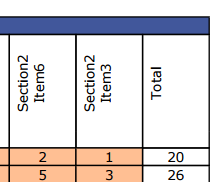
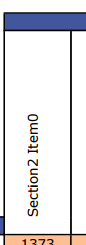
我使用TextFrame中的一个段落将文本方向向上显示--这几乎是我想要的结果,我得到的最后一个问题是文本似乎是左对齐的,我尝试将段落对齐设置为中心--这没有影响,也看不到使用TextFrame的选项。每次输出的文本都不会相同。
这就是我现在所拥有的
这就是我想要的
下面是我使用MigraDoc来实现这个目标的代码
for (int i = 0; i < section2Items.Length; i++)
{
    TextFrame colXTextFrame = bothSection2ItemHeadersRow.Cells[i + 1].AddTextFrame();
    colXTextFrame.Orientation = TextOrientation.Upward;
    colXTextFrame.Height = new Unit(140);

    Paragraph colXParagraph = new Paragraph();
    colXParagraph.Format.Alignment = ParagraphAlignment.Center;
    colXParagraph.AddText(section2Items[i].Section2ItemTitle);
    colXTextFrame.Add(colXParagraph);

    bothSection2ItemHeadersRow.Cells[i + 1].Borders.Bottom = new Border() { Color = new MigraDoc.DocumentObjectModel.Color(255, 255, 255), Width = new MigraDoc.DocumentObjectModel.Unit(0), Style = MigraDoc.DocumentObjectModel.BorderStyle.None };
}回答 1
Stack Overflow用户
回答已采纳
发布于 2016-11-04 10:02:35
下面是一个应该有效的代码示例。
您可以使用TextFrame的TextFrame属性在列的中间移动它。
// Create the table
Table Table = section.AddTable();
Table.Borders.Width = 0.5;

// create 3 columns
Column column1 = Table.AddColumn("4cm");
Column column2 = Table.AddColumn("4cm");
Column column3 = Tabl.AddColumn("4cm");


// make the row
Row row = Table.AddRow();


for (int i = 0; i < 3; i++)
{
    TextFrame t = row.Cells[i].AddTextFrame();
    t.Orientation = TextOrientation.Upward;
    t.Height = new Unit(140);

    // set the left margin to half of the column width
    t.MarginLeft = this.Tabelle.Columns[i].Width/2;

    Paragraph p = new Paragraph();
    p.Format.Alignment = ParagraphAlignment.Center;
    p.AddText("Test_" + i.ToString());

    t.Add(p);
}
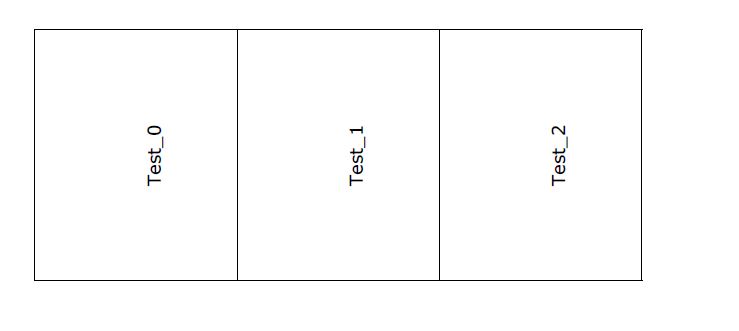
这将产生以下输出:
页面原文内容由Stack Overflow提供。腾讯云小微IT领域专用引擎提供翻译支持
原文链接:
https://stackoverflow.com/questions/40381515
复制相关文章
相似问题
腾讯云开发者

Copyright © 2013 - 2026 Tencent Cloud. All Rights Reserved. 腾讯云 版权所有
深圳市腾讯计算机系统有限公司 ICP备案/许可证号:粤B2-20090059  粤公网安备44030502008569号
腾讯云计算(北京)有限责任公司 京ICP证150476号 | 京ICP备11018762号