
胶子魅力4.0.0 GlassPane不再是模态?
我使用以下代码在Layer中安装了一个GlassPane并展示了它:
glassPane.getLayers().add(myLayer);
MobileApplication.getInstance().addLayerFactory("myLayer", ()-> myLayer);

MobileApplication.getInstance().showLayer("myLayer");在Charm 3.0.0上,图层在当前视图的顶部显示模态,而在Charm 4.0.0上,该层不再是模态。那么,在函数中是否有一个构建来再次显示它的模式,还是我们必须使用一个EventFilter?
编辑:
ProgressLayer完全码 (不适合魅力4.0.0)
ProgressLayer的简化代码:
public class ProgressLayer extends Layer {

   private static final GlassPane GLASS_PANE = MobileApplication.getInstance().getGlassPane();
   private String layerName;

   private StackPane              root;
   private Circle                 clip;
   private double                 size;

     public ProgressLayer(Node icon, double radius, String layerName) {
        setAutoHide(false);
        this.layerName = layerName;
        size = radius * 2;

        ProgressIndicator progress = new ProgressIndicator();
        progress.setStyle("-fx-color:#ff9100");
        progress.setRadius(radius);

        root = new StackPane(progress);

        if (icon != null) {
          icon.getStyleClass().add("progress-icon");

          clip = new Circle(radius-1);
          icon.setClip(clip);

          root.getChildren().add(icon);
        }

        getChildren().add(root);
        GLASS_PANE.getLayers().add(this);
    }

    @Override
    public void layoutChildren() {
        root.setVisible(isShowing());
        if (!isShowing()) {
          return;
        }

        root.resizeRelocate((GLASS_PANE.getWidth() - size) / 2, (GLASS_PANE.getHeight() - size) / 2, size, size);
        if (clip != null) {
          clip.setLayoutX(root.getWidth() / 2 -1);
          clip.setLayoutY(root.getHeight() /2 -1);
        }
    }

    public void setOnCancelled(EventHandler<MouseEvent> handler) {
        root.setOnMouseClicked(handler);
   }
}

只要一个操作正在运行,progressLayer就会显示出来,并且您无法中断该操作或隐藏该层,除非您按下中心的紫色图标:
progressLayer.setOnCancelled(e -> hideLayer(progressLayer.getLayerName()));这就是问题所在。当root不使用整个屏幕大小时,可以激活未被root覆盖的UI控件,例如按钮。这种行为与胶子魅力3.0.0形成鲜明对比。
回答 1
Stack Overflow用户
发布于 2016-10-31 20:04:11
你试过myLayer.setAutoHide(false)吗?
根据JavaDoc for autoHideProperty()
表示该层在其边界外单击时是否应该隐藏--默认情况下,这是正确的。
编辑
这是一个对我有用的小项目:
build.gradle
buildscript {
    repositories {
        jcenter()
    }
    dependencies {
        classpath 'org.javafxports:jfxmobile-plugin:1.1.1'
    }
}

apply plugin: 'org.javafxports.jfxmobile'

repositories {
    jcenter()
    maven {
        url 'http://nexus.gluonhq.com/nexus/content/repositories/releases'
    }
}

mainClassName = 'com.testmodal.TestModal'

dependencies {
    compile 'com.gluonhq:charm:4.0.1'
}

jfxmobile {
    downConfig {
        version = '3.0.0'
        plugins 'display', 'lifecycle', 'statusbar', 'storage'
    }
    android {
        manifest = 'src/android/AndroidManifest.xml'
    }
    ios {
        infoPList = file('src/ios/Default-Info.plist')
        forceLinkClasses = [
                'com.gluonhq.**.*',
                'javax.annotations.**.*',
                'javax.inject.**.*',
                'javax.json.**.*',
                'org.glassfish.json.**.*'
        ]
    }
}
TestModal
public class TestModal extends MobileApplication {

    public static final String BASIC_VIEW = HOME_VIEW;
    public static final String BASIC_LAYER = "My Layer";

    @Override
    public void init() {
        addViewFactory(BASIC_VIEW, () -> new BasicView(BASIC_VIEW));
        addLayerFactory(BASIC_LAYER, () -> new ProgressLayer(BASIC_LAYER));
    }

    @Override
    public void postInit(Scene scene) {
        Swatch.BLUE.assignTo(scene);
        ((Stage) scene.getWindow()).getIcons().add(new Image(TestModal.class.getResourceAsStream("/icon.png")));
    }

    class ProgressLayer extends Layer {

        private final Node root;

        public ProgressLayer(String layerName) {
            setAutoHide(false);

            ProgressIndicator progress = new ProgressIndicator();
            progress.setRadius(100);

            root = new StackPane(progress);
            getChildren().add(root);
            getGlassPane().getLayers().add(this);

            showingProperty().addListener((obs, ov, nv) -> {
                if (nv) {
                    setBackgroundFade(0.5);
                    PauseTransition p = new PauseTransition(Duration.seconds(3));
                    p.setOnFinished(e -> hideLayer(BASIC_LAYER));

                    p.playFromStart();
                }
            });
        }

        @Override
        public void layoutChildren() {
            root.resize(getGlassPane().getWidth(), getGlassPane().getHeight());
        }
    }
}
BasicView
public class BasicView extends View {

    public BasicView(String name) {
        super(name);

        Button button = new Button("Show Progress");
        button.setOnAction(e -> {
            MobileApplication.getInstance().showLayer(TestModal.BASIC_LAYER);
        });

        VBox controls = new VBox(button);
        controls.setAlignment(Pos.CENTER);

        setCenter(controls);
    }

    @Override
    protected void updateAppBar(AppBar appBar) {
        appBar.setNavIcon(MaterialDesignIcon.MENU.button(e -> System.out.println("Menu")));
        appBar.setTitleText("Basic View");
        appBar.getActionItems().add(MaterialDesignIcon.SEARCH.button(e -> System.out.println("Search")));
    }
}
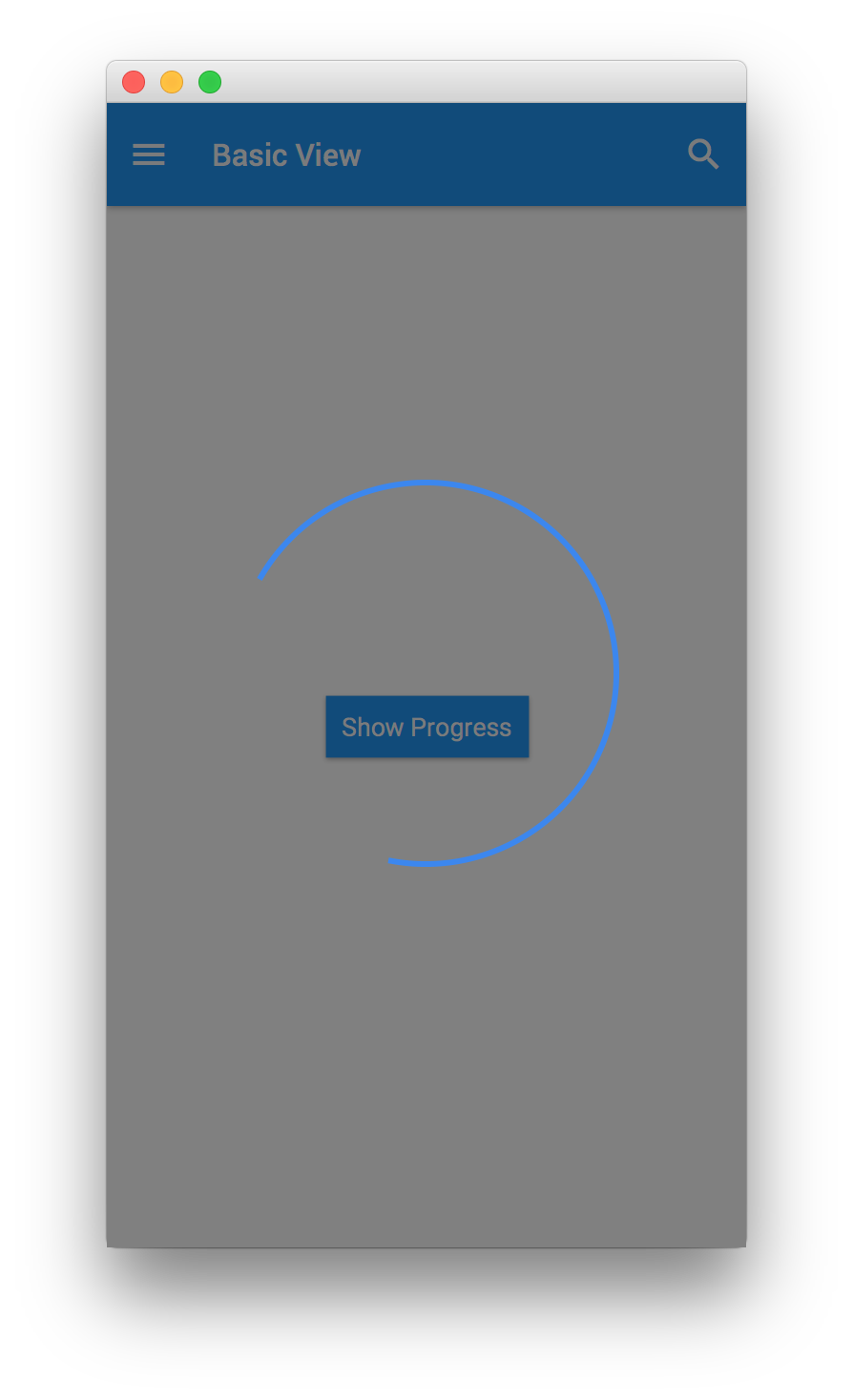
当我运行它,并点击按钮,背景淡出设置为0.5,只是为了看到所有的场景被玻璃窗格覆盖,我不能点击任何底层按钮,直到该层通过暂停转换被隐藏。
https://stackoverflow.com/questions/40347645
复制相似问题
腾讯云开发者

Copyright © 2013 - 2026 Tencent Cloud. All Rights Reserved. 腾讯云 版权所有
深圳市腾讯计算机系统有限公司 ICP备案/许可证号:粤B2-20090059  粤公网安备44030502008569号
腾讯云计算(北京)有限责任公司 京ICP证150476号 | 京ICP备11018762号