
UWP应用程序认证Launchactivatedeventargs.Prelaunch
我正在尝试测试我的UWP应用程序,以便用将其提交到商店。我唯一的问题是:
在应用程序的option方法实现中,请确保处理launchactivatedeventargs.prelaunch选项以使启动前事件具有感知性。
我从未更改过它,我使用的是Visual的原始项目
sealed partial class App : Application
{
    /// <summary>
    /// Initializes the singleton application object.  This is the first line of authored code
    /// executed, and as such is the logical equivalent of main() or WinMain().
    /// </summary>
    public App()
    {
        this.InitializeComponent();
        this.Suspending += OnSuspending;
    }

    /// <summary>
    /// Invoked when the application is launched normally by the end user.  Other entry points
    /// will be used such as when the application is launched to open a specific file.
    /// </summary>
    /// <param name="e">Details about the launch request and process.</param>
    protected override async void OnLaunched(LaunchActivatedEventArgs e) {
    #if DEBUG
        if (System.Diagnostics.Debugger.IsAttached) {
            this.DebugSettings.EnableFrameRateCounter = true;
        }
    #endif
        Frame rootFrame = Window.Current.Content as Frame;

        // Do not repeat app initialization when the Window already has content,
        // just ensure that the window is active
        if (rootFrame == null) {
            // Create a Frame to act as the navigation context and navigate to the first page
            rootFrame = new Frame();

            rootFrame.NavigationFailed += OnNavigationFailed;

            if (e.PreviousExecutionState == ApplicationExecutionState.Terminated) {
                //TODO: Load state from previously suspended application
            }

            // Place the frame in the current Window
            Window.Current.Content = rootFrame;
        }

        if (!e.PrelaunchActivated) {
            if (rootFrame.Content == null) {
                // When the navigation stack isn't restored navigate to the first page,
                // configuring the new page by passing required information as a navigation
                // parameter
                rootFrame.Navigate(typeof(FormView), e.Arguments);
            }

            // Ensure the current window is active
            Window.Current.Activate();
        }

        // Place the frame in the current Window
        Window.Current.Content = rootFrame;
    }

    /// <summary>
    /// Invoked when Navigation to a certain page fails
    /// </summary>
    /// <param name="sender">The Frame which failed navigation</param>
    /// <param name="e">Details about the navigation failure</param>
    void OnNavigationFailed(object sender, NavigationFailedEventArgs e)
    {
        throw new Exception("Failed to load Page " + e.SourcePageType.FullName);
    }

    /// <summary>
    /// Invoked when application execution is being suspended.  Application state is saved
    /// without knowing whether the application will be terminated or resumed with the contents
    /// of memory still intact.
    /// </summary>
    /// <param name="sender">The source of the suspend request.</param>
    /// <param name="e">Details about the suspend request.</param>
    private void OnSuspending(object sender, SuspendingEventArgs e)
    {
        var deferral = e.SuspendingOperation.GetDeferral();
        //TODO: Save application state and stop any background activity
        deferral.Complete();
    }
}我在googled上搜索了一些,但每个人都在谈论UWP的Template10,这是由于PreLaunch测试,App认证失败的链接
有什么建议吗?谢谢!

回答 2
Stack Overflow用户
发布于 2016-10-28 10:22:16
是的,这是一种通过WACK的方法。有时包也可以通过商店认证,即使它以前失败了WACK。
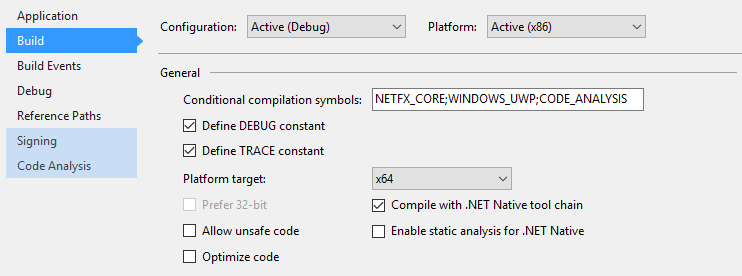
当您在Build部分的property下测试您的项目时,然后检查“用.NET工具链编译”,意味着您在“发布”mode.by默认情况下运行您的项目,您的应用程序使用了.NET本地工具链。由于包被编译成本机二进制文件,所以包不需要包含.NET框架库。此外,包依赖于最新安装的.NET本机运行时,而不是CoreCLR包。设备上的.NET本机运行时将始终与应用程序包兼容。通过“发布”配置进行本地本机编译将使您能够在类似于客户体验的环境中测试您的应用程序。在进行开发时定期测试这一点是很重要的。
因为商店将测试您在.NET本机模式下提交的包,所以您将通过检查“用.NET工具链编译”.通过认证。
此外,这里是关于文章的.NET本机,您可以参考它。
Stack Overflow用户
发布于 2016-10-27 14:13:15
我想我找到了解决办法,但也许只是个幸运的巧合。
如果在Build部分的Property下,我选中了“编译with.NET本机工具链”,现在结果是传递了
你认为这是正确答案吗?
https://stackoverflow.com/questions/40280127
复制相似问题
腾讯云开发者

Copyright © 2013 - 2026 Tencent Cloud. All Rights Reserved. 腾讯云 版权所有
深圳市腾讯计算机系统有限公司 ICP备案/许可证号:粤B2-20090059  粤公网安备44030502008569号
腾讯云计算(北京)有限责任公司 京ICP证150476号 | 京ICP备11018762号