
需要根据第一个库仑值将数据范围从一个excel工作表复制到另一个excel工作表
我有excel表(下面是带有头的示例),没有标题,其中有将近8,000行。如果A列中的值匹配,我需要将B、C、D列的值复制到另一个工作表。另外,问题是A列在每一行中都没有值。只有当它的值与上一行值不同时,才会填充它。
考虑下表的样本:
    ProdID    Name     Prop       Reveiwer
    1        abcName  abcProp     abcRev
             qweName  qweProp     qweRev
             asdName  asdProp     asdRev
    2        jhkName  jhkProp     jhkRev
             mnbName  mnbProp     mnbRev
    1        eName    eProp       eRev
             aName    aProp       aRev
当我们选择1时,预期输出是:
    ProdID  Name     Prop     Reveiwer
    1      abcName  abcProp   abcRev
           qweName  qweProp   qweRev
           asdName  asdProp   asdRev
           eName    eProp     eRev
           aName    aProp     aRev
我用VBA尝试了几个逻辑来实现上面的输出,但是它们都没有工作。
有谁能帮助我使用VBA代码,它可以得到预期的output.Also,让我知道这是否可以通过简单的方法实现,而不是VBA。
回答 2
Stack Overflow用户
发布于 2016-10-25 15:14:27
基于公共ID的搜索和列表单元格值
我在一个名为Sheet1 的电子表格中重新创建了您的数据
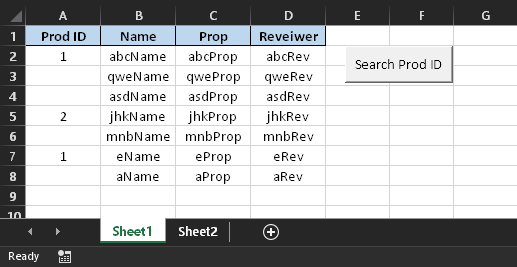
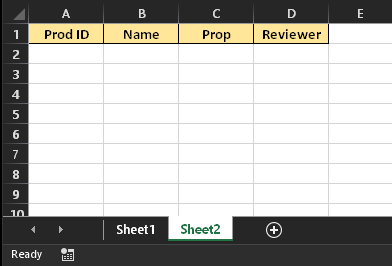
On I有一个空白页,其中只有标题
当我单击Sheet1**,上的按钮时,系统会提示我使用** InputBox
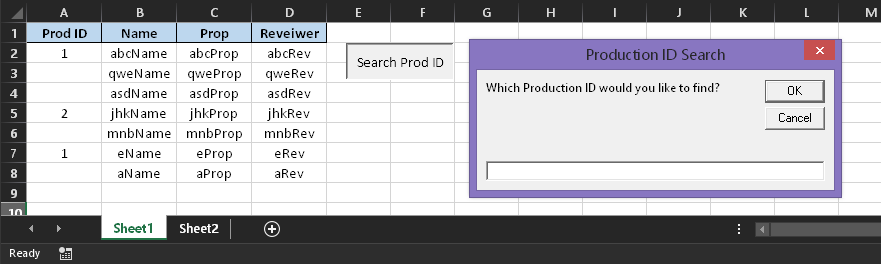
在本例中,我将搜索Prod ID值为1。
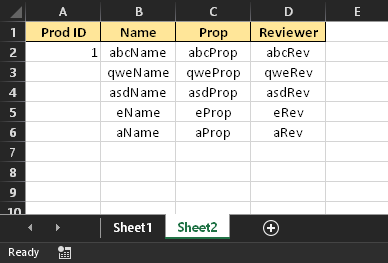
我可以重复很多次,结果页面将自动清除旧的搜索值,并且只列出新的搜索。
“守则”
FindAndShow 将以下代码放置在模块中。是要分配给第一页按钮形状的宏,如果您希望按照我的方式设置它.
Sub FindAndShow()
    Dim ws As Worksheet: Set ws = ThisWorkbook.Sheets(1)
    Dim wsResult As Worksheet: Set wsResult = ThisWorkbook.Sheets(2)
    Dim prodID As String, prodRng As Range
    Dim myRowOffset As Long, mySearch As String, nextRow As Long

    'First is clearing old search items
    wsResult.Range("A2", "D" & wsResult.Cells(wsResult.Rows.Count, "B").End(xlDown).Row).Clear

    'Next we find the next blank row to start placing our results. As I have it, this will
    'always be 2 because we're clearing old data. I've left it dynamic to make modifying the
    'code easier.
    nextRow = wsResult.Range("B2", wsResult.Cells(wsResult.Rows.Count, "B").End(xlUp)).Row + 1

    'Here we take our input from the user.
    'You can change the prompt and title to fit your needs.
    prodID = InputBox("Which Production ID would you like to find?", "Production ID Search")
    Set prodRng = ws.Range("A:A").Find(What:=prodID, LookIn:=xlValues, LookAt:=xlWhole)

    'This is the loop that finds search items, and pastes them to the results page.
    'Normally having range.value = range.value would be quickest, but since we're dealing with
    'thousands of cells that are in sizable groups, the copy method will be most ideal.
    If Not prodRng Is Nothing Then
    wsResult.Range("A" & nextRow).Value = prodID
        firstResult = prodRng.Address
        Do
            myRowOffset = FindRowOffset(prodRng)
            ws.Range(prodRng.Offset(0, 1), prodRng.Offset(myRowOffset, 3)).Copy _
                wsResult.Range("B" & nextRow)
            Set prodRng = ws.Range("A:A").FindNext(prodRng)
            nextRow = nextRow + myRowOffset + 1
        Loop While Not prodRng Is Nothing And prodRng.Address <> firstResult
    End If
End Sub

Function FindRowOffset(myRange As Range) As Long
    'This functions only purpose is to see how far each search block goes.
    Dim ws As Worksheet: Set ws = ThisWorkbook.Sheets(1)
    Dim i As Long: i = 1

    Do While myRange.Offset(i).Value = "" And myRange.Offset(i, 1) <> ""
        i = i + 1
    Loop
    FindRowOffset = i - 1
End FunctionStack Overflow用户
发布于 2016-10-25 13:45:54
最快的方法是填充第一列。您应该在一个列上有一个循环,您知道它是完全填充的(即第2列),将prodID存储在一个变量中,并在每次prodID is = "“时使用它,例如:
i=start_row
While Range("B" & i) <> ""
 if Range("A" & i) <> "" then
  prod_id=Range("A" & i)
 else
  Range("A" & i)=prod_id
 end if
 i=i+1
wendhttps://stackoverflow.com/questions/40240746
复制相似问题
腾讯云开发者

Copyright © 2013 - 2026 Tencent Cloud. All Rights Reserved. 腾讯云 版权所有
深圳市腾讯计算机系统有限公司 ICP备案/许可证号:粤B2-20090059  粤公网安备44030502008569号
腾讯云计算(北京)有限责任公司 京ICP证150476号 | 京ICP备11018762号