
JavaFX命令链接对话框
JavaFX命令链接对话框
提问于 2016-10-25 11:25:08
我想使对话框完全相同,在本教程中所描述的http://code.makery.ch/blog/javafx-8-dialogs/。对话框称为“命令链接对话框”。
不幸的是,由于这些对话框在JDK 8u40中,因此本教程被解压。
有没有一种简单的方法可以在没有ControlsFX的情况下使用新的JDK创建相同的对话框?
回答 1
Stack Overflow用户
回答已采纳
发布于 2016-10-25 14:01:45
首先,创建自己的按钮图形,类似于CommandLink。在我的示例中,我使用FontAwesomeFX创建绿色箭头图标:
GridPane graphicGrid = new GridPane();
graphicGrid.setHgap(5);
graphicGrid.setVgap(5);

// Create an icon using FontAwesomeFX.
Text icon = GlyphsDude.createIcon(FontAwesomeIcon.ARROW_RIGHT);
icon.setFill(Color.GREEN);

Label headerLabel = new Label("Go to the Circus");
headerLabel.setStyle("-fx-font-size: 1.5em;");

Label detailsLabel = new Label("Watch acrobats fly around and clowns, of course.");

graphicGrid.add(icon, 0, 0);
graphicGrid.add(headerLabel, 1, 0);
graphicGrid.add(detailsLabel, 1, 1);

Button button = new Button("", graphicGrid);

然后使用JavaFX对话框教程中的自定义对话框示例来创建您自己的自定义对话框,并使用您创建的按钮填充它。下面是一个完整的例子:
import de.jensd.fx.glyphs.GlyphsDude;
import de.jensd.fx.glyphs.fontawesome.FontAwesomeIcon;
import javafx.application.Application;
import javafx.scene.Node;
import javafx.scene.control.Button;
import javafx.scene.control.ButtonType;
import javafx.scene.control.Dialog;
import javafx.scene.control.Label;
import javafx.scene.layout.GridPane;
import javafx.scene.paint.Color;
import javafx.scene.text.Text;
import javafx.stage.Stage;

public class MCVE extends Application {
    @Override
    public void start(Stage stage) {
        Dialog dialog = new Dialog();

        GridPane content = new GridPane();
        content.setHgap(10);
        content.setVgap(5);

        Text headerIcon = GlyphsDude.createIcon(FontAwesomeIcon.INFO_CIRCLE, "3em");
        headerIcon.setFill(Color.BLUE);

        Label headerLabel = new Label("Where do you want to go?");
        headerLabel.setStyle("-fx-font-size: 1.5em;");

        CommandLink zooButton = new CommandLink("Go to the Zoo",
                "Here you will see zebras, monkeys, lions, elephants, and maybe also an alligator.");
        zooButton.setOnAction(e -> dialog.close());

        CommandLink circusButton = new CommandLink("Go to the Circus",
                "Watch acrobats fly around and clowns, of course.");
        circusButton.setOnAction(e -> dialog.close());

        CommandLink homeButton = new CommandLink("Stay Home", "Watch TV or play some board games with your siblings.");

        // To enable closing of the dialog. We need to add a hidden close
        // button. See this thread:
        // http://stackoverflow.com/questions/32048348/javafx-scene-control-dialogr-wont-close-on-pressing-x
        dialog.getDialogPane().getButtonTypes().add(ButtonType.CLOSE);
        Node closeButton = dialog.getDialogPane().lookupButton(ButtonType.CLOSE);
        closeButton.managedProperty().bind(closeButton.visibleProperty());
        closeButton.setVisible(false);

        content.add(headerIcon, 0, 0);
        content.add(headerLabel, 1, 0);
        content.add(zooButton, 1, 1);
        content.add(circusButton, 1, 2);
        content.add(homeButton, 1, 3);

        dialog.getDialogPane().setContent(content);

        dialog.showAndWait();
    }

    public static void main(String[] args) {
        launch();

    }

    class CommandLink extends Button {
        public CommandLink(String header, String text) {
            GridPane graphicGrid = new GridPane();
            graphicGrid.setHgap(5);
            graphicGrid.setVgap(5);

            // Create an icon using FontAwesome.
            Text icon = GlyphsDude.createIcon(FontAwesomeIcon.ARROW_RIGHT);
            icon.setFill(Color.GREEN);

            Label btnHeaderLabel = new Label(header);
            btnHeaderLabel.setStyle("-fx-font-size: 1.5em;");

            Label detailsLabel = new Label(text);

            graphicGrid.add(icon, 0, 0);
            graphicGrid.add(btnHeaderLabel, 1, 0);
            graphicGrid.add(detailsLabel, 1, 1);

            setGraphic(graphicGrid);
        }
    }
}
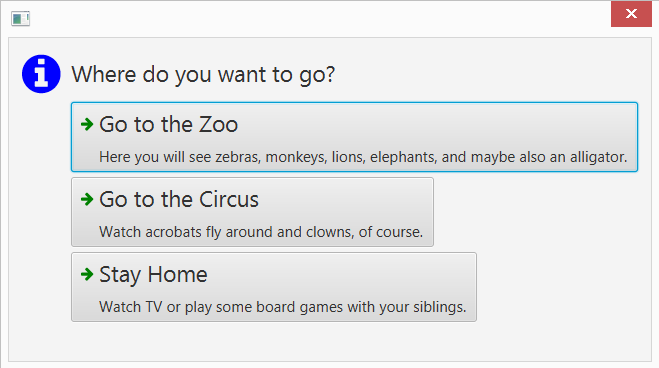
结果是:一个看起来有点像命令链接对话框的对话框。为了使它完美,你将不得不玩弄自己的造型。如果您想要原始信息图标,也可以使用官方对话框中的信息对话框。
页面原文内容由Stack Overflow提供。腾讯云小微IT领域专用引擎提供翻译支持
原文链接:
https://stackoverflow.com/questions/40238676
复制相关文章
相似问题
腾讯云开发者

Copyright © 2013 - 2026 Tencent Cloud. All Rights Reserved. 腾讯云 版权所有
深圳市腾讯计算机系统有限公司 ICP备案/许可证号:粤B2-20090059  粤公网安备44030502008569号
腾讯云计算(北京)有限责任公司 京ICP证150476号 | 京ICP备11018762号