
无法在PayPal HTMLButton上指定每个付款请求的“金额”
我正在尝试使用"HTML“方法与PayPal集成。结帐流程相当简单,用户单击“立即购买”->就可以转移到PayPal ->支付处理后的->返回网站。
基于客户想要“立即购买”的项目,提交表单中的“金额”将有所不同,而且我无法让PayPal接受我发送的值。我总是看到一个文本输入,当重定向到PayPal时它是空的。
我尝试了托管和非托管按钮,但仍然无法看到所需的效果。
托管按钮HTML示例:
<form action="https://www.sandbox.paypal.com/cgi-bin/webscr" method="post" target="_top">
  <input type="hidden" name="cmd" value="_s-xclick">
  <input type="hidden" name="hosted_button_id" value="HOSTEDBTNVALUE">
  <input type="image" src="https://www.sandbox.paypal.com/en_GB/SG/i/btn/btn_buynowCC_LG.gif" name="submit" alt="PayPal – The safer, easier way to pay online!" style="border: 0;">
  <img alt="" src="https://www.sandbox.paypal.com/en_GB/i/scr/pixel.gif" style="border: 0; width: 1; height: 1;">
  <input type="text" readonly="true" name="item_name" value="Test PayPal integration payment">
  <div class="form-group" id="amount_field">
    <label class="control-label col-md-2" for="amount">Amount</label>
    <div class="col-md-5">
      <input type="text" id="amount" name="amount" value="100" aria-describedby="amount_info_0" class="form-control"><span id="amount_info_0" class="help-block">Real</span></div>
  </div>
  <div class="form-group" id="txnRef_field">
    <label class="control-label col-md-2" for="txnRef">Transaction Ref</label>
    <div class="col-md-5">
      <input type="text" id="txnRef" name="txnRef" value="8d724ad470af4d9d91d49f84068c4bab" aria-describedby="txnRef_info_0" class="form-control"><span id="txnRef_info_0" class="help-block">Required</span></div>
  </div>
  <input type="hidden" name="currency_code" value="SGD">
</form>
上面的“量”是目前的文本输入,因为这是我的集成测试页面,在实际的应用程序中,它将是嵌入在表单中的隐藏/只读输入。
下面是非宿主按钮示例代码:
<form action="https://www.sandbox.paypal.com/cgi-bin/webscr" method="post" target="_top">
  <input type="hidden" name="cmd" value="_s-xclick">
  <input type="hidden" name="encrypted" value="-----BEGIN PKCS7-----ReallyLongKey-----END PKCS7-----">
  <input type="image" src="https://www.sandbox.paypal.com/en_GB/SG/i/btn/btn_buynowCC_LG.gif" name="submit" alt="PayPal – The safer, easier way to pay online!" style="border: 0;"><img alt="" src="https://www.sandbox.paypal.com/en_GB/i/scr/pixel.gif" style="border: 0; width: 1; height: 1;">
  <input type="hidden" name="notify_url" value="https://myapplication.com/transaction/paypal/status">
  <input type="hidden" name="currency_code" value="SGD">
  <input type="hidden" name="custom" value="ad4a63e2f2f04b908ddb8e7c67f9c67a">
  <input type="text" readonly="true" name="item_name" value="Test PayPal integration payment">
  <div class="form-group" id="amount_field">
    <label class="control-label col-md-2" for="amount">Amount</label>
    <div class="col-md-5">
      <input type="text" id="amount" name="amount" value="100" aria-describedby="amount_info_0" class="form-control"><span id="amount_info_0" class="help-block">Real</span></div>
  </div>
  <div class="form-group" id="txnRef_field">
    <label class="control-label col-md-2" for="txnRef">Transaction Ref</label>
    <div class="col-md-5">
      <input type="text" id="txnRef" name="txnRef" value="ad4a63e2f2f04b908ddb8e7c67f9c67a" aria-describedby="txnRef_info_0" class="form-control"><span id="txnRef_info_0" class="help-block">Required</span></div>
  </div>
</form>
下面是应用程序页面的截图,以及我在PayPal支付页面上看到的结果。请原谅缺乏对齐和造型。这是一个概念的证明之前,它是美丽的。
- 用于集成的应用程序测试页面

- 贝宝页面,预计金额是固定的,根据我的要求,不能编辑。
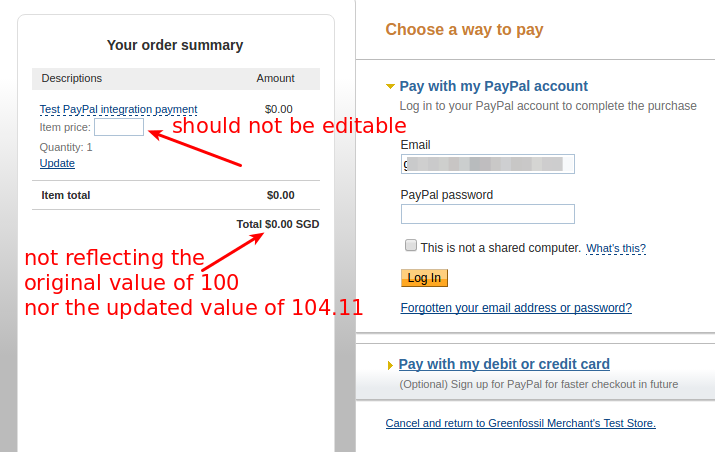
不知道我做错了什么。请帮帮忙。
谢谢。
回答 1
Stack Overflow用户
发布于 2016-10-25 10:29:13
我能够通过让PayPal生成具有以下设置的按钮来实现它: 1. Merchant account IDs: Use my primary email address没有使用安全商人帐户ID 2.取消选中save button at PayPal复选框。此外,在html按钮生成接口中,我单击了链接remove code protection,该链接使cmd值从_s-xclick到_xclick。
https://stackoverflow.com/questions/40210676
复制相似问题
腾讯云开发者

Copyright © 2013 - 2026 Tencent Cloud. All Rights Reserved. 腾讯云 版权所有
深圳市腾讯计算机系统有限公司 ICP备案/许可证号:粤B2-20090059  粤公网安备44030502008569号
腾讯云计算(北京)有限责任公司 京ICP证150476号 | 京ICP备11018762号