
pyuic4生成错误的布局?
pyuic4似乎基于Qt设计器的.ui文件生成错误的布局。UI文件在这里:
<?xml version="1.0" encoding="UTF-8"?>
<ui version="4.0">
<class>Dialog</class>
<widget class="QDialog" name="Dialog">
<property name="geometry">
<rect>
<x>0</x>
<y>0</y>
<width>348</width>
<height>267</height>
</rect>
</property>
<property name="windowTitle">
<string>Dialog</string>
</property>
<layout class="QVBoxLayout" name="verticalLayout_2">
<item>
<layout class="QVBoxLayout" name="verticalLayout">
<item alignment="Qt::AlignTop">
<widget class="QLabel" name="label">
<property name="sizePolicy">
<sizepolicy hsizetype="Preferred" vsizetype="Fixed">
<horstretch>0</horstretch>
<verstretch>0</verstretch>
</sizepolicy>
</property>
<property name="maximumSize">
<size>
<width>16777215</width>
<height>25</height>
</size>
</property>
<property name="text">
<string><html><head/><body><p align="center"><span style=" font-size:14pt;">Some Text</span></p></body></html></string>
</property>
</widget>
</item>
<item alignment="Qt::AlignTop">
<widget class="Line" name="line_2">
<property name="sizePolicy">
<sizepolicy hsizetype="Minimum" vsizetype="Fixed">
<horstretch>0</horstretch>
<verstretch>0</verstretch>
</sizepolicy>
</property>
<property name="orientation">
<enum>Qt::Horizontal</enum>
</property>
</widget>
</item>
<item alignment="Qt::AlignBottom">
<widget class="Line" name="line">
<property name="orientation">
<enum>Qt::Horizontal</enum>
</property>
</widget>
</item>
<item>
<layout class="QHBoxLayout" name="horizontalLayout">
<item alignment="Qt::AlignBottom">
<widget class="QPushButton" name="btn_customize">
<property name="text">
<string>Customize</string>
</property>
</widget>
</item>
<item alignment="Qt::AlignBottom">
<widget class="QPushButton" name="btn_done">
<property name="text">
<string>OK</string>
</property>
</widget>
</item>
</layout>
</item>
</layout>
</item>
</layout>
</widget>
<resources/>
<connections/>
</ui>在这个布局中,我尝试将一对按钮与对话框窗口底部对齐,并将一些文本与顶部对齐。运行pyuic4 test.ui --preview将显示与中心水平对齐的所有对象,而不是顶部和底部(并显示实际python程序中的对话框显示相同的结果)。相比之下,pyuic5 test.ui --preview似乎更符合我想要得到的目标。
如果有帮助的话,我的pyuic4版本是4.11.4,我在Ubuntu16.04上。
有什么想法吗?我做错了什么吗?或者可能有一个更新的pyuic4存在?
回答 1
Stack Overflow用户
发布于 2016-10-23 18:18:52
在pyuic中存在错误,影响布局对齐的处理。这是修正的PyQt-5.5,于2015年7月17日发布。然而,PyQt-4.11.4 (现在的版本)是在2015年6月11日发布的,所以这个修复程序还没有被包括在内。不过,PyQt-4.12的当前开发快照确实包含了修复程序。
但我不认为这能解决你的问题。相反,你需要做的是使用膨胀的间隔。下面是如何使用您的示例ui文件来完成此操作:
- 单击水平按钮布局,然后单击“中断布局”(这将删除所有当前布局)。
- Ctrl+click这两个按钮,然后单击水平布局。
- 单击“对话框”,然后单击“垂直布局”。
- 在两行小部件之间拖放垂直间隔
给你这个:
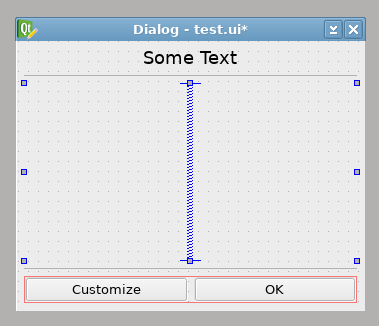
如果您希望在中心区域有一些其他的小部件,您可能需要在它们上面和/或下面添加扩展的垂直间隔,以获得相同的结果。然后,如果您在其中放置类似文本框或列表小部件的内容,它应该会自动展开以填充可用的空间--在这种情况下,将不需要任何间隔(或布局对齐)。
https://stackoverflow.com/questions/40198710
复制相似问题
腾讯云开发者

Copyright © 2013 - 2026 Tencent Cloud. All Rights Reserved. 腾讯云 版权所有
深圳市腾讯计算机系统有限公司 ICP备案/许可证号:粤B2-20090059  粤公网安备44030502008569号
腾讯云计算(北京)有限责任公司 京ICP证150476号 | 京ICP备11018762号