
查看UITabController中的不同选项卡
查看UITabController中的不同选项卡
提问于 2016-10-14 03:08:10
我正在尝试将数据从我的“创建一个聚会”表单中分离到我的第二个“查找派对”选项卡中。
下面是我的主要故事板的屏幕截图:
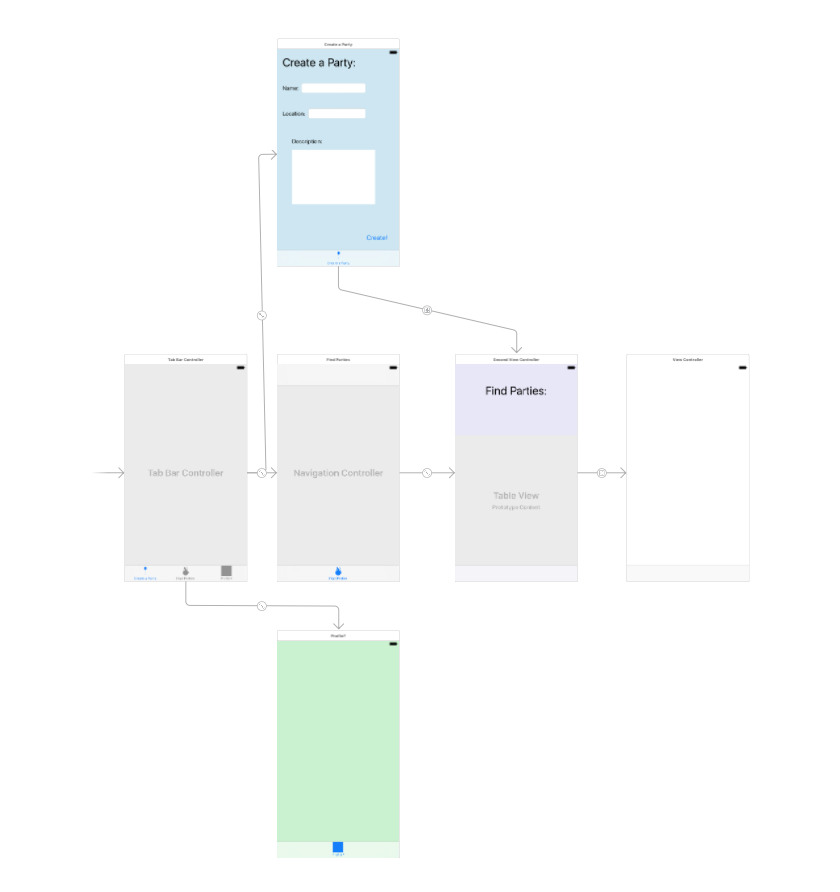
我的创建政党控制器的代码:
import UIKit

struct party {
    var name: String
    var location: String
    var description: String
}

class FirstViewController: UIViewController {

    @IBOutlet weak var nameField: UITextField!
    @IBOutlet weak var locationField: UITextField!
    @IBOutlet weak var descriptionField: UITextView!

    override func viewDidLoad() {
        super.viewDidLoad()
        // Do any additional setup after loading the view, typically from a nib.
    }

    override func didReceiveMemoryWarning() {
        super.didReceiveMemoryWarning()
        // Dispose of any resources that can be recreated.
    }

    var newParty = party(name: "", location: "", description: "")

    @IBAction func create(_ sender: AnyObject) {
        newParty = party(name: nameField.text!, location: locationField.text!, description: descriptionField.text!)
        nameField.text = ""
        locationField.text = ""
        descriptionField.text = ""
        performSegue(withIdentifier: "toPartyList", sender: newParty)
    }

    override func prepare(for segue: UIStoryboardSegue, sender: Any?) {
        let destinationViewController : SecondViewController = segue.destination as! SecondViewController
        destinationViewController.parties.append(newParty)
    }

}
“查找各方”选项卡的代码:
import UIKit

class SecondViewController: UIViewController, UITableViewDelegate, UITableViewDataSource {

    @IBOutlet weak var partyTable: UITableView!

    override func viewDidLoad() {
        super.viewDidLoad()

        partyTable.delegate = self
        partyTable.dataSource = self

        // updates the table of users everytime submit is clicked
        DispatchQueue.main.async{
            self.partyTable.reloadData()
        }
    }

    override func didReceiveMemoryWarning() {
        super.didReceiveMemoryWarning()
        // Dispose of any resources that can be recreated.
    }

     var parties = [party]()

    // creates the number of cells in the table
    func tableView(_ tableView: UITableView, numberOfRowsInSection section: Int) -> Int {
        return parties.count
    }

    func tableView(_ tableView: UITableView, cellForRowAt indexPath: IndexPath) -> UITableViewCell {

        // Make table cells the show the user name
        let cell = UITableViewCell()
        cell.textLabel?.text = parties[indexPath.row].name
        return cell
    }

    // Allows the user to swipe and delete people from the table and also the users array
    func tableView(_ tableView: UITableView, commit editingStyle: UITableViewCellEditingStyle, forRowAt indexPath: IndexPath) {

        if editingStyle == .delete {

            // delete the person in users array
            parties.remove(at: indexPath.row)

            // delete the cell from the table
            partyTable.deleteRows(at: [indexPath], with: .fade)
        }
    }


}
目前,我的索引只是直接带我到“查找各方”视图控制器,没有办法回来,而不是标签。我需要改变什么才能做到这一点?
回答 1
Stack Overflow用户
回答已采纳
发布于 2016-10-14 03:12:21
与其在本例中使用segue,不如通过编程切换制表符:
@IBAction func create(_ sender: AnyObject) {
    newParty = party(name: nameField.text!, location: locationField.text!, description: descriptionField.text!)
    nameField.text = ""
    locationField.text = ""
    descriptionField.text = ""
    tabBarController?.selectedIndex = 1 // 2nd tab
}
要传递信息,您可以这样做:
let navVC = tabBarController.viewControllers[1] as! UINavigationController
let rootVC = navVC.viewControllers[0] as! SomeViewController
rootVC.someData = myData页面原文内容由Stack Overflow提供。腾讯云小微IT领域专用引擎提供翻译支持
原文链接:
https://stackoverflow.com/questions/40034302
复制相关文章
相似问题
腾讯云开发者

Copyright © 2013 - 2026 Tencent Cloud. All Rights Reserved. 腾讯云 版权所有
深圳市腾讯计算机系统有限公司 ICP备案/许可证号:粤B2-20090059  粤公网安备44030502008569号
腾讯云计算(北京)有限责任公司 京ICP证150476号 | 京ICP备11018762号