
造型ControlsFX面包
造型ControlsFX面包
提问于 2016-10-12 18:37:24
我使用的是来自BreadcrumbBar的ControlsFX,它工作得很好。唯一的问题是我的造型,它看起来像下面的图片。在使用风景视图时,我看到这个组件只有三个类:.bread-crumb-bar、.button、.first。我试图添加这样的边框图像,但没有出现。
/*
 * ControlFX bread crumb
 *
 */
.bread-crumb-bar {
 }
.bread-crumb-bar .button {
  -fx-padding: 0 3 0 3;
  -fx-border-color: null;
  -fx-border-insets: 0;
  -fx-border-image-source: url("../images/icon/crumb-focused.png");
  -fx-border-image-slice: 1 10 1 10 fill;
  -fx-border-image-width: 1 10 1 10;
  -fx-border-image-repeat: stretch;
}

.bread-crumb-bar .button.first {
}
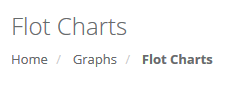
我如何将控件样式设置为在图像中看起来像面包屑
回答 1
Stack Overflow用户
回答已采纳
发布于 2016-12-27 14:35:18
我就是这样解决这个问题的。对于斜杠,你需要图像。你需要摆弄填充和适当地设置你的字体家庭。找不到最后一个/选定的面包屑的选择器。
bread-crumb-bar {
     -fx-background-color: transparent;
}
.bread-crumb-bar .button {
    -fx-padding: 8 12 8 20;
    -fx-border-color: null;
    -fx-border-insets: 0;
    -fx-content-display: left;
    -fx-background-position: left center;
    -fx-background-repeat: no-repeat;
    -fx-background-image: url("../img/slash.png");
    -fx-background-color: transparent;
    -fx-border-color: transparent;
    -fx-shape: null;
}
.bread-crumb-bar .first {
    -fx-background-color: transparent ;
    -fx-border-color: transparent;
    -fx-font-size: 1.11em;
    -fx-text-fill: #000;
    -fx-background-image: null;
    -fx-shape: null;
    -fx-padding: 8 12 8 0;
}
.crumb {
    -fx-text-fill: #000;
}
.crumb:hover,
.crumb:selected,
.crumb:focused
{
    -fx-background-color: rgba(0,0,0,0.1);
    -fx-border-color: null;
    -fx-font-size: 1.11em;
    -fx-text-fill: rgba(0,0,0,0.5);
}页面原文内容由Stack Overflow提供。腾讯云小微IT领域专用引擎提供翻译支持
原文链接:
https://stackoverflow.com/questions/40006003
复制相关文章
相似问题
腾讯云开发者

Copyright © 2013 - 2026 Tencent Cloud. All Rights Reserved. 腾讯云 版权所有
深圳市腾讯计算机系统有限公司 ICP备案/许可证号:粤B2-20090059  粤公网安备44030502008569号
腾讯云计算(北京)有限责任公司 京ICP证150476号 | 京ICP备11018762号