
浮动DOM,固定位置. Telerik Kendo-Mobile AppBuilder Icenium
浮动DOM,固定位置. Telerik Kendo-Mobile AppBuilder Icenium
提问于 2016-10-07 01:18:04
我正在使用Telerik Icenium,构建一个混合应用程序。我曾经查看过关于同一主题的其他帖子,但没有一篇有效。我认为可能有一些具体的肯多,有人知道如何解决这一问题。关于一个特定的观点
    <div data-role="view"
     data-title="Rules..."
     data-layout="main"
     data-model="app.workoutTypeRuleInterstatial"
     data-show="app.workoutTypeRuleInterstatial.onShow"
     data-after-show="app.workoutTypeRuleInterstatial.afterShow"
     id="workoutTypeRuleInterstatial_View">

    <ul data-role="listview"
        data-auto-bind="false"
        data-style="inset"
        data-template="workoutTypeRuleInterstatialModelTemplate"
        data-bind="{ source: workoutTypeRuleInterstatialModel.dataSource }"
        data-pull-to-refresh="true"
        data-endless-scroll="false"></ul>

    <script type="text/x-kendo-template" id="workoutTypeRuleInterstatialModelTemplate">
        <div class="image-with-text">
            <table style="width: 100%;">
                <tr>
                    <td style="width:100%;">
                        <a onclick="app.workoutTypeRuleInterstatial.workoutRuleClick('#: TypeId #')">
                            <h4 id="id" class="workoutRule">#: Name #</h4>
                        </a>
                    </td>
                </tr>
            </table>
        </div>
    </script>


    <div id="addButton">
        <img src="images/add.png" class="button" id="addNewWorkoutType" />
    </div>

</div>
而这个css
    <style>
    #addButton {
        top: 70%;
        left: 90%;
        width: 2.3em;
        height: 2.3em;
        margin-top: -9em;
        margin-left: 0em;
        border: 0;
        position: fixed;
    }

    .button {
        padding: 0;
        width: 2.3em;
        height: 2.3em;
    }
</style>
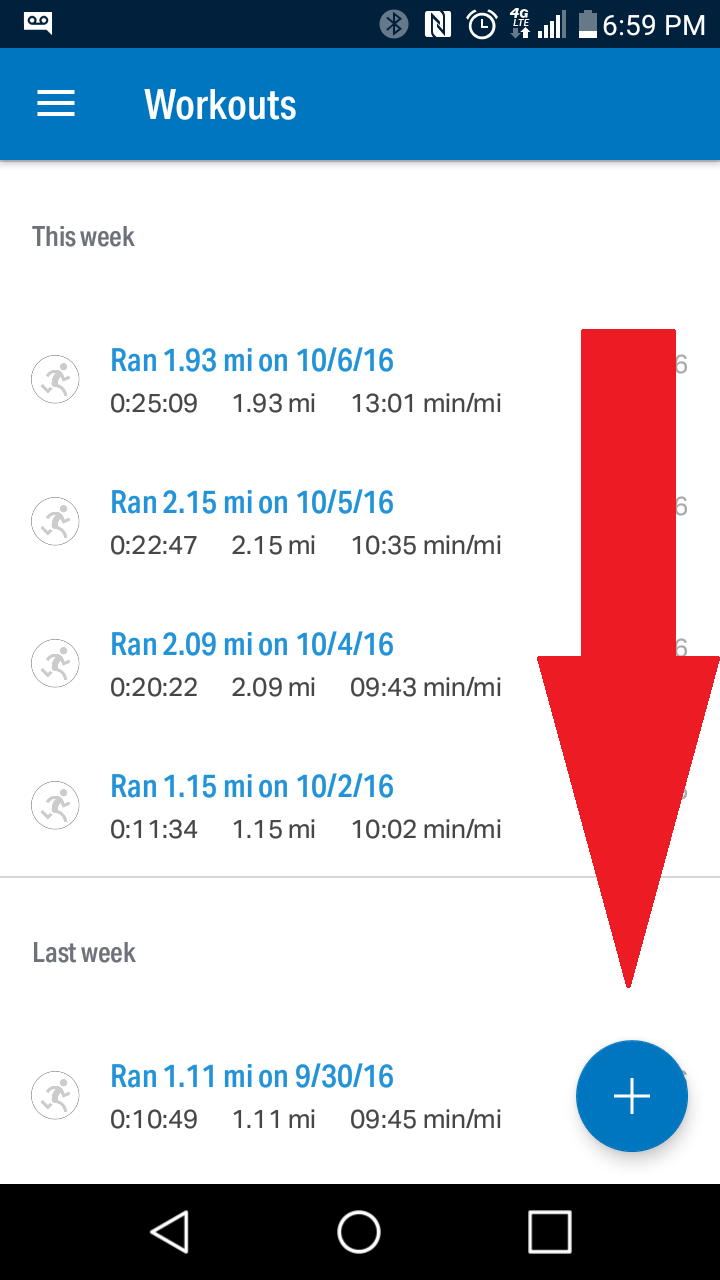
不允许元素在滚动列表时保持“固定”状态,它与列表一起滚动,我希望它像下面的图像一样(其中它不与列表一起滚动)
回答 1
Stack Overflow用户
回答已采纳
发布于 2016-10-10 18:57:53
答案是:
<footer data-role="footer">
    <div data-role="tabstrip" id="navigation-container">
        <a href="components/homeView/view.html" data-icon="home">Home View</a>
        <a href="components/settingsView/view.html" data-icon="settings">Settings</a>
        <a href="components/contactsView/view.html" data-icon="contacts">Contacts</a>
    </div>
    <a data-role="button" class="floating" data-icon="compose"></a>
</footer>

<style>
    .km-nova .km-button.floating {
        position: fixed;
        right: 20px;
        bottom: 70px;
        border-color: transparent;
        border-radius: 35px;
        width: 50px;
        height: 50px;
        line-height: 35px;
        background-color: red;
        color: white;
    }

        .km-nova .km-button.floating span {
            font-size: 1.5em;
        }
</style>页面原文内容由Stack Overflow提供。腾讯云小微IT领域专用引擎提供翻译支持
原文链接:
https://stackoverflow.com/questions/39907946
复制相关文章
相似问题
腾讯云开发者

Copyright © 2013 - 2026 Tencent Cloud. All Rights Reserved. 腾讯云 版权所有
深圳市腾讯计算机系统有限公司 ICP备案/许可证号:粤B2-20090059  粤公网安备44030502008569号
腾讯云计算(北京)有限责任公司 京ICP证150476号 | 京ICP备11018762号