
CropperJS:图像输出--“麦田”框不可见
CropperJS:图像输出--“麦田”框不可见
提问于 2016-10-06 16:00:06
我使用javascript 番薯来裁剪用户上传的图像。在裁剪器显示中,裁剪框外的图像不可见.以下图片所示的样本-
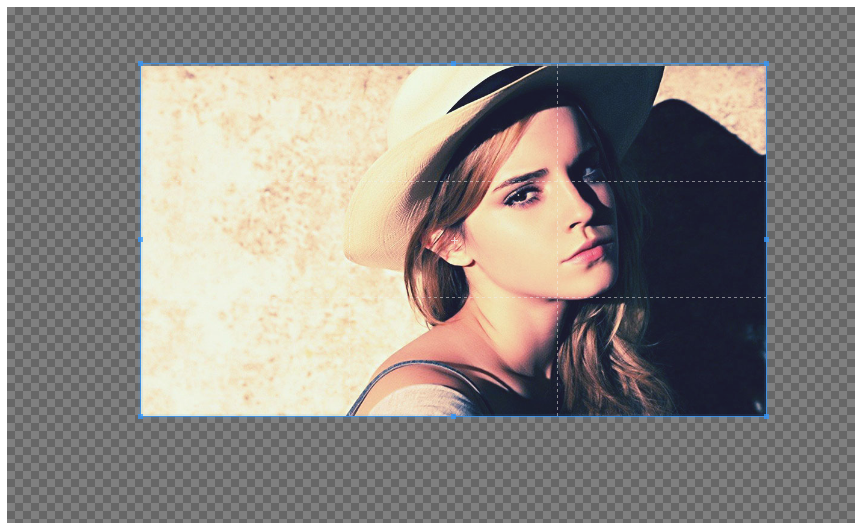
我的裁缝配置是-
var cropper_opts = {
  aspectRatio: 1/1,
  viewMode: 0,
  crop: function(e){}, //to show the crop box manually
  minCanvasWidth: 0,
  minCanvasHeight: 0,
  minCropBoxWidth: 0,
  minCropBoxHeight: 0,
  minContainerWidth: 860,   //decides the size of image
  minContainerHeight: 355,  //decides the size of image
  autoCropArea: 1,
  modal: true,      // Show the black modal
  guides: true,     // Show the dashed lines for guiding
  center: true,     // Show the center indicator for guiding
  highlight: true,  // Show the white modal to highlight the crop box
  background: true, // Show the grid background
}
请帮我解决这个问题。
回答 1
Stack Overflow用户
发布于 2017-02-20 15:23:36
这可能是因为您在某种类型的html模板中使用cropper,该模板已经集成了cropper,而画布元素已经应用了其他样式。
检查这个类.cropper-canvas
在我的例子中,我发现我使用的模板将其不透明度设置为0。
.cropper-canvas {
  cursor: crosshair;
  background-color: #fff;
  opacity: 0; /* that's the problem */
  filter: alpha(opacity=0);
}页面原文内容由Stack Overflow提供。腾讯云小微IT领域专用引擎提供翻译支持
原文链接:
https://stackoverflow.com/questions/39900677
复制相关文章
相似问题
腾讯云开发者

Copyright © 2013 - 2026 Tencent Cloud. All Rights Reserved. 腾讯云 版权所有
深圳市腾讯计算机系统有限公司 ICP备案/许可证号:粤B2-20090059  粤公网安备44030502008569号
腾讯云计算(北京)有限责任公司 京ICP证150476号 | 京ICP备11018762号