
底部显示ListViewItem
底部显示ListViewItem
提问于 2016-10-02 18:14:08
我在SplitView窗格中有一个简单的ListBoxItems,其中包含4 ListBoxItems,如下所示。
<SplitView.Pane>
<ListBox SelectionChanged="ListBox_SelectionChanged" Name="mListBox" Width="250" HorizontalAlignment="Stretch">
<ListBoxItem Name="Landing_Page">
<StackPanel Orientation="Horizontal" >
<TextBlock Text="" Width="16" Height="16" FontSize="16" HorizontalAlignment="Center" VerticalAlignment="Center" Margin="4,0,0,2" TextAlignment="Center" FontFamily="Segoe MDL2 Assets"/>
<TextBlock Text="Mainpage" Margin="16,0,0,0"/>
</StackPanel>
</ListBoxItem>
<ListBoxItem Name="Page1">
<StackPanel Orientation="Horizontal" >
<TextBlock Text="" Width="16" Height="16" FontSize="16" HorizontalAlignment="Center" VerticalAlignment="Center" Margin="4,0,0,2" TextAlignment="Center" FontFamily="Segoe MDL2 Assets"/>
<TextBlock Text="Page1" Margin="16,0,0,0"/>
</StackPanel>
</ListBoxItem>
<ListBoxItem Name="Page2">
<StackPanel Orientation="Horizontal" >
<TextBlock Text="" Width="16" Height="16" FontSize="16" HorizontalAlignment="Center" VerticalAlignment="Center" Margin="4,0,0,2" TextAlignment="Center" FontFamily="Segoe MDL2 Assets"/>
<TextBlock Text="Page 2" Margin="16,0,0,0"/>
</StackPanel>
</ListBoxItem>
<ListBoxItem Name="About">
<StackPanel Orientation="Horizontal">
<TextBlock Text="" Width="16" Height="16" FontSize="16" HorizontalAlignment="Center" VerticalAlignment="Center" Margin="4,0,0,2" TextAlignment="Center" FontFamily="Segoe MDL2 Assets"/>
<TextBlock Text="About the App" Margin="16,0,0,0"/>
</StackPanel>
</ListBoxItem>
</ListBox>
</SplitView.Pane>现在,我想在ListBoxItem窗格的底部显示关于SplitView的内容。我该怎么做?
回答 1
Stack Overflow用户
回答已采纳
发布于 2016-10-02 20:54:55
保持UI样式与现在类似的最简单的解决方案是使用第二个ListBox并将其放在底部(使用网格)。
<SplitView.Pane>
<Grid>
<Grid.RowDefinitions>
<RowDefinition Height="*" />
<RowDefinition Height="Auto" />
</Grid.RowDefinitions>
<ListBox SelectionChanged="TopListBox_SelectionChanged" Name="TopListBox" Width="250" HorizontalAlignment="Stretch" Grid.Row="0" VerticalAlignment="Top">
<ListBoxItem Name="Landing_Page">
<StackPanel Orientation="Horizontal" >
<TextBlock Text="" Width="16" Height="16" FontSize="16" HorizontalAlignment="Center" VerticalAlignment="Center" Margin="4,0,0,2" TextAlignment="Center" FontFamily="Segoe MDL2 Assets"/>
<TextBlock Text="Mainpage" Margin="16,0,0,0"/>
</StackPanel>
</ListBoxItem>
<ListBoxItem Name="Page1">
<StackPanel Orientation="Horizontal" >
<TextBlock Text="" Width="16" Height="16" FontSize="16" HorizontalAlignment="Center" VerticalAlignment="Center" Margin="4,0,0,2" TextAlignment="Center" FontFamily="Segoe MDL2 Assets"/>
<TextBlock Text="Page1" Margin="16,0,0,0"/>
</StackPanel>
</ListBoxItem>
<ListBoxItem Name="Page2">
<StackPanel Orientation="Horizontal" >
<TextBlock Text="" Width="16" Height="16" FontSize="16" HorizontalAlignment="Center" VerticalAlignment="Center" Margin="4,0,0,2" TextAlignment="Center" FontFamily="Segoe MDL2 Assets"/>
<TextBlock Text="Page 2" Margin="16,0,0,0"/>
</StackPanel>
</ListBoxItem>
</ListBox>
<ListBox SelectionChanged="BottomListBox_SelectionChanged" Name="BottomListBox" Width="250" HorizontalAlignment="Stretch" Grid.Row="1">
<ListBoxItem Name="About">
<StackPanel Orientation="Horizontal">
<TextBlock Text="" Width="16" Height="16" FontSize="16" HorizontalAlignment="Center" VerticalAlignment="Center" Margin="4,0,0,2" TextAlignment="Center" FontFamily="Segoe MDL2 Assets"/>
<TextBlock Text="About the App" Margin="16,0,0,0"/>
</StackPanel>
</ListBoxItem>
</ListBox>
</Grid>
</SplitView.Pane>
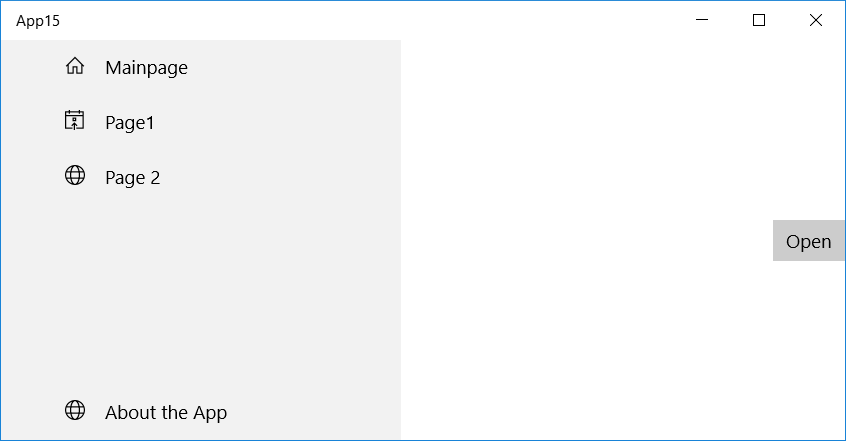
由于我在第一行使用Height="*",在第二行使用Auto,所以底部的About按钮总是可见的,如果列表中有太多项,则顶部列表将滚动。
要修复的另一件事是所选的项,因为您现在处理的是2个ListBoxes,而不是1。
private void TopListBox_SelectionChanged(object sender, SelectionChangedEventArgs e)
{
    BottomListBox.SelectedItem = null;
    TopListBox.SelectedItem = e.AddedItems.FirstOrDefault();
}

private void BottomListBox_SelectionChanged(object sender, SelectionChangedEventArgs e)
{
    TopListBox.SelectedItem = null;
    BottomListBox.SelectedItem = e.AddedItems.FirstOrDefault();
}页面原文内容由Stack Overflow提供。腾讯云小微IT领域专用引擎提供翻译支持
原文链接:
https://stackoverflow.com/questions/39820110
复制相关文章
相似问题
腾讯云开发者

Copyright © 2013 - 2026 Tencent Cloud. All Rights Reserved. 腾讯云 版权所有
深圳市腾讯计算机系统有限公司 ICP备案/许可证号:粤B2-20090059  粤公网安备44030502008569号
腾讯云计算(北京)有限责任公司 京ICP证150476号 | 京ICP备11018762号