
如何通过代码发送提示信息?
如何向应用程序发送提示消息?我试过一个小测试:
  TForm1 = class(TForm)
    ApplicationEvents1: TApplicationEvents;
    Memo1: TMemo;
    procedure ApplicationEvents1Hint(Sender: TObject);
    procedure FormMouseMove(Sender: TObject; Shift: TShiftState; X, Y: Integer);
  private
    { Private declarations }
  public
    { Public declarations }
  end;

procedure TForm1.ApplicationEvents1Hint(Sender: TObject);
begin
  Memo1.Lines.Add(Application.Hint);
end;

procedure TForm1.FormMouseMove(Sender: TObject; Shift: TShiftState; X, Y: Integer);
begin
  Application.Hint := 'Hello';
end;
观察回忆录的台词,似乎每次我设置“Hello”时都会发送一条空的提示信息。
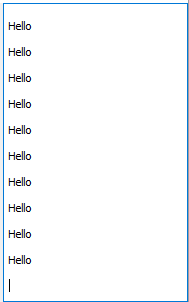
在一个真实的场景中,空的提示信息会隐藏我的提示信息,我不明白我做错了什么,这是错误的方法吗?
回答 2
Stack Overflow用户
发布于 2016-09-30 19:12:36
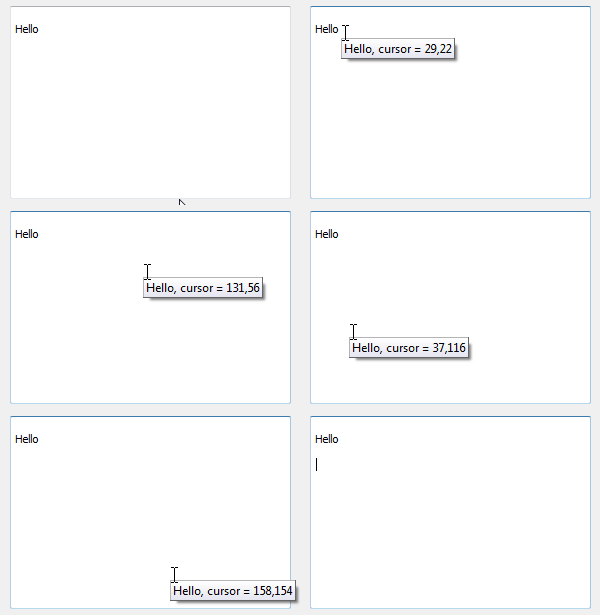
我怀疑您真正想要做的是在鼠标移动到控件上时调整当前显示的提示。为此,您可以使用TApplication.OnShowHint或TApplicationEvents.OnShowHint事件,也可以对目标控件进行子类处理CM_HINTSHOW消息。其中任何一个都将提供对您可以自定义的THintInfo记录的访问,例如:
procedure TForm1.ApplicationEvents1ShowHint(var HintStr: string;
  var CanShow: Boolean; var HintInfo: THintInfo)
begin
  // HintInfo.HintControl is the control that is about to display a hint
  if HintInfo.HintControl = Memo1 then
  begin
    // HintInfo.CursorPos is the current mouse position within the HintControl
    HintStr := Format('Hello, cursor = %d,%d', [HintInfo.CursorPos.X, HintInfo.CursorPos.Y]);

    // the hint will remain active until it times out (see
    // TApplication.HintHidePause and THintInfo.HideTimeout) or
    // the mouse moves outside of the HintInfo.CursorRect.  In
    // the latter case, a new hint will be displayed. This allows
    // you to change the hint for different sections of the
    // HintControl. The CursorRect is set to the HintControl's
    // whole client area by default.

    // In this example, setting the new CursorRect to a 1x1 square
    // around the current CursorPos will display a new hint string
    // on each mouse movement...
    HintInfo.CursorRect := Rect(HintInfo.CursorPos.X, HintInfo.CursorPos.Y, HintInfo.CursorPos.X, HintInfo.CursorPos.Y);
  end;
end;请注意,使用这种方式自定义显示的提示不会在每次提示更改时触发TApplication.OnHint/TApplicationEvents.OnHint事件,只有在显示新的提示弹出时才会触发。OnShowHint/CM_HINTSHOW允许您对现有的提示弹出执行实时更新。
Stack Overflow用户
发布于 2016-09-30 15:11:06
您不应该直接设置Application.Hint。该框架是通过TApplication.Idle实现的。它是这样做的:
Control := DoMouseIdle;
if FShowHint and (FMouseControl = nil) then
  CancelHint;
Application.Hint := GetLongHint(GetHint(Control));在这里,Control是鼠标下的任何控件。由于您没有为程序中的任何控件指定Hint属性,所以每当执行此代码时,它都会将Application.Hint设置为''。
所以,下面是发生的情况:
- 你移动鼠标:
- 鼠标移动处理程序通过设置
Application.Hint来响应该操作。 - 消息队列被清空并执行
TApplication.OnIdle。 - 这会将
Application.Hint更新回''。
然后你回到起点,前后重复。
所以,是的,这确实是错误的做法。正确的方法是什么,我不知道,因为我不知道你真正的问题。通常,您为动作、菜单项、按钮、工具按钮等组件设置Hint属性,但您的需求可能更具有动态性。我不能和他们说话,但我相信我已经解释了你为什么要观察这种行为。
另一点,我觉得值得强调的是,暗示是相当有趣的野兽。您从来没有以同步的方式显示任何提示。您要等到系统决定要显示一个提示,然后以某种方式向它提供提示的内容。提示显示在应用程序空闲时,通常是当鼠标停止移动时。您的代码试图强制在OnMouseMove事件中显示提示,最好将其描述为与框架交叉工作的代码。
https://stackoverflow.com/questions/39794238
复制相似问题
腾讯云开发者

Copyright © 2013 - 2026 Tencent Cloud. All Rights Reserved. 腾讯云 版权所有
深圳市腾讯计算机系统有限公司 ICP备案/许可证号:粤B2-20090059  粤公网安备44030502008569号
腾讯云计算(北京)有限责任公司 京ICP证150476号 | 京ICP备11018762号