
栓住细胞的特定部分
我有一个被称为="Dealer: " & CustomerName的单元格。CustomerName是字典引用的名称。我怎么能随心所欲地只写“商人:”而不是顾客的名字。
示例:
经销商: Josh
我试过了
Cells(5, 1).Characters(1, 7).Font.Bold = True但它似乎只适用于非引用的单元格。我怎么能让这个在引用的单元格上工作呢?
回答 4
Stack Overflow用户
发布于 2016-10-10 13:49:05
您可以使用下面的函数对公式中的一些输入文本加粗体。
因此,在您的单元格中,您现在可以键入=Bold("Dealer:")&CustomerName
准确地说,这只会使字母字母(a到z和A到Z)更大胆,所有其他字符都将保持不变。我还没有在不同的平台上测试过它,但似乎在我的平台上工作。可能不支持所有字体。
 Function Bold(sIn As String)
    Dim sOut As String, Char As String
    Dim Code As Long, i As Long
    Dim Bytes(0 To 3) As Byte

    Bytes(0) = 53
    Bytes(1) = 216

    For i = 1 To Len(sIn)
        Char = Mid(sIn, i, 1)
        Code = Asc(Char)
        If (Code > 64 And Code < 91) Or (Code > 96 And Code < 123) Then
            Code = Code + IIf(Code > 96, 56717, 56723)
            Bytes(2) = Code Mod 256
            Bytes(3) = Code \ 256
            Char = Bytes
        End If
        sOut = sOut & Char
    Next i
    Bold = sOut
End Function
编辑:
已经做了一个努力,以重构以上的工作方式,而不是让它充满神奇的数字。
  Function Bold(ByRef sIn As String) As String
     ' Maps an input string to the Mathematical Bold Sans Serif characters of Unicode
     ' Only works for Alphanumeric charactes, will return all other characters unchanged

     Const ASCII_UPPER_A As Byte = &H41
     Const ASCII_UPPER_Z As Byte = &H5A
     Const ASCII_LOWER_A As Byte = &H61
     Const ASCII_LOWER_Z As Byte = &H7A
     Const ASCII_DIGIT_0 As Byte = &H30
     Const ASCII_DIGIT_9 As Byte = &H39
     Const UNICODE_SANS_BOLD_UPPER_A As Long = &H1D5D4
     Const UNICODE_SANS_BOLD_LOWER_A As Long = &H1D5EE
     Const UNICODE_SANS_BOLD_DIGIT_0 As Long = &H1D7EC

     Dim sOut As String
     Dim Char As String
     Dim Code As Long
     Dim i As Long

     For i = 1 To Len(sIn)
        Char = Mid(sIn, i, 1)
        Code = AscW(Char)
        Select Case Code
           Case ASCII_UPPER_A To ASCII_UPPER_Z
              ' Upper Case Letter
              sOut = sOut & ChrWW(UNICODE_SANS_BOLD_UPPER_A + Code - ASCII_UPPER_A)
           Case ASCII_LOWER_A To ASCII_LOWER_Z
              ' Lower Case Letter
              sOut = sOut & ChrWW(UNICODE_SANS_BOLD_LOWER_A + Code - ASCII_LOWER_A)
           Case ASCII_DIGIT_0 To ASCII_DIGIT_9
              ' Digit
              sOut = sOut & ChrWW(UNICODE_SANS_BOLD_DIGIT_0 + Code - ASCII_DIGIT_0)
           Case Else:
              ' Not available as bold, return input character
              sOut = sOut & Char
        End Select
     Next i
     Bold = sOut
  End Function

  Function ChrWW(ByRef Unicode As Long) As String
     ' Converts from a Unicode to a character,
     ' Includes the Supplementary Tables which are not normally reachable using the VBA ChrW function

     Const LOWEST_UNICODE As Long = &H0              '<--- Lowest value available in unicode
     Const HIGHEST_UNICODE As Long = &H10FFFF        '<--- Highest vale available in unicode
     Const SUPPLEMENTARY_UNICODE As Long = &H10000   '<--- Beginning of Supplementary Tables in Unicode. Also used in conversion to UTF16 Code Units
     Const TEN_BITS As Long = &H400                  '<--- Ten Binary Digits - equivalent to 2^10. Used in converstion to UTF16 Code Units
     Const HIGH_SURROGATE_CONST As Long = &HD800     '<--- Constant used in conversion from unicode to UTF16 Code Units
     Const LOW_SURROGATE_CONST As Long = &HDC00      '<--- Constant used in conversion from unicode to UTF16 Code Units

     Dim highSurrogate As Long, lowSurrogate As Long

     Select Case Unicode
        Case Is < LOWEST_UNICODE, Is > HIGHEST_UNICODE
           ' Input Code is not in unicode range, return null string
           ChrWW = vbNullString
        Case Is < SUPPLEMENTARY_UNICODE
           ' Input Code is within range of native VBA function ChrW, so use that instead
           ChrWW = ChrW(Unicode)
        Case Else
           ' Code is on Supplementary Planes, convert to two UTF-16 code units and convert to text using ChrW
           highSurrogate = HIGH_SURROGATE_CONST + ((Unicode - SUPPLEMENTARY_UNICODE) \ TEN_BITS)
           lowSurrogate = LOW_SURROGATE_CONST + ((Unicode - SUPPLEMENTARY_UNICODE) Mod TEN_BITS)
           ChrWW = ChrW(highSurrogate) & ChrW(lowSurrogate)
     End Select

End Function有关使用的unicode字符的参考,请参见此处符号/list.htm
UTF16上的维基百科页面显示了将Unicode转换为两个UTF16代码点的算法。
Stack Overflow用户
发布于 2016-10-01 08:58:37
正如他们已经说过的那样,如果部分单元格值是从同一单元格中的公式/函数派生出来的,则不能格式化该单元格值。
然而,也许有一些适合你需要的解决办法。
不幸的是,我无法真正理解你的真实环境,下面是一些盲点:
1“环境”
您有一个VBA代码,它在某个时候在单元格中写入,如下所示:
Cells(5, 1).Formula = "=""Dealer: "" & CustomerName"您希望"Dealer:"部件粗体化
- 最简单的方法就是 与单元格(5,1) .Formula =“=”交易商:“& CustomerName”.Value = .Value .Characters(1,7).Font.Bold = True结束
- 但您也可以使用
Worksheet_Change()事件处理程序,如下所示: 您的VBA代码仅限于 单元格(5,1).Formula =“=”交易商:“& CustomerName” 在相关工作表代码窗格中放置以下代码时: 私有子Worksheet_Change(ByVal Target As Range),如果离开目标(.Text,7) = "Dealer:“,那么Application.EnableEvents = False‘<-防止这个宏被错误的GoTo ExitSub .Value = .Value .Characters(1,7).Font.Bold = True End如果以ExitSub结束: Application.EnableEvents = True‘<-获取标准事件处理后端子 在不需要On Error GoTo ExitSub和ExitSub: Application.EnableEvents = True的地方,但是当Application.EnableEvents = Falseid使用时,我把它们作为一个良好的实践
2“环境”
excel工作表中有包含公式的单元格,如下所示:
="Dealer:" & CustomerName其中CustomerName是一个命名范围
而您的VBA代码将修改该命名范围的内容。
在这种情况下,Worksheet_Change()子将由命名范围值更改而不是由包含公式的单元格触发。
因此,我将检查更改后的单元格是否为valid单元格(即对应于well known命名范围),然后带一个子单元格扫描预定义的范围,并使用使用该“命名范围”的公式查找和格式化所有单元格,如下所示(注释应该对您有所帮助):
Option Explicit

Private Sub Worksheet_Change(ByVal Target As Range)
    With Target
        If Not Intersect(ActiveWorkbook.Names("CustomerName").RefersToRange, Target) Is Nothing Then
            Application.EnableEvents = False '<-- prevent this macro to be fired again and again by the statement following in two rows
            On Error GoTo ExitSub
            FormatCells Columns(1), "CustomerName" '<-- call a specific sub that will properly format all cells of passed range that contains reference to passed "named range" name
        End If
    End With

ExitSub:
    Application.EnableEvents = True '<-- get standard event handling back
End Sub

Sub FormatCells(rng As Range, strngInFormula As String)
    Dim f As Range
    Dim firstAddress As String

    With rng.SpecialCells(xlCellTypeFormulas) '<--| reference passed range cells containg formulas only
        Set f = .Find(what:=strngInFormula, LookIn:=xlFormulas, lookat:=xlPart) '<--| search for the first cell in the referenced range containing the passed formula part
        If Not f Is Nothing Then '<--| if found
            firstAddress = f.Address '<--| store first found cell address
            Do '<--| start looping through all possible matching criteria cells
                f.Value = f.Value '<--| change current cell content into text resulting from its formula
                f.Characters(1, 7).Font.Bold = True '<--| make its first 7 characters bold
                Set f = .FindNext(f) '<--| search for next matching cell
            Loop While f.Address <> firstAddress '<--| exit loop before 'Find()' method wraps back to the first cell found
        End If
    End With
End SubStack Overflow用户
发布于 2016-10-08 22:16:41
需求:
我的理解是,OP需要在单元格A5中包含公式="Dealer: " & CustomerName的结果,该公式以粗体字符显示Dealer:部分。现在,还不清楚的是公式的CustomerName部分的性质。该解决方案假设它对应于具有工作簿作用域的Defined Name (如果不同,请告诉我)。
我假设使用公式而不是直接写入公式的结果和使用VBA过程格式化A5单元格的原因是允许用户仅通过工作簿中的计算更改而不是通过运行VBA过程来查看来自不同客户的数据。
假设我们在一个名为Report的工作表中有以下数据,如果定义的名称CustomerName有一个工作簿作用域,并且是隐藏的。位于A5的是公式="Dealer: " & CustomerName,图1显示了带有Customer 1数据的报告。
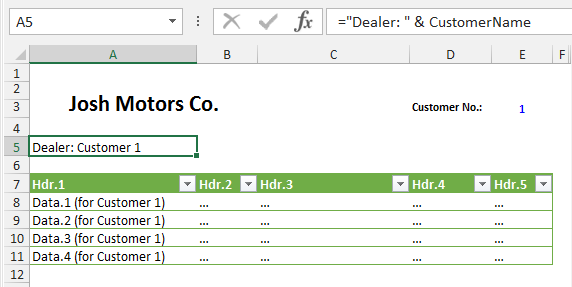
Fig.1
现在,如果我们将单元格E3中的客户号更改为4,则报告将显示所选客户的数据;而不运行任何VBA过程。不幸的是,由于单元格A5包含一个公式,其内容字体不能部分格式化,以粗体字符显示“Dealer:”。图2显示了带有Customer 4数据的报表。
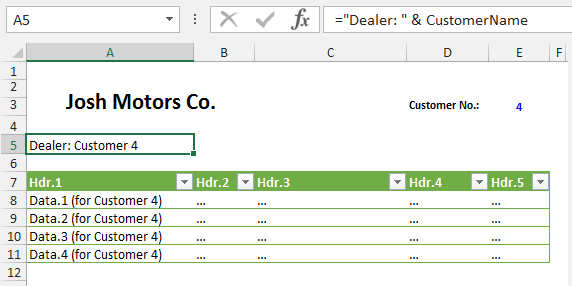
Fig.2
本文提出的解决方案是动态显示图形对象中单元格或区域的内容。
要实现此解决方案,我们需要重新创建所需的输出范围,并在Shape中添加一个A5,其中包含指向输出范围的链接。假设我们不希望在报告所在的同一个工作表中看到这个输出范围,并且请记住输出范围单元格不能隐藏;让我们在B2:C3上另一个名为“Customers Data”的工作表中创建这个输出范围(参见图3)。输入B2 Dealer:,在C2中输入公式=Customer Name,然后根据需要格式化每个单元格(B2字体粗体,如果您愿意,C3可以有不同的字体类型--让我们为这个示例应用字体斜体)。确保范围具有适当的宽度,这样文本就不会溢出单元格。
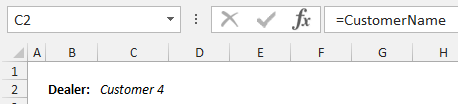
Fig.3
建议为这个范围创建一个Defined Name。下面的代码创建了名为Defined Name的RptDealer。
Const kRptDealer As String = "RptDealer" ‘Have this constant at the top of the Module. It is use by two procedures

Sub Name_ReportDealerName_Add()
'Change Sheetname "Customers Data" and Range "B2:C2" as required
    With ThisWorkbook.Sheets("Customers Data")
        .Cells(2, 2).Value = "Dealer: "
        .Cells(2, 2).Font.Bold = True
        .Cells(2, 3).Formula = "=CustomerName"  'Change as required
        .Cells(2, 3).Font.Italic = True
        With .Parent
            .Names.Add Name:=kRptDealer, RefersTo:=.Sheets("Customers Data").Range("B2:C2") ', _
                Visible:=False 'Visible is True by Default, use False want to have the Name hidden to users
            .Names(kRptDealer).Comment = "Name use for Dealer\Customer picture in report"
        End With
        .Range(kRptDealer).Columns.AutoFit
    End With
End Sub按照上述准备,现在我们可以创建将链接到名为RptDealer的输出范围的形状。在工作表A5中选择Report单元格,然后按照动态显示图片中的单元格范围内容的说明操作,或者如果您愿意,可以使用下面的代码添加和格式化链接的Shape。
Sub Shape_DealerPicture_Set(rCll As Range)
Const kShpName As String = "_ShpDealer"
Dim rSrc As Range
Dim shpTrg As Shape

    Rem Delete Dealer Shape if present and set Dealer Source Range
    On Error Resume Next
    rCll.Worksheet.Shapes(kShpName).Delete
    On Error GoTo 0

    Rem Set Dealer Source Range
    Set rSrc = ThisWorkbook.Names(kRptDealer).RefersToRange

    Rem Target Cell Settings & Add Picture Shape
    With rCll
        .ClearContents
        If .RowHeight < rSrc.RowHeight Then .RowHeight = rSrc.RowHeight
        If .ColumnWidth < rSrc.Cells(1).ColumnWidth + rSrc.Cells(2).ColumnWidth Then _
            .ColumnWidth = rSrc.Cells(1).ColumnWidth + rSrc.Cells(2).ColumnWidth
        rSrc.CopyPicture
        .PasteSpecial
        Selection.Formula = rSrc.Address(External:=1)
        Selection.PrintObject = msoTrue
        Application.CutCopyMode = False
        Application.Goto .Cells(1)
        Set shpTrg = .Worksheet.Shapes(.Worksheet.Shapes.Count)
    End With

    Rem Shape Settings
    With shpTrg
        On Error Resume Next
        .Name = "_ShpDealer"
        On Error GoTo 0
        .Locked = msoFalse
        .Fill.Visible = msoFalse
        .Line.Visible = msoFalse
        .ScaleHeight 1, msoTrue
        .ScaleWidth 1, msoTrue
        .LockAspectRatio = msoTrue
        .Placement = xlMoveAndSize
        .Locked = msoTrue
    End With

    End Sub
可以使用以下过程调用上面的代码:
Sub DealerPicture_Apply()
Dim rCll As Range
    Set rCll = ThisWorkbook.Sheets("Report").Cells(5, 1)
    Call Shape_DealerPicture_Set(rCll)
    End Sub
最终的结果是一幅像公式一样的图片,因为它被链接到包含所需公式和格式的输出范围(见图4)。
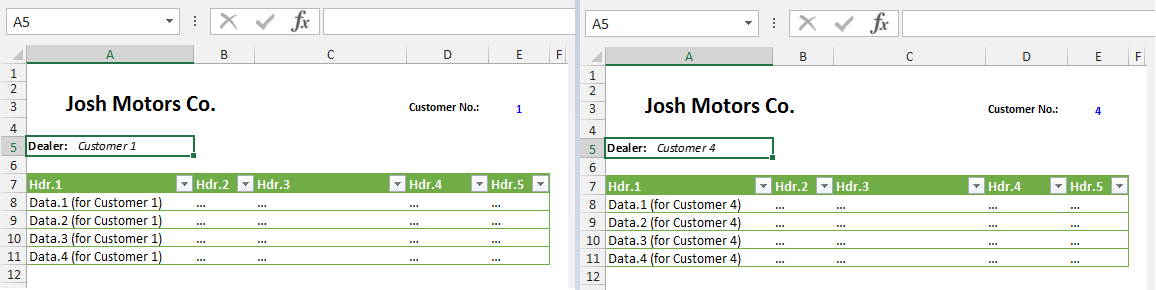
Fig.4
https://stackoverflow.com/questions/39793924
复制相似问题
腾讯云开发者

Copyright © 2013 - 2026 Tencent Cloud. All Rights Reserved. 腾讯云 版权所有
深圳市腾讯计算机系统有限公司 ICP备案/许可证号:粤B2-20090059  粤公网安备44030502008569号
腾讯云计算(北京)有限责任公司 京ICP证150476号 | 京ICP备11018762号