
滚动条在CollapsiblePanelExtender中总是可见的
滚动条在CollapsiblePanelExtender中总是可见的
提问于 2016-09-27 18:38:04
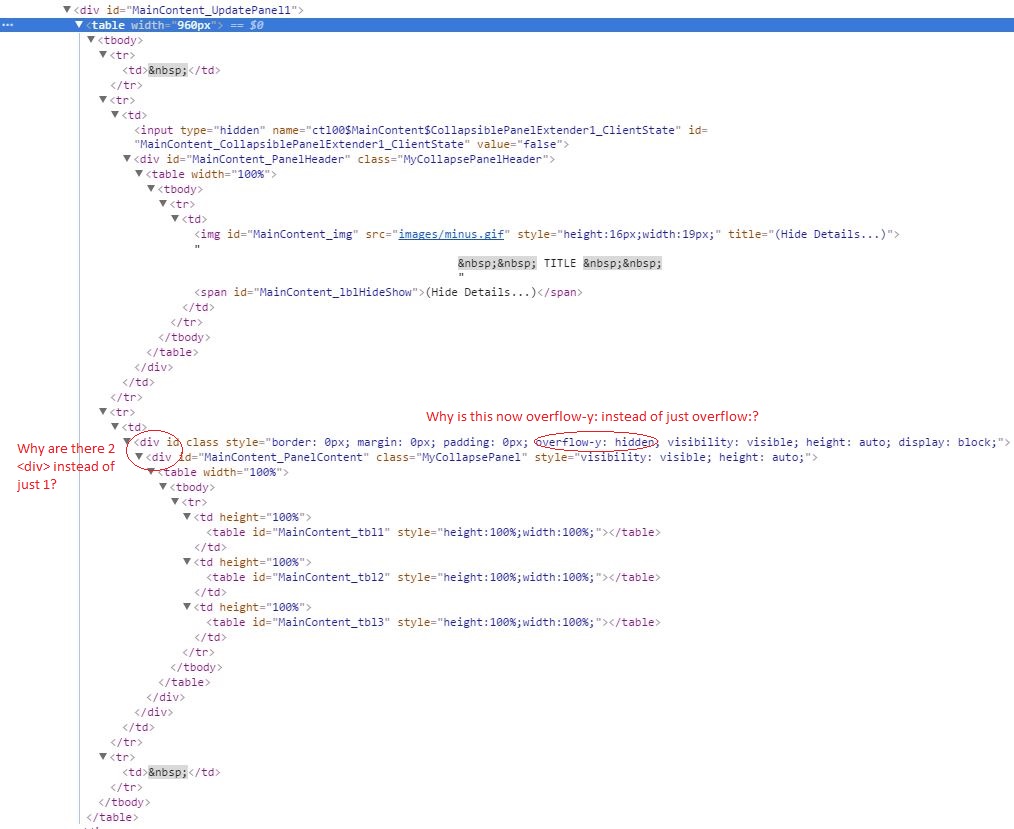
我有一个正在尝试设置的网页,它将显示嵌套在一个Tables中的Ajax CollapsiblePanelExtender。这张桌子的嵌套是正确的,但式样却很奇怪。我最近开始使用Chrome的检查工具,我认为它指向了正确的方向,但我很难理解为什么检查器显示的内容与我的.aspx文件中的不同。我也在Firefox上尝试过,而且行为也是相似的,所以这似乎并不是一个仅限于Chrome的bug。
- 我在
style中为表直接嵌套的AjaxPanel设置了style,但是当在浏览器中显示时,会出现一个水平滚动条,检查器显示样式已更改为overflow-y:hidden;。是什么使我的风格在.aspx文件中的设计和浏览器中显示的方式之间发生变化? - 我在.aspx文件中指定的Ajax .aspx似乎被浏览器转换为
<div>。我可以接受。奇怪的是,检查器中似乎出现了一个额外的<div>,而我并没有在.aspx文件中指定任何位置。这个额外的<div>从何而来?
.aspx文件的最小复制:
<%@ Page Title="" Language="vb" AutoEventWireup="false" MasterPageFile="~/Site_old.Master" CodeBehind="TEST.aspx.vb" Inherits="MyProject.TEST" %>
<%@ Register Assembly="AjaxControlToolkit" Namespace="AjaxControlToolkit" TagPrefix="asp" %>
<asp:Content ID="Content1" ContentPlaceHolderID="HeadContent" runat="server">
<style type="text/css">
.MyCollapsePanelHeader
{
height:20px;
font-weight: bold;
padding:5px;
cursor: pointer;
vertical-align:middle;
font-size:small;
overflow:hidden;
}
.MyCollapsePanel
{
width:100%;
height:100%;
border: 1px solid #BBBBBB;
border-top: none;
overflow:hidden;
}
</style>
</asp:Content>
<asp:Content ID="Content2" ContentPlaceHolderID="MainContent" runat="server">
<asp:UpdatePanel ID="UpdatePanel1" runat="server" ChildrenAsTriggers="true">
<ContentTemplate>
<table width="960px">
<tr>
<td> </td>
</tr>
<tr>
<td>
<asp:CollapsiblePanelExtender ID="CollapsiblePanelExtender1" runat="server"
TargetControlID="PanelContent"
ExpandControlID="PanelHeader"
CollapseControlID="PanelHeader"
Collapsed="true"
TextLabelID="lblHideShow"
ExpandedText="(Hide Details...)"
CollapsedText="(Show Details...)"
ImageControlID="img"
ExpandedImage="images/minus.gif"
CollapsedImage="images/plus.gif"
SuppressPostBack="true" >
</asp:CollapsiblePanelExtender>
<asp:Panel ID="PanelHeader" runat="server" CssClass="MyCollapsePanelHeader">
<table width="100%">
<tr>
<td>
<asp:Image ID="img" runat="server" Height="16px" ImageUrl="images/plus.gif" Width="19px" />
TITLE
<asp:Label ID="lblHideShow" runat="server" Text="Label">(Show Details...)</asp:Label>
</td>
</tr>
</table>
</asp:Panel>
</td>
</tr>
<tr>
<td>
<asp:Panel id="PanelContent" class="MyCollapsePanel" runat="server">
<table width="100%">
<tr>
<td height="100%" runat="server">
<asp:Table ID="tbl1" runat="server" Width="100%" Height="100%"/>
</td>
<td height="100%" runat="server">
<asp:Table ID="tbl2" runat="server" Width="100%" Height="100%"/>
</td>
<td height="100%" runat="server">
<asp:Table ID="tbl3" runat="server" Width="100%" Height="100%"/>
</td>
</tr>
</table>
</asp:Panel>
</td>
</tr>
<tr>
<td> </td>
</tr>
</table>
</ContentTemplate>
</asp:UpdatePanel>
</asp:Content>检查器输出的屏幕截图:
回答 1
Stack Overflow用户
回答已采纳
发布于 2016-10-07 21:05:23
我似乎已经解决了这个问题。我认为这是因为CollapsiblePanelExtender和Panel被分离成不同的细胞。将目标Panel移动到与CollapsiblePanelExtender相同的单元格后,滚动条就消失了。
<div>元素被复制,overflow-y元素仍然存在。我还是不明白为什么这些看起来是这样的。但这似乎与滚动条显示的原因无关。因为这是我最初试图解决的问题,我想这算是一个解决方案。
Working .aspx
<asp:Content ID="Content2" ContentPlaceHolderID="MainContent" runat="server">
<asp:UpdatePanel ID="UpdatePanel1" runat="server" ChildrenAsTriggers="true">
<ContentTemplate>
<table width="960px">
<tr>
<td> </td>
</tr>
<tr>
<td>
<asp:CollapsiblePanelExtender ID="CollapsiblePanelExtender1" runat="server"
TargetControlID="PanelContent"
ExpandControlID="PanelHeader"
CollapseControlID="PanelHeader"
Collapsed="true"
TextLabelID="lblHideShow"
ExpandedText="(Hide Details...)"
CollapsedText="(Show Details...)"
ImageControlID="img"
ExpandedImage="images/minus.gif"
CollapsedImage="images/plus.gif"
SuppressPostBack="true" >
</asp:CollapsiblePanelExtender>
<asp:Panel ID="PanelHeader" runat="server" CssClass="MyCollapsePanelHeader">
<table width="100%">
<tr>
<td>
<asp:Image ID="img" runat="server" Height="16px" ImageUrl="images/plus.gif" Width="19px" />
TITLE
<asp:Label ID="lblHideShow" runat="server" Text="Label">(Show Details...)</asp:Label>
</td>
</tr>
</table>
</asp:Panel>
<asp:Panel id="PanelContent" class="MyCollapsePanel" runat="server">
<table width="100%">
<tr>
<td height="100%" runat="server">
<asp:Table ID="tbl1" runat="server" Width="100%" Height="100%"/>
</td>
<td height="100%" runat="server">
<asp:Table ID="tbl2" runat="server" Width="100%" Height="100%"/>
</td>
<td height="100%" runat="server">
<asp:Table ID="tbl3" runat="server" Width="100%" Height="100%"/>
</td>
</tr>
</table>
</asp:Panel>
</td>
</tr>
<tr>
<td> </td>
</tr>
</table>
</ContentTemplate>
</asp:UpdatePanel>
</asp:Content>页面原文内容由Stack Overflow提供。腾讯云小微IT领域专用引擎提供翻译支持
原文链接:
https://stackoverflow.com/questions/39732035
复制相关文章
相似问题
腾讯云开发者

Copyright © 2013 - 2026 Tencent Cloud. All Rights Reserved. 腾讯云 版权所有
深圳市腾讯计算机系统有限公司 ICP备案/许可证号:粤B2-20090059  粤公网安备44030502008569号
腾讯云计算(北京)有限责任公司 京ICP证150476号 | 京ICP备11018762号