
Java Graphics.fillXxx()与Graphics2D.scale()相结合
我有这样的计划:
import java.awt.Color;
import java.awt.Dimension;
import java.awt.Font;
import java.awt.Graphics;
import java.awt.Graphics2D;
import java.awt.geom.Rectangle2D;

import javax.swing.JComponent;
import javax.swing.JFrame;
import javax.swing.SwingUtilities;
import javax.swing.WindowConstants;


public class TestLine {

    public static void main(String[] args) {
        SwingUtilities.invokeLater(new Runnable() {

            @Override
            public void run() {
                new TestLine().start();
            }
        });
    }

    private static void start() {
        JFrame frame = new JFrame();
        frame.setContentPane(new CarthPanel());
        frame.setDefaultCloseOperation(WindowConstants.EXIT_ON_CLOSE);
        frame.pack();
        frame.setVisible(true);
    }

    private static class CarthPanel extends JComponent {

        @Override
        public Dimension getPreferredSize() {
            return new Dimension(200, 200);
        }

        @Override
        protected void paintComponent(Graphics g) {
            Graphics2D gg = (Graphics2D) g;

            int w = gg.getClipBounds().width;
            int h = gg.getClipBounds().height;
            System.out.println("(w,h)=(" + w + "," + h + ")");

            gg.translate(w - 1, 0); // <<< when uncommenting both lines, mirroring applies
            gg.scale(-1.0, 1.0);    //

            paintTest(gg, w, h);
        }

        private static void paintTest(Graphics2D g, int w, int h) {
            // black background
            g.setColor(Color.black);
            g.fillRect(0, 0, w, h);

            // colored corners
            g.setColor(Color.RED);
            g.drawLine(0, 0, 10, 0);
            g.drawLine(0, 0, 0, 10);
            g.setColor(Color.RED);
            g.drawLine(0, 199, 10, 199);
            g.drawLine(0, 199, 0, 189);
            g.setColor(Color.CYAN);
            g.drawLine(189, 0, 199, 0);
            g.drawLine(199, 0, 199, 10);
            g.setColor(Color.CYAN);
            g.drawLine(189, 199, 199, 199);
            g.drawLine(199, 199, 199, 189);

            // yellow squares
            g.setColor(Color.yellow);
            g.drawRect(3, 3, 10, 10);
            g.fillRect(186, 3, 11, 11);
            g.fillRect(3, 186, 11, 11);
            g.drawRect(186, 186, 10, 10);

            String chars = "ABC";
            g.setFont(Font.decode("Arial 72"));
            Rectangle2D rect = g.getFontMetrics().getStringBounds(chars, g);
            g.drawString(chars, (int) (200 - rect.getWidth()) / 2, (int) (200 - rect.getHeight()));
        }
    }
}
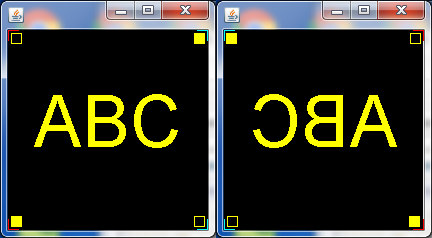
如果您运行这个程序一次有两行注释,然后有一次用相同的行注释掉(请参阅代码),那么您将看到以下内容:
[
如果您没有发现问题,下面是一张放大的图片:
人们会期望这个图像会被完美的镜像。对于所有笔画和空心形状(= drawXxx()方法)都是如此。然而,所有填充的形状(= fillXxx()方法)都是在我期望它们的左侧绘制的,例如填充的黄色矩形,您还可以注意到黑色背景已经移动,就像右边边框的白线所看到的那样。
这是个bug还是故意的?我怀疑这与在drawXxx()和fillXxx()方法中处理“宽度”和“高度”的不同有关:
- drawRect(x,y,w,h)产生一个具有X轴边界x和x+w的空心矩形,因此矩形是w+1像素宽的。
- fillRect(x,y,w,h)产生一个填充的矩形,x轴边界x和x+w-1,所以矩形是w像素宽的。
我遗漏了什么?
回答 2
Stack Overflow用户
发布于 2016-09-27 12:58:47
它是一个bug,它不是一个特性:)当然它不是有意的,镜像图像应该是完美的,没有理由不应该这样做。
有一种方法可以使用BufferedImage在其上正常渲染,然后绘制这个BufferedImage翻转,唯一的缺点是一些性能影响和不好看的文本绘制使用液晶子像素。
import java.awt.Color;
import java.awt.Dimension;
import java.awt.Font;
import java.awt.Graphics;
import java.awt.Graphics2D;
import java.awt.geom.Rectangle2D;
import java.awt.image.BufferedImage;

import javax.swing.JComponent;
import javax.swing.JFrame;
import javax.swing.SwingUtilities;
import javax.swing.WindowConstants;


public class TestLine {

    public static void main(String[] args) {
        SwingUtilities.invokeLater(new Runnable() {

            @Override
            public void run() {
                new TestLine().start();
            }
        });
    }

    private static void start() {
        JFrame frame = new JFrame();
        frame.setContentPane(new CarthPanel());
        frame.setDefaultCloseOperation(WindowConstants.EXIT_ON_CLOSE);
        frame.pack();
        frame.setVisible(true);
    }

    private static class CarthPanel extends JComponent {

        @Override
        public Dimension getPreferredSize() {
            return new Dimension(200, 200);
        }

        @Override
        protected void paintComponent(Graphics g) {
            Graphics2D gg = (Graphics2D) g;

//            System.out.println("(w,h)=(" + w + "," + h + ")");

            gg.translate(getWidth(), 0); // <<< when uncommenting both lines, mirroring applies
            gg.scale(-1.0, 1.0);    //

            BufferedImage img = new BufferedImage(getWidth(), getHeight(), BufferedImage.TYPE_INT_RGB);

            try {
                paintTest(img.createGraphics());
            } catch (Exception e) {
                e.printStackTrace();
            }

            g.drawImage(img, 0, 0, null);
        }


        private void paintTest(Graphics2D g) {
            // black background
            g.setColor(Color.black);
            g.fillRect(0, 0, getWidth(), getHeight());

            // colored corners
            g.setColor(Color.RED);
            g.drawLine(0, 0, 10, 0);
            g.drawLine(0, 0, 0, 10);
            g.setColor(Color.RED);
            g.drawLine(0, 199, 10, 199);
            g.drawLine(0, 199, 0, 189);
            g.setColor(Color.CYAN);
            g.drawLine(189, 0, 199, 0);
            g.drawLine(199, 0, 199, 10);
            g.setColor(Color.CYAN);
            g.drawLine(189, 199, 199, 199);
            g.drawLine(199, 199, 199, 189);

            // yellow squares
            g.setColor(Color.yellow);
            g.drawRect(3, 3, 10, 10);
            g.fillRect(186, 3, 11, 11);
            g.fillRect(3, 186, 11, 11);
            g.drawRect(186, 186, 10, 10);

            String chars = "ABC";
            g.setFont(Font.decode("Arial 72"));
            Rectangle2D rect = g.getFontMetrics().getStringBounds(chars, g);
            g.drawString(chars, (int) (200 - rect.getWidth()) / 2, (int) (200 - rect.getHeight()));
        }
    }
}Stack Overflow用户
发布于 2016-09-27 13:09:25
不是一个答案,而是一个假设-矩形的“包含(x,y)”将是true (x,y),它构成了rect的(x,y)角,false表示(maxx,maxy)角。演示:
Rectangle r=new Rectangle(0, 0, 10, 10);
System.out.println(r.contains(0, 5)); // true
System.out.println(r.contains(5, 0)); // true
System.out.println(r.contains(10, 5)); // false
System.out.println(r.contains(5, 10)); // false假设fillRect不会将“最大边”视为要填充的内部点。
为了评估假设,我建议您尝试使用一个GeneralPath,它定义相同的矩形,并看到填充它有什么不同。应禁止GeneralPath对“右上边框与形状内部不一致”作出任何假设。
https://stackoverflow.com/questions/39724683
复制相似问题
腾讯云开发者

Copyright © 2013 - 2026 Tencent Cloud. All Rights Reserved. 腾讯云 版权所有
深圳市腾讯计算机系统有限公司 ICP备案/许可证号:粤B2-20090059  粤公网安备44030502008569号
腾讯云计算(北京)有限责任公司 京ICP证150476号 | 京ICP备11018762号