
防火墙密码和电子邮件认证失败,出错
防火墙密码和电子邮件认证失败,出错
提问于 2016-09-22 08:56:09
我正在使用最新版本/SDK开发一个应用程序
- Visual Studio
- 科多瓦
- 离子型
- AngularJS
- Firebase
- 基因运动
我试图通过Firebase (电子邮件和密码)为我的应用程序中的一个用户提供服务。我已经在网络上搜索了一个解决方案,但我根本无法让它正常工作。
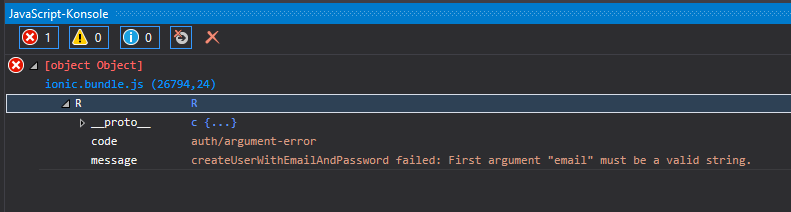
嗯,只要我点击注册按钮(右上角),我就会得到这个错误消息。
这是register.html (包含一个表单)
<ion-modal-view>
<div class="bar bar-header firstStart">
    <div class="button button-clear button-positive" ng-click="closeModal()">
       Schließen
    </div>
    <h1 class="title modalTitle">Registrieren </h1>
    <div class="button button-clear button-positive"
         ng-click="signupEmail()"> Speichern </div>
</div>

<ion-content class="has-header" padding="true">
    <div class="list list-inset">
        <label class="item item-input item-floating-label">
            <i class="icon ion-ios-email placeholder-icon"></i>
            <span class="input-label">E-Mail</span>
            <input type="email" ng-model="data.email" placeholder="E-Mail" id="email">
        </label>
        <label class="item item-input item-floating-label">
            <i class="icon ion-ios-locked placeholder-icon"></i>
            <span class="input-label">Passwort</span>
            <input type="password" ng-model="data.password"
                   placeholder="Passwort" id="password">
        </label>
    </div>
</ion-content>
app.js
    .controller('modalController', ['$scope', '$ionicModal','$firebase',
     function ($scope, $ionicModal,$firebase)
     {
        $ionicModal.fromTemplateUrl('templates/register.html', {
        scope: $scope,
        animation: 'slide-in-up',
        backdropClickToClose: false,
        hardwareBackButtonClose: false,
        focusFirstInput: true
    }).then(function (modal) {
        $scope.modal = modal;
    });

    $scope.signupEmail = function () {
        $scope.data = {};
        var email = $scope.data.email;
        alert(email);
        var password = $scope.data.password;
        alert(password);
        /*if (email.length < 4) {
            alert('Please enter an email address.');
            return;
        }
        if (password.length < 4) {
            alert('Please enter a password.');
            return;
        }*/

        firebase.auth().createUserWithEmailAndPassword(email, password).catch(
        function (error)
        {
            // Handle Errors here.
            var errorCode = error.code;
            var errorMessage = error.message;
            // [START_EXCLUDE]
            if (errorCode == 'auth/weak-password') {
                alert('The password is too weak.');
            } else {
                alert(errorMessage);
            }
            if (errorCode == 'auth/argument-error') {
                alert('Error with arg');
            } else {
                alert(errorMessage);
            }
            console.log(error);
            // [END_EXCLUDE]
        });
        // [END createwithemail]
    };

    $scope.login = function () {
        firebase.auth().onAuthStateChanged(function (user) {
            if (user) {
                // User is signed in.
                alert("User already signed in");
            } else {
                // No user is signed in.
                firebase.auth().signInWithEmailAndPassword(email, password).catch(
              function (error)
              {
                 // Handle Errors here.
                 var errorCode = error.code;
                 var errorMessage = error.message;
                 alert("error during login:" + errorMessage + "Code: " + errorCode);
               })
            }
        });
    };

    $scope.openModal = function () {
        $scope.modal.show();
    };

    $scope.closeModal = function () {
        $scope.modal.hide();
    };
    // Cleanup the modal when we're done with it!
    $scope.$on('$destroy', function () {
        $scope.modal.remove();
    });
    // Execute action on hide modal
    $scope.$on('modal.hidden', function () {
        // Execute action
    });
    // Execute action on remove modal
    $scope.$on('modal.removed', function () {
        // Execute action
    });
}]);
请注意,app.js包含两个控制器,因为如果用户点击右上角的按钮,其中一个模式会打开另一个模式。
此函数将导致错误。
这个函数放在app.js中,只是想为您突出显示它。
$scope.signupEmail = function () {
    $scope.data = {};
    var email = $scope.data.email;
    alert(email);
    var password = $scope.data.password;
    alert(password);

    firebase.auth().createUserWithEmailAndPassword(email, password).catch(
        function (error)
        {
           // Handle Errors here.
           var errorCode = error.code;
           var errorMessage = error.message;
           // [START_EXCLUDE]
           if (errorCode == 'auth/weak-password') {
             alert('The password is too weak.');
           } else {
            alert(errorMessage);
           }
           if (errorCode == 'auth/argument-error') {
            alert('Error with arg');
           } else {
            alert(errorMessage);
           }
           console.log(error);
           // [END_EXCLUDE]
       });
       // [END createwithemail]
     };
注意:正如您可能看到的那样,我正在打印密码并发送电子邮件给用户以查看其值,但我得到的唯一结果是
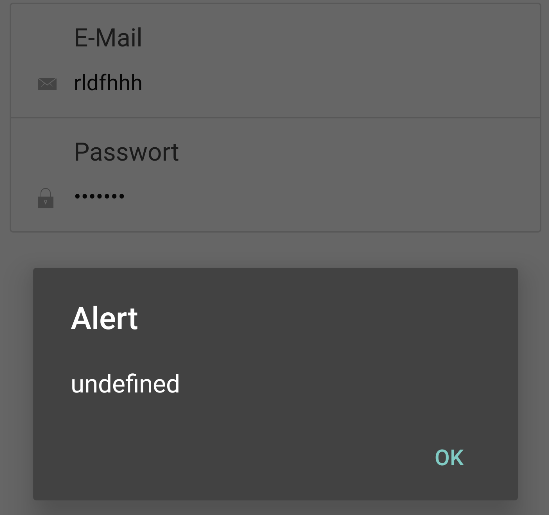
我做错了什么?非常感谢你的回答。
谢谢!
回答 1
Stack Overflow用户
发布于 2016-09-22 17:12:26
$scope.data = {};

var email = $scope.data.email;
alert(email);

var password = $scope.data.password;
alert(password);
电子邮件总是没有定义。
页面原文内容由Stack Overflow提供。腾讯云小微IT领域专用引擎提供翻译支持
原文链接:
https://stackoverflow.com/questions/39634499
复制相关文章
相似问题
腾讯云开发者

Copyright © 2013 - 2026 Tencent Cloud. All Rights Reserved. 腾讯云 版权所有
深圳市腾讯计算机系统有限公司 ICP备案/许可证号:粤B2-20090059  粤公网安备44030502008569号
腾讯云计算(北京)有限责任公司 京ICP证150476号 | 京ICP备11018762号