
将文件读写到生成不同字节文件的Server列中的代码
将文件读写到生成不同字节文件的Server列中的代码
提问于 2016-09-21 09:36:40
使用:
- MS- Server 2014
- MS 2013,将ODBC表链接到Server数据库
- “Server”ODBC驱动程序(10.00.10586.00,Microsoft Corporation,SQLSRV32.DLL)
- DAO
我们有一个Access数据库,将ODBC表链接到SQL Server 2014数据库,在Access应用程序中的表单后面有VBA代码,用于将文件上载到Server (varbinarymax)列,并在以后从同一blob列下载该文件。
但是,我们发现,在检索前面从blob列上传的文件时,保存的文件有一些额外的字节添加到文件的末尾。
下面是“无法比较”中两个文件比较的屏幕截图:
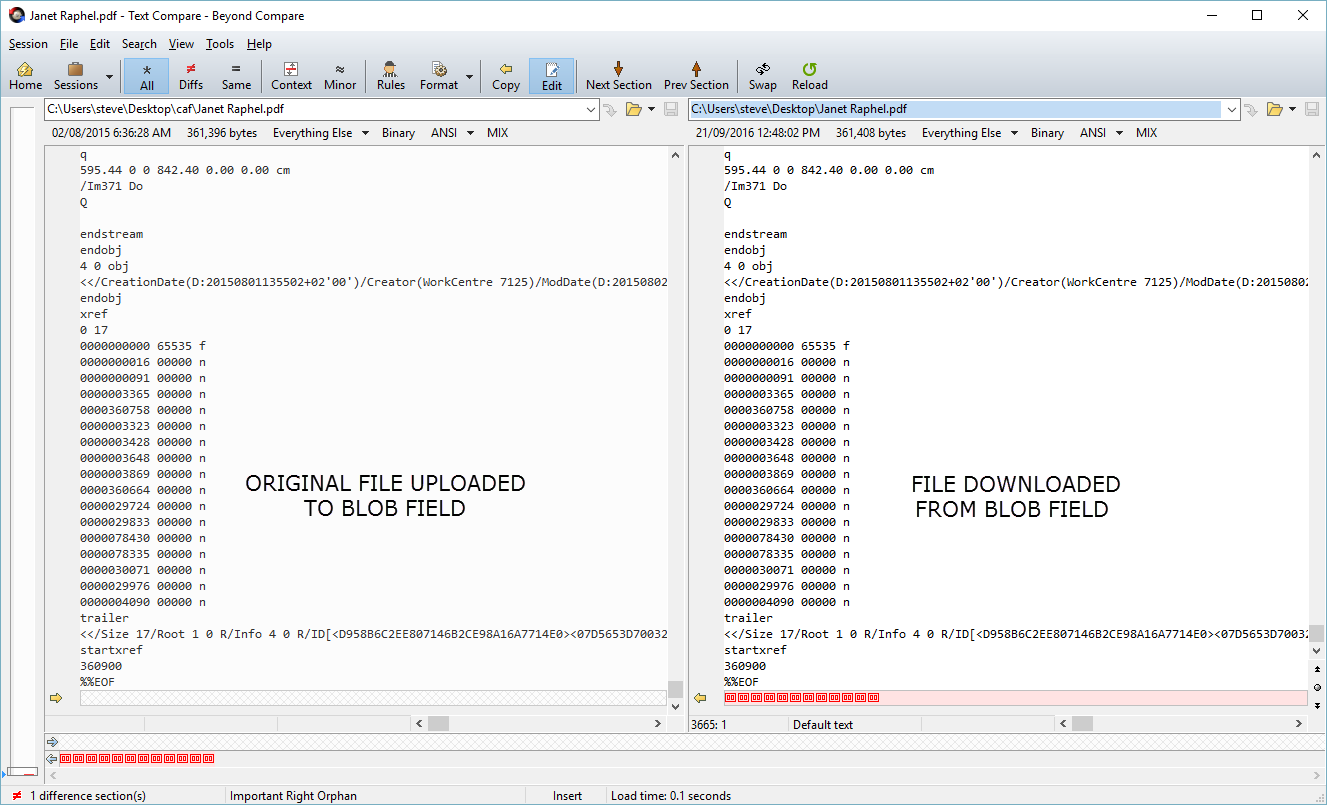
如果有人能检查并指出代码中的错误,我将不胜感激。守则如下:
Function ReadBLOB(SourceFileName As String, TableName As String, FieldName As String, _
                  IDFieldName As String, IDFieldValue As Variant)
    Dim NumBlocks As Integer, SourceFile As Integer, i As Integer
    Dim FileLength As Long
    Dim LeftOver As Long
    Dim FileData() As Byte
    Dim RetVal As Variant
    Dim BlockSize As Long

    Dim s As String

    On Error GoTo Err_ReadBLOB

    BlockSize = 32767

    ' Open the source file.
    SourceFile = FreeFile
    Open SourceFileName For Binary Access Read As SourceFile

    ' Get the length of the file.
    FileLength = LOF(SourceFile)
    If FileLength = 0 Then
        ReadBLOB = 0
        Exit Function
    End If

    ' Calculate the number of blocks to read and leftover bytes.
    NumBlocks = FileLength \ BlockSize
    LeftOver = FileLength Mod BlockSize

    Dim T As dao.Recordset

    If TypeName(IDFieldValue) = "String" Then
        IDFieldValue = "'" & IDFieldValue & "'"
    End If

    s = "SELECT [" & FieldName & "] FROM [" & TableName & "] WHERE [" & IDFieldName & "] = " & IDFieldValue

    Set T = CurrentDb.OpenRecordset(s, dbOpenDynaset, dbSeeChanges)

    T.Edit

    ' Read the 1st block of data (upto Leftover in size), writing it to the table.
    'FileData = String$(LeftOver, 32)
    ReDim FileData(LeftOver)
    Get SourceFile, , FileData
    T(FieldName).AppendChunk (FileData)

    ' Read the remaining blocks of data, writing them to the table.
    'FileData = String$(BlockSize, 32)
    ReDim FileData(BlockSize)
    For i = 1 To NumBlocks
        Get SourceFile, , FileData
        T(FieldName).AppendChunk (FileData)

    Next i

    ' Update the record and terminate function.
    T.Update
    Close SourceFile
    ReadBLOB = FileLength
    Exit Function

Err_ReadBLOB:
    ReadBLOB = -Err

    MsgBox Err.Description

    Exit Function
End Function

Function WriteBLOB2(TableName As String, FieldName As String, IDFieldName As String, _
                    IDFieldValue As Variant, DestinationFileName As String) As Long

    Dim NumBlocks As Integer, DestFile As Integer, i As Integer
    Dim FileLength As Long, LeftOver As Long
    Dim FileData() As Byte
    Dim RetVal As Variant
    Dim BlockSize As Long
    Dim s As String
    Dim f As String

    On Error GoTo Err_WriteBLOB

    BlockSize = 32767

    Dim T As dao.Recordset

    If TypeName(IDFieldValue) = "String" Then
        IDFieldValue = "'" & IDFieldValue & "'"
    End If

    s = "SELECT [" & FieldName & "] FROM [" & TableName & "] WHERE [" & IDFieldName & "] = " & IDFieldValue

    Set T = CurrentDb.OpenRecordset(s, dbOpenSnapshot, dbSeeChanges)

    If T.RecordCount = 0 Then
        WriteBLOB2 = 0
        Exit Function
    End If

    ' Get the size of the field.
    FileLength = T(FieldName).FieldSize()
    If FileLength = 0 Then
        WriteBLOB2 = 0
        Exit Function
    End If

    ' Calculate number of blocks to write and leftover bytes.
    NumBlocks = FileLength \ BlockSize
    LeftOver = FileLength Mod BlockSize

    ' Remove any existing destination file.
    DestFile = FreeFile
    Open DestinationFileName For Output As DestFile
    Close DestFile

    ' Open the destination file.
    Open DestinationFileName For Binary As DestFile

    ' Write the leftover data to the output file.
    FileData = T(FieldName).GetChunk(0, LeftOver)
    Put DestFile, , FileData

    ' Write the remaining blocks of data to the output file.
    For i = 1 To NumBlocks
        ' Reads a chunk and writes it to output file.
        FileData = T(FieldName).GetChunk((i - 1) * BlockSize + LeftOver, BlockSize)
        Put DestFile, , FileData

    Next i

    ' Terminates function
    Close DestFile
    WriteBLOB2 = FileLength
    Exit Function

Err_WriteBLOB:
    WriteBLOB2 = -Err

    MsgBox Err.Description

    Exit Function
End Function

Public Sub ClearSQLBlob2(TableName As String, FieldName As String, _
                         IDFieldName As String, IDFieldValue As Variant)

    If TypeName(IDFieldValue) = "String" Then
        IDFieldValue = "'" & IDFieldValue & "'"
    End If

    DoCmd.SetWarnings False
    DoCmd.RunSQL "UPDATE [" & TableName & "] SET [" & FieldName & "] = NULL WHERE [" & IDFieldName & "] = " & IDFieldValue
    DoCmd.SetWarnings True
End Sub回答 1
Stack Overflow用户
回答已采纳
发布于 2016-09-21 12:11:36
我认为问题是:
除非模块中有Option Base 1声明,否则数组是基于零的。
所以如果LeftOver = 2,
ReDim FileData(LeftOver)实际上将声明一个包含3个字节的数组FileData(0 To 2)。因此,下面的Get将读取3个字节,但您希望它读取2个字节。
对于全尺寸数组也是如此。
最后,您从文件中读取了太多的NumBlocks + 1字节,剩下的部分将是00字节。
解决方案:使用
ReDim FileData(1 To LeftOver)
ReDim FileData(1 To BlockSize)编辑:请注意,您必须检查情况LeftOver = 0。
页面原文内容由Stack Overflow提供。腾讯云小微IT领域专用引擎提供翻译支持
原文链接:
https://stackoverflow.com/questions/39612793
复制相关文章
相似问题
腾讯云开发者

Copyright © 2013 - 2026 Tencent Cloud. All Rights Reserved. 腾讯云 版权所有
深圳市腾讯计算机系统有限公司 ICP备案/许可证号:粤B2-20090059  粤公网安备44030502008569号
腾讯云计算(北京)有限责任公司 京ICP证150476号 | 京ICP备11018762号