
GridLayoutManager相同图像大小
GridLayoutManager相同图像大小
提问于 2016-09-20 02:06:37
我正在试验RecyclerView和GridLayoutManager。
我最终想要显示的图像大小与这样的相同,如果可能的话,甚至是方形的:
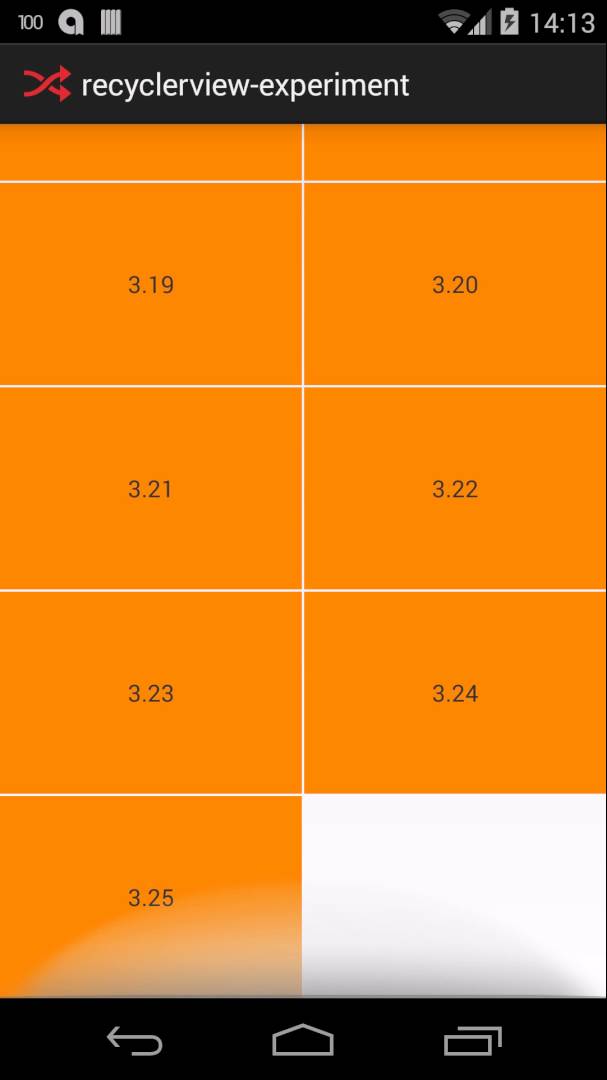
GridLayoutManager的什么元素使这成为可能?是否修改用于填充RecyclerView的单项XML?
回答 2
Stack Overflow用户
回答已采纳
发布于 2016-09-20 04:31:24
首先,您必须像下面这样子类一个ImageView:
import android.content.Context;
import android.util.AttributeSet;
import android.widget.ImageView;


public class MyImageview extends ImageView {
    public MyImageview (Context context) {
        super(context);
    }

    public MyImageview (Context context, AttributeSet attrs) {
        super(context, attrs);
    }

    public MyImageview (Context context, AttributeSet attrs, int defStyleAttr) {
        super(context, attrs, defStyleAttr);
     }

    @Override
    protected void onMeasure(int widthMeasureSpec, int heightMeasureSpec) {
        super.onMeasure(widthMeasureSpec, heightMeasureSpec);
        setMeasuredDimension(getMeasuredWidth(), getMeasuredWidth()); // Snap to
        // width
    }
}在XML文件.中使用此文件
<LinearLayout xmlns:android="http://schemas.android.com/apk/res/android"
    android:orientation="vertical"
    android:layout_width="match_parent"
    android:layout_height="match_parent">

    <com.app.MyImageview
        android:layout_width="match_parent"
        android:layout_height="match_parent"
        android:id="@+id/imageBackground"
        android:scaleType="centerCrop"/>

</LinearLayout>确保您的MyImageView高度和宽度必须是match_parent。
Stack Overflow用户
发布于 2018-05-07 09:19:44
如果您使用Picaso,那么下面的用户可以使其平滑:
Picasso.with(mContext)
            .load(mUri)
            .placeholder(R.drawable.ic_loading_animated)
            .fit()
            .centerCrop() // resizing images can really distort the aspect ratio, prevent this
.into(mImageView)页面原文内容由Stack Overflow提供。腾讯云小微IT领域专用引擎提供翻译支持
原文链接:
https://stackoverflow.com/questions/39584657
复制相关文章
相似问题
腾讯云开发者

Copyright © 2013 - 2026 Tencent Cloud. All Rights Reserved. 腾讯云 版权所有
深圳市腾讯计算机系统有限公司 ICP备案/许可证号:粤B2-20090059  粤公网安备44030502008569号
腾讯云计算(北京)有限责任公司 京ICP证150476号 | 京ICP备11018762号