
net.tcp抛出异常(显然)为Solid .config <systerm.serviceModel>
我想我已经尝试了所有的东西,但是我无法让一个简单的net.tcp WCF服务工作,我需要一些帮助。
namespace AppRefactory.JdmCommSample
{
    public enum DocType { Labels, Releases, Artists }

    // NOTE: You can use the "Rename" command on the "Refactor" menu to change the interface name "IService1" in both code and config file together.
    [ServiceContract]
    public interface ILabelOperations
    {

        [OperationContract]
        bool PassLabelProcess(string targetAddress, string hostCommand, MusicLabelContract musicLabel);

        // TODO: Add your service operations here
    }
}
下面是在一个文件LabelProcess.svc中实现该服务:
namespace AppRefactory.JdmCommSample
{
    // NOTE: You can use the "Rename" command on the "Refactor" menu to change the class name "MusicLabel" in code, svc and config file together.
    // NOTE: In order to launch WCF Test Client for testing this service, please select MusicLabel.svc or MusicLabel.svc.cs at the Solution Explorer and start debugging.
    public class LabelOperations : ILabelOperations
    {
        public bool PassLabelProcess(string targetAddress, string hostCommand, MusicLabelContract musicLabel)
        {
            throw new NotImplementedException();
        }
    }
}
我对服务的web.config进行了广泛的阅读,并使用了ServiceModelReg.exe来帮助我--但是下面是服务项目的web.config的当前版本:
<?xml version="1.0"?>
<configuration>

  <appSettings>
    <add key="aspnet:UseTaskFriendlySynchronizationContext" value="true"/>
  </appSettings>
  <system.web>
    <compilation debug="true" targetFramework="4.5.2"/>
    <httpRuntime targetFramework="4.5.2"/>
    <httpModules>
      <add name="ApplicationInsightsWebTracking" type="Microsoft.ApplicationInsights.Web.ApplicationInsightsHttpModule, Microsoft.AI.Web"/>
    </httpModules>
  </system.web>
  <system.serviceModel>
    <behaviors>
      <endpointBehaviors>
        <behavior name="epTcpBehavior">
          <endpointDiscovery />
        </behavior>
      </endpointBehaviors>
      <serviceBehaviors>
        <behavior name="ServiceBehaviorConfig">
          <serviceMetadata httpGetEnabled="false" />
          <serviceDebug httpHelpPageEnabled="false" httpsHelpPageEnabled="false"
            includeExceptionDetailInFaults="true" />
        </behavior>
        <behavior name="">
          <serviceMetadata httpGetEnabled="true" httpsGetEnabled="true" />
          <serviceDebug includeExceptionDetailInFaults="false" />
        </behavior>
      </serviceBehaviors>
    </behaviors>
    <protocolMapping>
        <add binding="basicHttpsBinding" scheme="https"/>
        <add binding="netTcpBinding" scheme="net.tcp" bindingConfiguration="InsecureTcp" />
    </protocolMapping>
    <serviceHostingEnvironment aspNetCompatibilityEnabled="true" multipleSiteBindingsEnabled="true"/>
    <services>
      <service behaviorConfiguration="ServiceBehaviorConfig" name="AppRefactory.JdmCommSample.LabelOperations">
        <endpoint address="LabelService" binding="netTcpBinding" bindingConfiguration="InsecureTcp"
          name="LabelOperations" contract="AppRefactory.JdmCommSample.ILabelOperations" />
        <endpoint address="netTcpMex" binding="mexTcpBinding" bindingConfiguration="NewBinding0"
          name="NetTcpMEX" contract="IMetadataExchange" />
        <endpoint address="mexhttp" binding="mexHttpBinding" name="HttpMex"
          contract="IMetadataExchange" />
        <host>
          <baseAddresses>
            <add baseAddress="net.tcp://localhost/JdmCommSample/" />
          </baseAddresses>
        </host>
      </service>
    </services>
    <bindings>
      <netTcpBinding>
        <binding name="InsecureTcp" portSharingEnabled="true">
          <security mode="None" />
        </binding>
      </netTcpBinding>
      <mexTcpBinding>
        <binding name="NewBinding0" />
      </mexTcpBinding>
    </bindings>
  </system.serviceModel>
  <system.webServer>
    <modules runAllManagedModulesForAllRequests="true">
      <remove name="ApplicationInsightsWebTracking"/>
      <add name="ApplicationInsightsWebTracking" type="Microsoft.ApplicationInsights.Web.ApplicationInsightsHttpModule, Microsoft.AI.Web"
        preCondition="managedHandler"/>
    </modules>
    <!--
        To browse web app root directory during debugging, set the value below to true.
        Set to false before deployment to avoid disclosing web app folder information.
      -->
    <directoryBrowse enabled="true"/>
    <validation validateIntegratedModeConfiguration="false"/>
  </system.webServer>

</configuration>
当我转到客户端项目并尝试添加服务引用(在Visual 2015中)时,我将得到以下错误:
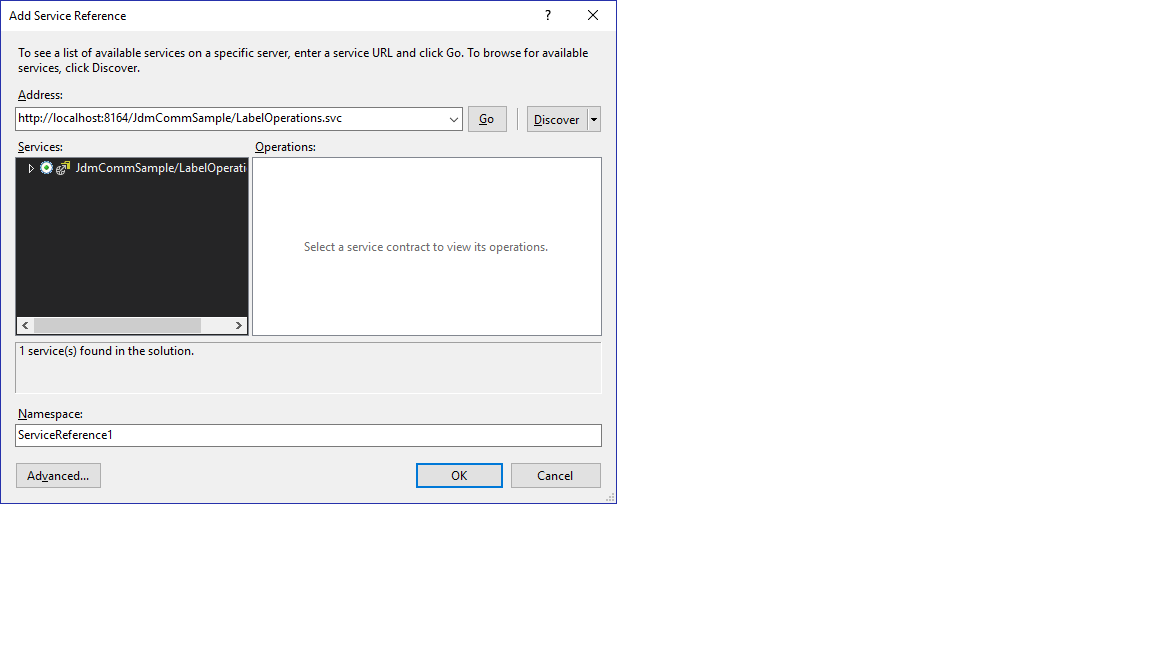
单击“发现”按钮不会显示该服务,因此我手动输入服务地址: net://localhost/JdmCommSample/LabelOperations.svc并获得以下结果,单击“Go”按钮:
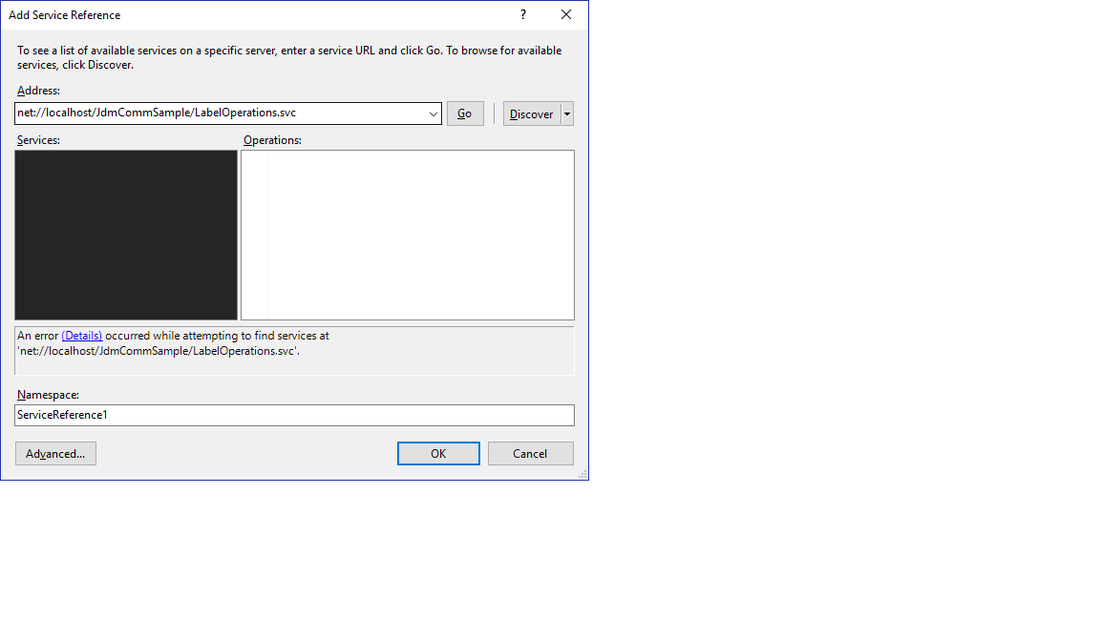
最后,我单击上面错误消息块(对话中)中的'Details‘链接,并得到以下内容:
添加服务参考错误对话:
无法识别URI前缀。元数据包含无法解析的引用:'net.tcp://localhost/JdmCommSample/LabelOperations.svc'.在net.tcp://localhost/JdmCommSample/LabelOperations.svc没有能够接收消息的端点侦听。这通常是由不正确的地址或SOAP操作造成的。有关更多细节,请参见InnerException (如果存在)。如果在当前解决方案中定义了服务,请尝试构建解决方案并再次添加服务引用。
我已经收到同样的错误消息很长一段时间了,我无法弄清楚为什么客户机的元数据一直坚持使用服务的旧http://地址,以及为什么它不接受net.tcp地址。
最后,我应该快速添加使用以下开发环境:
- Visual Studio 2015
- Windows 10
- IIS 10
...and --我已经花了时间尝试解决这个问题,方法是修改IIS设置,使用支持net.tcp的默认服务(无论是否带有http),并在/bin和编码文件夹中创建虚拟应用程序,以支持交互式调试。上面的最后对话中描述的错误消息更改--但只说我正在使用的net.tcp://地址‘不可用’。
再次感谢您的帮助!
回答 1
Stack Overflow用户
发布于 2016-09-30 03:36:28
好的--看来我已经解决了这个mess.....and,这里的问题是--多年来我一直没有使用Visual来配置net.tcp端点,并且错误地结束了这个错误的结论,因为系统托盘中没有WCF测试服务,人们会使用对话框来配置net.tcp链接。
根据MSDN中关于通过(WAS)设置net.tcp服务的文章,所有端点配置和服务引用都是使用客户端手工构建或工具生成的代码(使用svcutil.exe)来处理的,并且服务端主要是手工构建的逻辑。
因此,我在这篇文章中的问题是期望和错误信息的结果。抱歉..。
这里的下一步是创建一个单向服务方法,其效果将是在客户端上抛出一个事件。我希望在未来的几天里会有关于这个主题的问题--如果有人在这个话题上有任何有用的链接可以分享,请不要把它们保留在自己身上!)
https://stackoverflow.com/questions/39583664
复制相似问题
腾讯云开发者

Copyright © 2013 - 2026 Tencent Cloud. All Rights Reserved. 腾讯云 版权所有
深圳市腾讯计算机系统有限公司 ICP备案/许可证号:粤B2-20090059  粤公网安备44030502008569号
腾讯云计算(北京)有限责任公司 京ICP证150476号 | 京ICP备11018762号