
SL中的OsReload软件采集
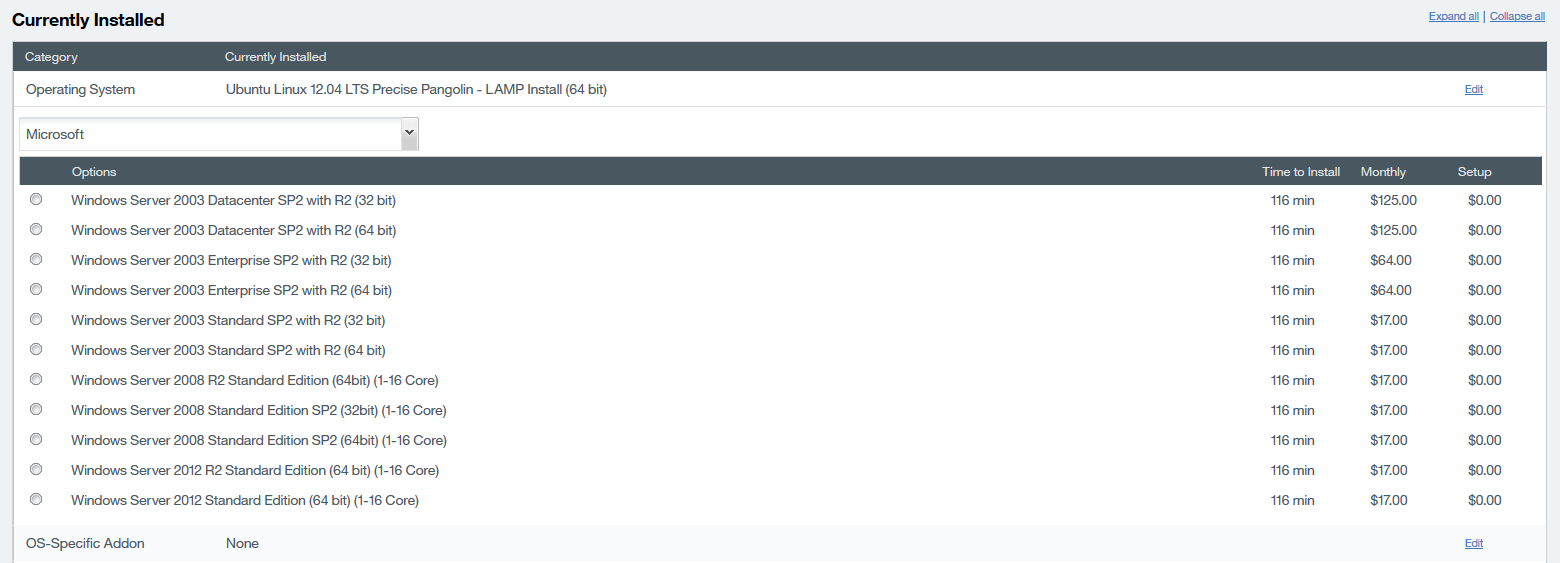
我试图让操作系统选项重新加载,但我找不到API来获得选项。如何使用Java客户端获取OS名称、安装时间和价格?如果你能给我一个样品或指南,我们将不胜感激。
回答 1
Stack Overflow用户
发布于 2016-09-19 19:02:58
尝试下面的java脚本:
package com.softlayer.api.Prices;

import com.softlayer.api.ApiClient;
import com.softlayer.api.RestApiClient;
import com.softlayer.api.service.product.Package;
import com.softlayer.api.service.product.item.Category;
import com.softlayer.api.service.product.item.Price;

/**
 * This script Retrieves options for OS reload as Control Portal
 *
 * Important Manual Page:
 * http://sldn.softlayer.com/reference/services/SoftLayer_Product_Package/getItemPrices
 *
 * @license <http://sldn.softlayer.com/article/License>
 * @authon SoftLayer Technologies, Inc. <sldn@softlayer.com>
 * @version 0.2.2
 */
public class GetItemPrices {
    /**
     * This is the constructor, is used to Route
     */
    public GetItemPrices() {
        // Declare your SoftLayer username and apiKey
        String username = "set me";
        String apiKey = "set me";

        // Define the server's identifier
        Long packageId = new Long(46);

        // Create client and Search Service
        ApiClient client = new RestApiClient().withCredentials(username, apiKey);
        Package.Service packageService = Package.service(client, packageId);

        // Define an object mask to get additional properties
        packageService.withMask().itemPrices().categories();
        packageService.withMask().itemPrices().item().softwareDescription().averageInstallationDuration();

        // Define the Manufactures that you want to display
        String[] manufactures = {"CentOS", "Citrix", "CloudLinux", "Debian", "FreeBSD", "Microsoft", "Other", "Parallels", "Redhat", "Ubuntu", "VMware", "Vyatta"};

        try {
            for(String manu : manufactures) {
                System.out.println(manu);
                for (Price price : packageService.getObject().getItemPrices()) {
                    for (Category category : price.getCategories()) {
                        if (category.getCategoryCode().equals("os")) {

                            if (price.getItem().getSoftwareDescription().getManufacturer().equals(manu)) {
                                System.out.printf("Price Id: %-10s Description: %-70s Time To Install: %-4s Monthly: %-7s Setup: %-7s\n",
                                        price.getId(), price.getItem().getDescription(), price.getItem().getSoftwareDescription().getAverageInstallationDuration(),
                                        price.getRecurringFee(), price.getSetupFee());
                            }

                        }
                    }
                }
        }

        } catch (Exception e) {
            System.out.println("Error: " + e);
        }
    }

    /**
     * This is the main method which makes use of Get Item Prices
     *
     * @param args
     * @return Nothing
     */
    public static void main(String[] args) {
        new GetItemPrices();
    }


}如您所见,有必要从希望显示重新加载选项的服务器中定义packageId。
不幸的是,无法使用Java客户端SoftLayer从服务器获取包,因为“包”掩码存在一个问题:
https://github.com/softlayer/softlayer-java/pull/37
有一个修复,但是方法的返回类型有问题。所以你得试着用另一种方式得到包裹。
更新的
很抱歉延迟了几次测试,我验证了在控制门户中重新加载屏幕目前存在一个问题,无法提供重新加载的选项,因为您可以看到Windows 2003就像一个选项,但是不可能使用它,因为它是不推荐的。
另一个问题,例如,如果我们在第一个磁盘中有一个25 GB的VSI,我们就不能为Windows重新加载OS,因为Control将显示一个异常,即在第一个磁盘中必须有100 GB。
我可以提供一个脚本来获得避免冲突的重新加载选项,但是脚本将继续显示Windows 2003或Vyatta,这些选项都是不推荐的(这是脚本提供错误信息的唯一情况,这是因为这些选项尚未从目录中删除--另一个问题)--对于脚本显示的其他选项,它将显示正确的选项。
对于我之前提到的问题,您可以提交一张票证,说明Control显示无效/错误选项的原因。
我希望这个剧本能帮到你。让我知道任何评论或怀疑。
package com.softlayer.api.Prices;

import com.softlayer.api.ApiClient;
import com.softlayer.api.RestApiClient;
import com.softlayer.api.service.billing.Order;
import com.softlayer.api.service.billing.order.Item;
import com.softlayer.api.service.product.Package;
import com.softlayer.api.service.product.item.Category;
import com.softlayer.api.service.product.item.Price;
import com.softlayer.api.service.product.item.resource.Conflict;
import com.softlayer.api.service.virtual.Guest;
import java.util.List;

/**
 * This script Retrieves options for OS reload as Control Portal
 *
 * Important Manual Page:
 * http://sldn.softlayer.com/reference/services/SoftLayer_Product_Package/getItemPrices
 *
 * @license <http://sldn.softlayer.com/article/License>
 * @authon SoftLayer Technologies, Inc. <sldn@softlayer.com>
 * @version 0.2.2
 */
public class GetItems {
    /**
     * This is the constructor, is used to Route
     */
    public GetItems() {
        // Declare your SoftLayer username and apiKey
        String username = "set me";
        String apiKey = "set me";

        // Define the package's identifier
        Long packageId = new Long(46);
        // Define the server's identifier
        Long serverId = new Long(24453061);

        // Create client and Search Service
        ApiClient client = new RestApiClient().withCredentials(username, apiKey);
        Package.Service packageService = Package.service(client, packageId);
        Guest.Service guestService = Guest.service(client, serverId);
        // Get Items
        guestService.withNewMask().maxCpu();
        guestService.withNewMask().billingItem().orderItem().order();
        System.out.println(guestService.getObject().getBillingItem().getOrderItem().getOrder().getId());
        Order.Service orderService = Order.service(client, guestService.getObject().getBillingItem().getOrderItem().getOrder().getId());
        orderService.withNewMask().items().item();

        List<Conflict> conflicts = packageService.getItemConflicts();
        List<Item> billingOrderItems = orderService.getObject().getItems();

        // Define an object mask to get additional properties
        packageService.withMask().itemPrices().categories();
        packageService.withMask().itemPrices().item().softwareDescription().averageInstallationDuration();
        packageService.withMask().itemPrices().capacityRestrictionMaximum();
        packageService.withMask().itemPrices().capacityRestrictionMinimum();

        // Define the Manufactures that you want to display
        String[] manufactures = {"CentOS", "Citrix", "CloudLinux", "Debian", "FreeBSD", "Microsoft", "Other", "Parallels", "Redhat", "Ubuntu", "VMware", "Vyatta"};
        boolean product;

        try {
            for(String manu : manufactures) {
                System.out.println(manu);
                for (Price price : packageService.getObject().getItemPrices()) {
                    product = true;
                    for (Category category : price.getCategories()) {
                        if (category.getCategoryCode().equals("os")) {
                            if (price.getItem().getSoftwareDescription().getManufacturer().equals(manu)) {


                                if (price.getCapacityRestrictionMaximum() != null && price.getCapacityRestrictionMinimum() != null) {
                                       if (guestService.getObject().getMaxCpu() < Long.parseLong(price.getCapacityRestrictionMinimum())){
                                            product = false;
                                       }
                                }
                                if(product == true) {
                                    System.out.printf("Price Id: %-10s Item Id: %-10s Description: %-70s Time To Install: %-4s Monthly: %-7s Setup: %-7s Min Cores: %-5s Max Cores: %-5s\n",
                                            price.getId(), price.getItemId(), price.getItem().getDescription(), price.getItem().getSoftwareDescription().getAverageInstallationDuration(),
                                            price.getRecurringFee(), price.getSetupFee(), price.getCapacityRestrictionMinimum(), price.getCapacityRestrictionMaximum());
                                }
                            }
                        }
                    }
                }
            }

        } catch (Exception e) {
            System.out.println("Error: " + e);
        }
    }

    /**
     * This is the main method which makes use of Get Item Prices
     *
     * @param args
     * @return Nothing
     */
    public static void main(String[] args) {
        new GetItems();
    }


}备注:替换用户名、apiKey和serverId值,此脚本仅适用于VSI,同样的想法也适用于BMS。
https://stackoverflow.com/questions/39572896
复制相似问题
腾讯云开发者

Copyright © 2013 - 2026 Tencent Cloud. All Rights Reserved. 腾讯云 版权所有
深圳市腾讯计算机系统有限公司 ICP备案/许可证号:粤B2-20090059  粤公网安备44030502008569号
腾讯云计算(北京)有限责任公司 京ICP证150476号 | 京ICP备11018762号