
折叠工具栏布局setTitle不工作
折叠工具栏布局setTitle不工作
提问于 2016-09-18 14:22:39
我试图使用折叠工具栏来执行nestedScrollview,但是当我调用活动collapsingToolbar.setTitle("my“)时,它就不起作用了。以下是我的xml:
    <?xml version="1.0" encoding="utf-8"?>

<android.support.design.widget.CoordinatorLayout
        xmlns:android="http://schemas.android.com/apk/res/android"
        xmlns:app="http://schemas.android.com/apk/res-auto"
        android:layout_width="match_parent"
        android:layout_height="match_parent" android:id="@+id/coordinatorLayout"
>

    <android.support.design.widget.AppBarLayout
            android:layout_height="192dp"
            android:layout_width="match_parent">

        <android.support.design.widget.CollapsingToolbarLayout
                android:id="@+id/coll_toolbar"
                android:layout_width="match_parent"
                android:layout_height="match_parent"
                app:layout_scrollFlags="scroll|exitUntilCollapsed">

            <android.support.v7.widget.Toolbar
                    android:layout_width="match_parent"
                    android:layout_height="?attr/actionBarSize"
                    app:layout_collapseMode="pin"
                    android:id="@+id/view_toolbar">

                <RelativeLayout android:layout_width="wrap_content"
                                android:layout_height="wrap_content">

                    <ImageButton android:layout_width="wrap_content" android:layout_height="wrap_content"
                                 android:src="@drawable/abc_ic_menu_cut_mtrl_alpha" android:id="@+id/image_btn"
                                 android:background="#00ffffff" android:layout_alignParentTop="true"
                                 android:layout_alignParentEnd="true"
                                 android:paddingRight="15dp"/>

                </RelativeLayout>

            </android.support.v7.widget.Toolbar>

        </android.support.design.widget.CollapsingToolbarLayout>

    </android.support.design.widget.AppBarLayout>

    <android.support.v4.widget.NestedScrollView

            android:layout_height="match_parent"
            android:layout_width="match_parent"
            android:fillViewport="true"
            app:layout_behavior="@string/appbar_scrolling_view_behavior">

        <RelativeLayout android:layout_width="match_parent" android:layout_height="match_parent"
                        app:layout_behavior="@string/appbar_scrolling_view_behavior">

            <TextView android:layout_width="wrap_content" android:layout_height="wrap_content"
                      android:id="@+id/textee"
                      android:text="svsdvsdvbshvdfcbsdvbsvbshdbvsdvsdhvbsdhvbsdhvbsdhvbsdhvbsdhbvsdhvbsdhvbsdhbvsdhvbsdhbvsdhbvsdhbvsdhdbvshdbvshdbvshbvsdhbvsdhbvsdhvbsdhvbsdhvbsdhvbsdhvb"
                      android:textColor="#000000" android:textSize="34dp"
                      app:layout_behavior="@string/appbar_scrolling_view_behavior"/>

        </RelativeLayout>

    </android.support.v4.widget.NestedScrollView>

</android.support.design.widget.CoordinatorLayout>
这里我叫setTitle
@Override
    protected void onCreate(@Nullable Bundle savedInstanceState) {
        super.onCreate(savedInstanceState);
        setContentView(R.layout.view__activity);

        CollapsingToolbarLayout collToolbar = (CollapsingToolbarLayout) findViewById(R.id.coll_toolbar);

        Toolbar toolbar = (Toolbar) findViewById(R.id.view_toolbar);
        setSupportActionBar(toolbar);
        getSupportActionBar().setDisplayHomeAsUpEnabled(true);

        collToolbar.setTitle("Caccaaa!!");
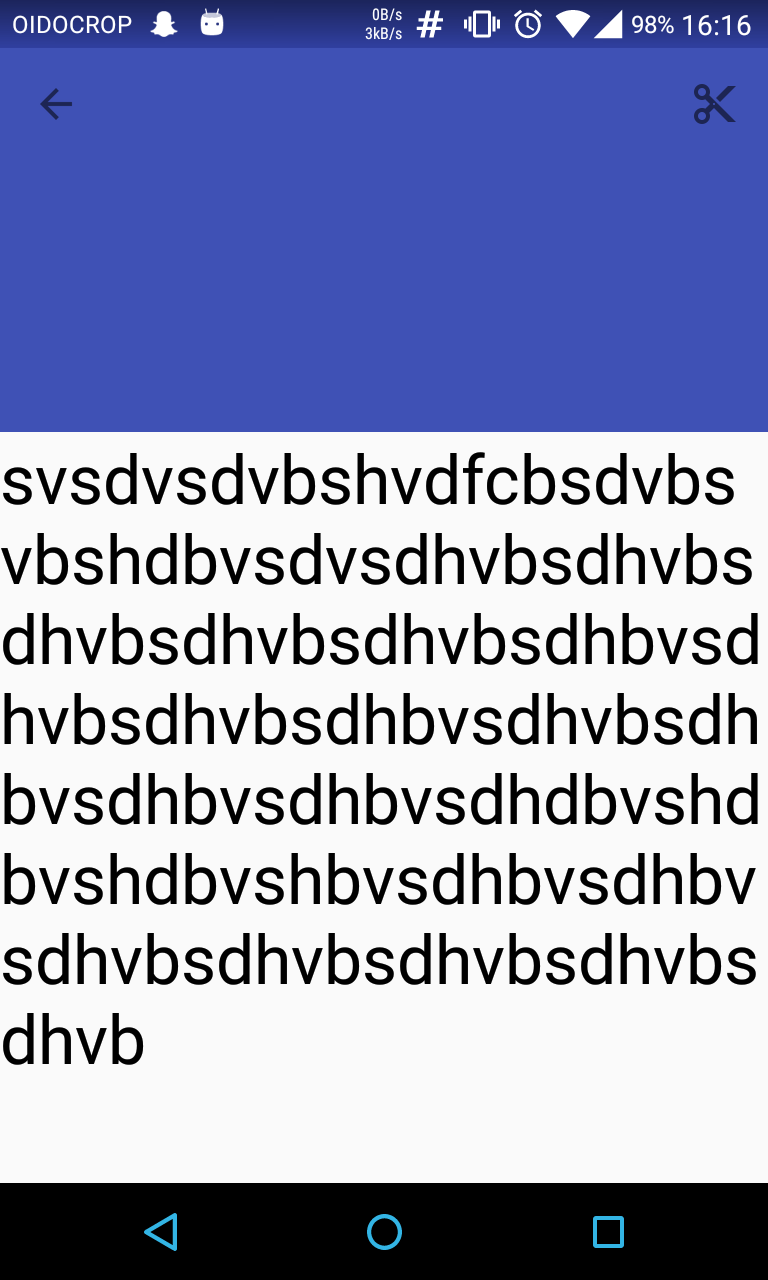
我该如何改变箭头和剪刀的颜色?我尝试在我的主题中使用<item name="titleTextColor">#FFFFFF</item>,但它不起作用,谢谢!
回答 2
Stack Overflow用户
回答已采纳
发布于 2016-09-18 14:32:28
我怀疑发生了什么,当你的工具栏崩溃时你就会出现.
为启动程序删除以下代码(然后根据您的需要可能会以不同的方式重构):
        <RelativeLayout android:layout_width="wrap_content"
                        android:layout_height="wrap_content">

            <ImageButton android:layout_width="wrap_content" android:layout_height="wrap_content"
                         android:src="@drawable/abc_ic_menu_cut_mtrl_alpha" android:id="@+id/image_btn"
                         android:background="#00ffffff" android:layout_alignParentTop="true"
                         android:layout_alignParentEnd="true"
                         android:paddingRight="15dp"/>

</RelativeLayout>Stack Overflow用户
发布于 2016-09-18 14:29:12
嗨,你能试试这个吗?
而不是:
CollapsingToolbarLayout collToolbar = (CollapsingToolbarLayout) findViewById(R.id.coll_toolbar);

Toolbar toolbar = (Toolbar) findViewById(R.id.view_toolbar);
setSupportActionBar(toolbar);
getSupportActionBar().setDisplayHomeAsUpEnabled(true);
collToolbar.setTitle("Caccaaa!!");
使用这个
CollapsingToolbarLayout collToolbar = (CollapsingToolbarLayout) findViewById(R.id.coll_toolbar);
Toolbar toolbar = (Toolbar) findViewById(R.id.view_toolbar);
setSupportActionBar(toolbar);
getSupportActionBar().setDisplayHomeAsUpEnabled(true);
getSupportActionBar().setTitle("Caccaaa!!");
希望这能帮到你
页面原文内容由Stack Overflow提供。腾讯云小微IT领域专用引擎提供翻译支持
原文链接:
https://stackoverflow.com/questions/39558660
复制相关文章
相似问题
腾讯云开发者

Copyright © 2013 - 2026 Tencent Cloud. All Rights Reserved. 腾讯云 版权所有
深圳市腾讯计算机系统有限公司 ICP备案/许可证号:粤B2-20090059  粤公网安备44030502008569号
腾讯云计算(北京)有限责任公司 京ICP证150476号 | 京ICP备11018762号